
EHR Training Tips for Busy Medical Practices
Want to save time, reduce burnout, and improve EHR satisfaction? Proper training makes all the difference.
Here’s what you need to know:
- Physicians without training are 3.5 times more likely to dislike their EHR system.
- Burnout is real: 71% of clinicians link it to EHRs, with 20.9% of doctors spending 8+ hours weekly on after-hours documentation.
- Structured training can save 40–60 minutes daily, letting providers focus more on care.
Key Strategies:
- Plan Ahead: Start training prep 5–6 months before go-live. Train tech-savvy "Super Users" early to assist others.
- Role-Specific Training: Tailor sessions to job functions. For instance, physicians need clinical documentation training, while front desk staff focus on scheduling.
- Hands-On Practice: Use sandbox environments for real-world scenarios without patient pressure.
- Flexible Methods: Combine live sessions, self-paced resources, and peer mentoring for better participation.
- Ongoing Support: Assign in-house experts and leverage vendor resources to handle post-launch questions.
- Track Results: Monitor progress at 30, 90, and 180 days to identify gaps and refine workflows.
Why It Matters:
Training done right leads to fewer errors, improved efficiency, and happier staff. Practices that invest in EHR education report better patient care and financial outcomes.
For actionable tips and examples, read on.
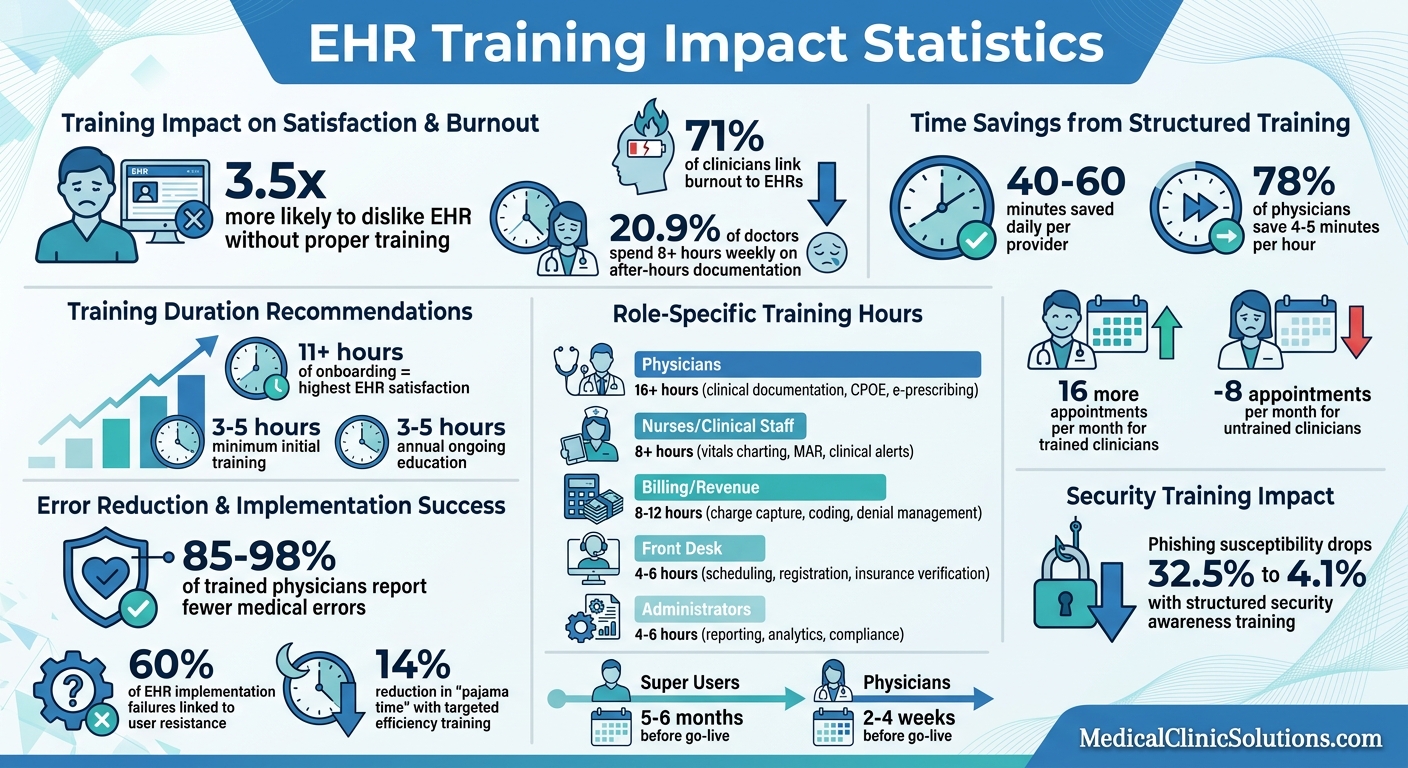
EHR Training Impact: Key Statistics on Time Savings, Efficiency, and Clinician Satisfaction
Best Practices for Implementing a New EHR System
Create a Clear and Flexible Training Plan
A well-structured yet adaptable training plan is the foundation of a successful EHR rollout. Without it, staff may face confusion, wasted time, and frustration – issues that can jeopardize the entire implementation process. The plan should provide enough detail to guide learning while remaining flexible to accommodate the unpredictable demands of healthcare schedules.
Start planning your training timeline 5–6 months before go-live. This early preparation gives you time to train "Super Users" first – those tech-savvy staff members who can act as internal champions. For physicians, schedule training 2–4 weeks before go-live to ensure they retain their skills.
Interestingly, about 60% of EHR implementation failures are linked to user resistance. On the flip side, thorough training is one of the strongest predictors of clinician satisfaction.
"Training wasn’t an afterthought – it was central to the entire onboarding strategy." – Joey Marie Horton, CEO, North Country Family Health Center
Your training plan must also address logistical challenges. Begin planning for backfill coverage at least a year in advance so staff can attend sessions without disrupting patient care. Offer training sessions across all shifts, including nights and weekends, to ensure everyone has access. A "No Training, No Access" policy can help enforce participation and ensure all users are competent before the system goes live. Once the overall plan is in place, focus on understanding the specific training needs of each team member.
Evaluate Staff Roles and Technical Skills
Designing an effective training curriculum starts with understanding the EHR functions each role requires. Not everyone needs the same level of expertise. For example, a billing specialist doesn’t need to learn clinical documentation, and a physician doesn’t need to focus on insurance workflows.
Create a role-module matrix to map each position to the EHR modules they’ll use daily:
| Staff Role | Core Training Focus | Recommended Initial Hours |
|---|---|---|
| Physicians | Clinical documentation, CPOE, e-prescribing, templates | 16+ hours |
| Nurses/Clinical Staff | Vitals charting, MAR, clinical alerts, care plans | 8+ hours |
| Front Desk | Scheduling, registration, insurance verification | 4–6 hours |
| Billing/Revenue | Charge capture, ICD-10 coding, denial management | 8–12 hours |
| Administrators | Reporting dashboards, analytics, compliance | 4–6 hours |
Assess computer literacy levels within your team. Staff with limited technical skills may need basic computer training before diving into EHR-specific tasks. Self-assessment scales (e.g., rating comfort on a 1–5 scale) can help identify individual training needs. After these assessments, observe real workflows to align training with day-to-day practices.
Spend 2–3 days shadowing workflows to understand how tasks are performed in practice, rather than relying on generic feature lists. This hands-on approach also helps identify potential Super Users – respected, tech-savvy staff who can mentor their peers and troubleshoot during go-live. These steps pave the way for setting realistic training milestones.
Set Achievable Goals and Deadlines
Setting unrealistic goals can lead to early burnout. Once you’ve mapped roles to training needs, establish clear benchmarks. Use SMART goals – Specific, Quantifiable, Attainable, Meaningful, and Time-bound. For example, instead of a vague goal like "learn the EHR", set a specific target such as "complete three patient check-ins using the scheduling module by Friday."
In July 2025, North Country Family Health Center successfully implemented athenaOne by emphasizing training as their core strategy. CEO Joey Marie Horton and Health Information Management Manager Ann Shepard prepared staff to earn EHR certifications well before go-live. This proactive approach created internal champions who could address issues quickly, resulting in a smoother transition and greater staff confidence.
"The modules are really key and instrumental in helping everyone be efficient in the system." – Ann Shepard, Health Information Management Manager, North Country Family Health Center
Break training into smaller, manageable sessions to avoid overwhelming your team. Ideal class sizes range from 8 to 16 participants, allowing for personalized attention. Train Super Users first so they can support other staff during subsequent sessions. Pilot sessions with leadership and analysts ensure the curriculum aligns with workflows, while regular feedback helps refine the process.
Clinicians who receive more than 11 hours of onboarding training report the highest levels of EHR satisfaction. At a minimum, aim for 3–5 hours of initial training. Plan for an additional 3–5 hours of ongoing education each year to cover system updates and efficiency tips.
Use Role-Specific Training to Save Time
Generalized training sessions can feel like a waste of time. Think about it: a dermatologist’s documentation process is worlds apart from the scheduling tasks handled by a front desk coordinator. Combining these roles in one training risks boring seasoned professionals and overwhelming those just starting out.
Conducting a Training Needs Assessment (TNA) can help cut through the noise. By creating a roadmap tailored to each role, staff can focus on learning the tools that matter most to their daily tasks. This targeted approach not only speeds up the learning process but also leads to higher satisfaction among clinicians.
When training is customized, the results are impressive. Physicians are 3.5 times less likely to report dissatisfaction with EHR systems, with 78% saving 4–5 minutes per hour. That adds up to about 40–60 minutes saved each day. Nurses also benefit, with a 135% higher likelihood of finding their EHR system easy to learn. The key? Focus on the most relevant features for each role.
Teach Core Features for Each Position
Start by pinpointing the tasks each role handles most frequently. Here’s a quick breakdown:
- Front desk staff: Scheduling and patient registration.
- Billing specialists: Charge capture and coding.
- Physicians: Clinical documentation, CPOE (Computerized Provider Order Entry), e-prescribing, and specialty templates.
A great example comes from Cleveland Clinic. Their informatics team worked with the Pediatrics department to identify the tools pediatricians use most often. The result? A custom EHR dashboard tailored to their needs. It worked so well that it was later expanded into a multi-specialty provider dashboard.
"Tailoring training to specific roles and departments, and using examples that reflect providers’ actual day-to-day tasks, ensures that the content is practical and immediately applicable."
– Becky Rankin, Informatics and Training Director, Cleveland Clinic
Sutter Health also took a targeted approach. Between 2024 and 2025, they focused on efficiency training for physicians, zeroing in on documentation shortcuts and inbox management – two of the most challenging areas for doctors. The result? A 14% reduction in "pajama time", or after-hours documentation.
Once you’ve covered the essentials, it’s equally important to cut out anything that doesn’t serve a purpose.
Skip Information Staff Won’t Use
To save time and improve retention, strip out training content that isn’t applicable to a role’s daily responsibilities. For example:
- Administrators don’t need to know clinical charting.
- Front desk staff can skip denial management workflows.
- Physicians shouldn’t waste time learning scheduling features.
This approach matters because nearly half of clinicians (48%) say EHRs slow them down due to workflows that don’t align with their actual practice.
"A training needs assessment (TNA) maps every role in your organization to the specific EHR modules, workflows, and competencies they’ll use daily. Skipping this step is the root cause of the most common training mistake: one-size-fits-all sessions."
– EHRSource
To get this right, spend 2–3 days shadowing your staff. Observe how they work instead of relying on assumptions. This hands-on research identifies which features deserve attention and which can be left out. The result? Staff feel confident and capable from day one.
Provide Different Training Methods
When it comes to training, one size doesn’t fit all. People learn differently – some thrive in structured classroom settings, while others prefer the flexibility of self-paced materials. For medical practices with unpredictable schedules, offering a variety of training methods is essential to ensure everyone can participate effectively.
"Offering multiple options helps accommodate different learning styles and schedules… This flexibility not only improves knowledge retention but also makes staff feel supported and respected during a time of change."
– athenahealth
Using multiple formats – like videos, tip sheets, live sessions, and interactive modules – keeps training accessible no matter the shift. The goal is to make every training hour count, even in a busy practice.
Conduct Hands-On Practice Sessions
Nothing builds confidence like hands-on experience. Practice helps staff develop muscle memory in ways that reading or watching videos simply can’t. A great way to do this is by setting up a sandbox environment. This allows staff to practice real-world tasks – like scheduling for front desk teams, charge capture for billing specialists, or documentation workflows for physicians – without the stress of live patient care.
To maximize the impact, keep these sessions small, ideally with 8 to 16 participants. This setup ensures everyone has enough time to actively engage and ask questions.
Make Online Resources Available
Self-paced resources are a lifesaver for busy staff. Take the example of North Country Family Health Center, which revamped its training in July 2025. New hires began with interactive learning modules to master the basics. Once completed, they received one-on-one guidance from Health Information Management Manager Ann Shepard, streamlining the overall process.
"The modules are really key and instrumental in helping everyone be efficient in the system."
– Ann Shepard, Health Information Management Manager, North Country Family Health Center
Resources like video walkthroughs, webinars, and interactive modules are especially helpful because they can be revisited anytime for a quick refresher.
Set Up Peer Training Partnerships
Sometimes, the best teacher is someone who’s already in the trenches. Peer training programs, led by "Super Users", are an effective way to bridge the gap between technical IT training and day-to-day practice. These Super Users – staff members who receive advanced training – become trusted resources for their colleagues. To be effective, they should be identified and trained 5–6 months before go-live.
"When providers hear about tools or training from trusted peers, it significantly increases engagement and adoption."
– Dr. Jean Vickers, Associate Chief Health Information Officer, Cleveland Clinic
Peer partnerships offer a more approachable form of support. Staff often feel more comfortable turning to a colleague than reaching out to IT or vendor help desks. Plus, these mentors can provide practical, role-specific advice that formal training might miss. Together, these methods create a well-rounded training system tailored to the needs of your practice.
Set Up Fast Support Options
After targeted training sessions, having quick, reliable support is essential to keep workflows running smoothly. Even with thorough preparation, questions or minor issues can crop up during patient visits, and immediate answers are key to avoiding disruptions. Without accessible support, practices might see a temporary drop in efficiency – anywhere from 20% to 50% – when transitioning to new EHR systems.
Combining in-house expertise with vendor support ensures your team has the resources they need to stay confident and maintain productivity.
Assign In-House EHR Experts
In-house experts, often called "Super Users", play a critical role in providing frontline support during live patient interactions. These individuals come from various departments – such as physicians, nurses, front desk staff, and billing – and receive advanced training to become go-to resources for their peers. To set them up for success, begin training these experts 5–6 months before the EHR system goes live. Temporarily reassign them from their regular duties and provide identifying badges so they’re easy to spot during busy shifts.
This approach proved effective for North Country Family Health Center when they implemented athenaOne in July 2025. Under the leadership of CEO Joey Marie Horton and Health Information Management Manager Ann Shepard, the center made EHR certification a priority for staff. This created internal champions who could address issues on-site without having to rely on external assistance.
Use Vendor Support Resources
Your EHR vendor offers more than just software – they also provide valuable support services like help desks, training specialists, and on-site assistance to handle challenges beyond your in-house team’s expertise. For example, at North Country Family Health Center, Clinical Operations Officer Barb Fargo leveraged vendor-provided coaching calls after go-live. These sessions helped fine-tune workflows and improve provider efficiency.
"We’ve had providers take advantage of tailored coaching calls, which has helped them gain even more efficiency… and that’s all part of the athena package – it’s not at an additional cost."
– Barb Fargo, Clinical Operations Officer, North Country Family Health Center
During the first week after launch, having "at-the-elbow" (ATE) support – vendor specialists working directly alongside clinicians – can be a game-changer. This hands-on guidance helps staff navigate workflows confidently and prevents hesitation in critical moments. Over the next 2–4 weeks, as your team gains confidence and self-sufficiency, you can gradually scale back this level of support.
Providing timely and tailored support ensures that the benefits of focused training carry over seamlessly into live patient care.
Document Processes and Track Results
Clear documentation turns temporary training into a long-term system. Without written procedures, staff might create inefficient shortcuts that become bad habits, ultimately leading to missed opportunities for improvement.
Write Step-by-Step Workflow Instructions
Detailed, step-by-step guides customized to your practice’s workflow help ensure consistency across your team. Use the clinician observations from the previous 2–3 days to align these guides with real-world practices.
Include practical tips, such as using short, semicolon-separated phrases for the History of Present Illness (HPI). Dr. Jay Winner, a family physician at Sansum Clinic, emphasizes this approach with his advice:
"Sentences are for novels and prisons, not for documenting a medical visit".
Incorporate templates for routine visits, physicals, and procedures to reduce repetitive typing. Also, provide instructions for using "smart phrases" or "dot phrases", which can automatically pull in recent lab results or commonly used assessment plans.
Don’t overlook security protocols in your documentation. Healthcare remains a prime target for cyberattacks. Structured security awareness training can lower phishing susceptibility from 32.5% to 4.1%. Your procedures should remind staff to spot phishing attempts and comply with HIPAA privacy rules.
Plan to review and update these workflows every 3–6 months. This allows you to adjust based on how the workflows are actually being used, rather than relying solely on theoretical designs. These updated guides not only improve daily operations but also lay the groundwork for tracking metrics, as discussed in the next section.
Monitor Training Results and Make Changes
Once workflows are documented, consistent monitoring ensures improvements stick. Evaluate progress at 30, 90, and 180 days.
| Timeframe | What to Measure | Purpose |
|---|---|---|
| 30 Days | Competency tests, help desk ticket volume, error rates | Spot immediate training gaps |
| 90 Days | Patient wait times, documentation time per encounter | Assess training success and plan adjustments |
| 180 Days | Appointment volume, financial KPIs, trend analysis | Ensure sustained improvements and refine workflows |
Help desk ticket volume is a key indicator – if ticket numbers plateau or increase, it’s a sign that workflows need clarification or additional training. Another useful metric is "pajama time", which refers to after-hours documentation. Alarmingly, 20.9% of physicians spend over 8 hours per week on this task. If this number remains high, it may indicate a need for more advanced training on templates and smart phrases.
Regular monitoring can drive meaningful change. For example, Sutter Health found that ongoing efficiency training helped maintain and reinforce initial improvements. Similarly, a primary care group profiled by the American Medical Association reduced clinician burnout by 64% through redesigned workflows and team-based documentation.
To stay ahead, high-performing practices dedicate 3–5 hours annually to EHR training, ensuring staff remain proficient with system updates and new features. The tracking data you collect will pinpoint where to focus this additional training for the greatest impact.
Conclusion
Focused EHR training can turn what feels like a disruptive hurdle into a genuine clinical advantage. The strategies shared here – tailored training plans, role-specific methods, diverse learning options, accessible support, and ongoing progress monitoring – work together to unlock your system’s potential while keeping patient care front and center.
The results speak for themselves. Structured training helped 78% of physicians save 4–5 minutes per hour, adding up to nearly an hour reclaimed each day. Trained clinicians also averaged 16 more appointments per month, compared to a drop of 8 for those without training. Even more impactful, 85–98% of trained physicians reported fewer medical errors. Reflecting on North Country Family Health Center’s athenaOne® rollout in July 2025, CEO Joey Marie Horton highlighted how comprehensive training fostered internal champions who supported their colleagues, making the transition smoother and more effective.
The benefits extend far beyond efficiency. Dr. Jean Vickers, Associate Chief Health Information Officer at Cleveland Clinic, emphasized the broader value of thoughtful training:
"Our training programs are designed to meet providers where they are by offering training that is accessible, time-efficient and clearly shows value to their daily work".
When training is designed to fit seamlessly into real-world workflows and respects the time constraints of providers, it transforms the EHR from a frustrating task into a tool that truly enhances patient care. These measurable improvements highlight the importance of connecting with resources tailored to your practice’s unique needs.
For more information and resources to optimize your EHR system, visit Medical Clinic Solutions.
FAQs
How do I pick the right Super Users?
To ensure a smooth transition to the EHR system, it’s crucial to pick team members who are comfortable with technology, knowledgeable about the EHR software, and capable of helping others. Aim to identify these individuals 5-6 months before the go-live date so they can take the lead in training and supporting their colleagues.
Focus on staff with strong communication skills, a positive outlook on technology, and a genuine willingness to mentor others. These traits are key to ensuring the training process runs smoothly and that the entire team adapts well to the new system.
What should we track after go-live to prove training worked?
After the go-live phase, it’s essential to monitor key metrics to assess how effective the training has been. Metrics like user comprehension (measured through quizzes or surveys), workflow compliance, help desk ticket volume, and user feedback can reveal how well employees have adjusted to the new system. These insights can help pinpoint any gaps or areas that need further attention.
How can we cut after-hours EHR work without hurting documentation quality?
Cutting down after-hours work in electronic health record (EHR) systems doesn’t have to mean compromising on documentation quality. Smart templates and AI-assisted workflows can make a big difference by simplifying and speeding up the process.
Batching documentation tasks and using one-screen EHR systems are also effective strategies. These approaches minimize the need to jump between screens, saving time and reducing mental fatigue.
Additionally, training staff on efficient documentation methods and implementing role-based templates can lighten the workload. With these steps, it’s possible to maintain detailed, accurate records without the need for extra work hours.