
EHR Data Migration: Step-by-Step Process

Most EHR migrations fail, stall, or cost more than planned – and the main fix is a clear process. If I were planning this move, I’d keep the scope tight, move only the data staff need for care and billing, test the data more than once, and keep the old system in read-only mode for 30 to 90 days after go-live.
Here’s the short version:
- I’d split data into active records to move now and historical records to archive.
- I’d assign clear owners for project, IT, clinical review, billing, and HIPAA checks.
- I’d define success before the move starts, including zero loss in critical fields and a duplicate rate under 3%.
- I’d clean source data first, since duplicate patient records often sit around 8% to 12%.
- I’d map each source field to the new EHR, including code sets like LOINC, RxNorm, SNOMED CT, and CVX.
- I’d run a pilot, a full-volume test, and a pre-go-live UAT round before cutover.
- I’d verify live data with record counts, chart review, and workflow checks right after go-live.
- I’d keep a running issue log and retrain staff during the first days after launch.
In plain English: this is less about “moving everything” and more about moving the right data, checking it field by field, and protecting patient care while the system changes.
If you want a safe path, the article’s process comes down to four moves: plan, clean and map, test, and cut over with close follow-up.
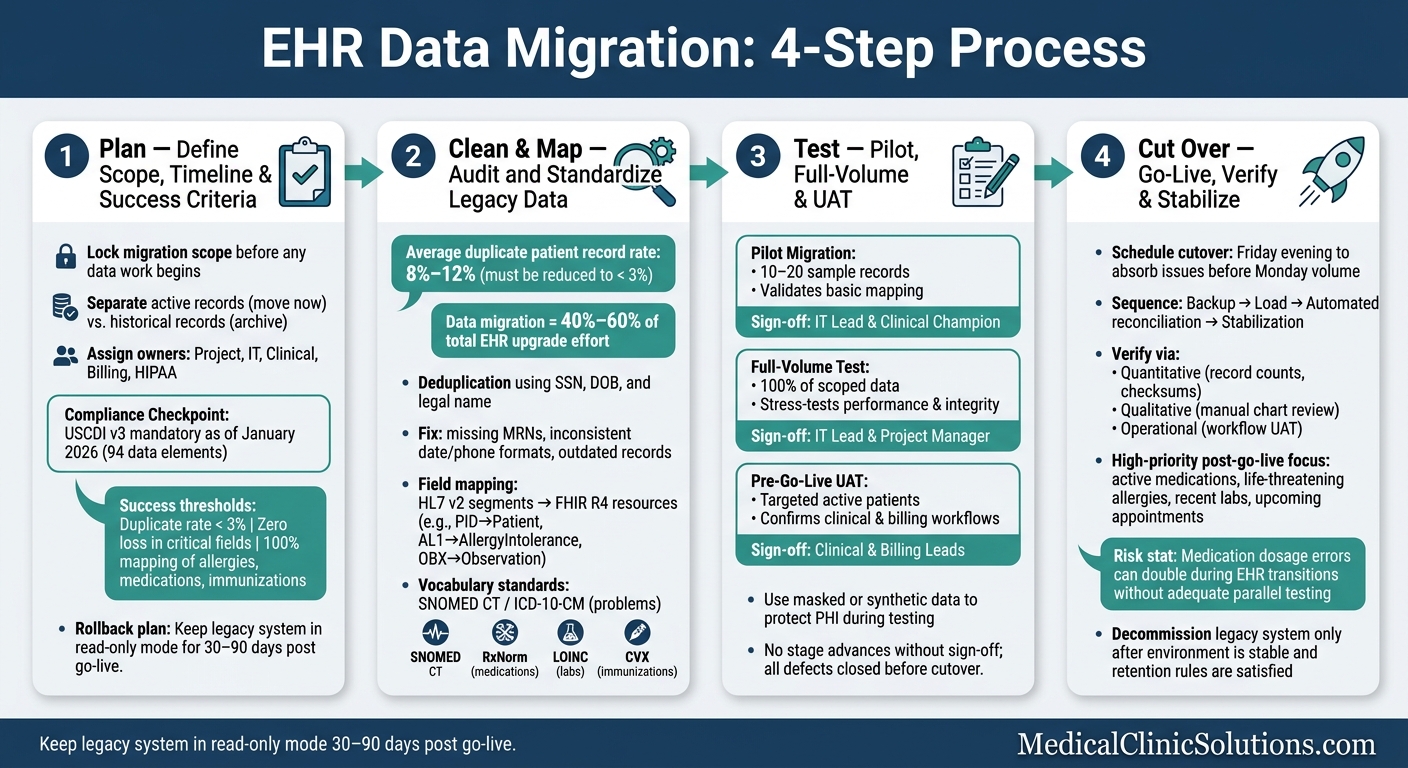
EHR Data Migration: 4-Step Process Overview
Lead an EMR Integration & Migration Project: A Step-by-Step Guide for Health IT Professionals
Step 1: Define Scope, Timeline, and Success Criteria
Once roles are set, lock the migration scope before any data work starts. Be clear about what will move, what will stay archived, and when the migration has to be finished. That means setting the date range, record volume, and data types in scope up front.
This also needs to reflect the kind of practice you run. A fertility clinic may need IVF cycle tracking data, while a radiology group may depend on imaging-related records and workflows. On top of that, every integration point – labs, pharmacies, medical billing software solutions, and health information exchanges – needs to be listed so it can be rebuilt and retested in the new system. Set the budget early too, because integrations, data volume, and vendor changeover are major cost drivers.
Compliance milestones should be part of the plan from the start. As of January 2026, USCDI v3 is mandatory, which means your migration must support 94 specific data elements. Build those checkpoints into the timeline now, not later.
Rank Clinical and Operational Data by Priority
Next, sort data by what staff will need on day one. Put active charts, upcoming appointments, insurance data, open balances, and referral workflows at the top of the list. Older notes, claims, and scanned documents can usually be archived instead.
That order matters. If front-desk staff can’t verify insurance or clinicians can’t see active charts, go-live can go sideways fast.
Define Acceptance Criteria and Rollback Plans
A migration is not done when data lands in the new system. It’s done when that data is checked and confirmed. Set success thresholds before go-live, not after. Target a duplicate record rate below 3% and zero data loss in critical fields. You should also aim for 100% mapping completeness for key clinical fields such as allergies, medications, and immunizations.
Clinician sign-off on chart accuracy should be part of the acceptance criteria. If the people using the records every day don’t trust them, the migration isn’t ready.
Your rollback plan needs to be written down and tested ahead of time. If production testing reveals system-wide problems – duplicated medications or mismatched patient identities, for example – the team needs a clear decision path for reverting. A common best practice is to keep the legacy system in read-only mode for 30–90 days after go-live before decommissioning it.
Once these criteria are in place, the next move is cleaning and mapping the source data.
Step 2: Audit, Clean, and Map Legacy Data
Before you extract anything, audit the source data.
That step matters more than most teams expect. The average duplicate patient record rate across healthcare organizations is 8% to 12%, while modern EHR systems usually need that rate below 3%. On top of that, data migration can make up 40% to 60% of an EHR upgrade. So if you clean up the source first, you save yourself a lot of pain later.
Fix Duplicates, Missing Fields, and Inconsistent Formats
Start with a plain inventory of what you have. Look at the databases, file types like HL7 v2 and FHIR, any proprietary data structures, and unstructured content like scanned PDFs and free-text clinical notes.
Once the scope is clear, run deduplication scripts in the source system. Use Social Security numbers, dates of birth, and legal names to find and merge overlapping records. At the same time, flag missing MRNs and incomplete demographic data for manual review before extraction.
Small formatting issues can turn into big cleanup jobs later. Date mismatches and inconsistent phone number strings are classic examples. Fix them in the source data first, not after the move.
| Data Quality Problem | Cleanup Action Required |
|---|---|
| Duplicate patients | Merge records using SSN, DOB, and legal name; aim for a duplicate rate below 3% |
| Missing fields | Flag incomplete MRNs or demographics; backfill or mark as "Unknown" |
| Inconsistent formats | Standardize date and phone number formats; remove special characters from phone numbers |
| Outdated records | Archive inactive patients and expired insurance entries |
| Non-standard codes | Map proprietary local codes to SNOMED-CT, LOINC, or ICD-10 |
| Unstructured data | Convert scanned PDFs and free-text notes into searchable attachments |
Once the data is clean, map each source field to its destination.
Map Source Fields to Destination Fields
Every source field needs a documented destination. This is one of the highest-risk parts of the job from a clinical standpoint. A mapping error in an allergy severity code, for example, can carry serious risk in the new system.
Here are the core mappings your team needs to define:
| Source Segment (HL7 v2) | Target FHIR R4 Resource | Clinical Data Category |
|---|---|---|
| PID | Patient | Demographics |
| PV1 | Encounter | Visits/Encounters |
| AL1 | AllergyIntolerance | Allergies |
| OBX | Observation | Lab Results / Vitals |
| DG1 | Condition | Problem List / Diagnoses |
| ORC / RXA | MedicationRequest | Medications |
| NK1 | RelatedPerson | Emergency Contacts |
Structure is only part of the job. Vocabulary mapping matters just as much.
Problem lists should map to SNOMED CT or ICD-10-CM. Medications need RxNorm. Lab results use LOINC. Immunizations use CVX codes. If a local or proprietary code doesn’t have a standard match, your team needs to document that decision clearly.
Put every mapping decision into a formal source-to-target map. That document becomes the reference point for test migrations and validation.
Step 3: Run Test Migrations and Validate Results
Once your source-to-target map is locked, start by testing field mappings. Then test full workflows. After that, run user acceptance testing (UAT) with clinicians. The goal is simple: check the source-to-target map field by field and focus first on the highest-priority clinical and billing fields.
Run Pilot, Full-Volume, and Pre-Go-Live Test Migrations
Move through testing in three stages. Each stage should have a clear owner and a clear sign-off.
| Test Stage | Purpose | Dataset Size | Key Checks | Sign-off Owner |
|---|---|---|---|---|
| Pilot Migration | Validate basic mapping and connectivity | 10–20 sample records | Field mapping accuracy, basic record structure | IT Lead & Clinical Champion |
| Full-Volume Test | Stress-test performance and data integrity | 100% of scoped data | Record counts, checksums, query latency | IT Lead & Project Manager |
| Pre-Go-Live (UAT) | Confirm clinical and billing workflows before cutover | Targeted active patients | Allergies, medications, scheduling, billing workflows | Clinical & Billing Leads |
Validate Record Counts, Charts, and Workflows
After each test run, validate results across three tracks.
- IT validation: Run automated reconciliation scripts to compare record counts, checksums, and data relationships between the source and target systems. For example, medications should still be tied to the right patient.
- Clinical chart review: Have clinical reviewers do hands-on spot checks in patient charts. They should review allergies, medications, and problem lists to make sure the data came over the right way.
- Workflow testing: Check appointments, insurance, and billing records. Then test scheduling and billing workflows end to end so staff are ready for go-live.
If a defect shows up, log it with full defect traceability. Then fix the source data or the transformation logic and rerun the affected test. No stage should move ahead until the assigned sign-off owner approves the results. Every defect needs to be closed before cutover.
Use masked or synthetic data in test runs so PHI is not exposed.
Once validation passes, the team can move into cutover and live-data checks.
Step 4: Execute Cutover, Verify Live Data, and Stabilize Operations
Once testing is done, it’s time for the final cutover.
Manage Go-Live Day and Immediate Post-Migration Checks
Start the final production load on Friday evening so the weekend can absorb problems before Monday patient volume picks back up. During the cutover window, take one last backup from the legacy system and make sure the data is readable. Then load production and run automated reconciliation scripts to confirm that record counts and field values match.
At this stage, cutover should follow a tight sequence: backup, load, validation, and stabilization.
Before you call go-live a success, check the system in three ways:
| Verification Category | Method | Key Elements to Check |
|---|---|---|
| Quantitative | Automated reconciliation | Total record counts, checksums, orphaned records |
| Qualitative | Manual chart review | Medication dosages, allergy severity, clinical note formatting |
| Operational | Workflow testing (UAT) | Appointment scheduling, claim submission, imaging access |
Right after go-live, audit user permissions and reconcile financial records so you can catch access problems and revenue issues early. Keep the legacy system available as a read-only reference during stabilization. Decommission it only after the new environment is steady and all regulatory data retention rules are satisfied.
Log Issues, Retrain Staff, and Get the Right Implementation Support
Keep a running issue log during stabilization so the team can see what’s still open, what’s been fixed, and what needs attention next. If you’re using parallel operation, leave both systems available for a short period. That gives you a clean way to compare results and spot workflow gaps before the old system is retired.
Medication dosage errors have been documented to double during EHR transitions that lack adequate parallel testing. That’s a big deal. Clinical leads should stay close to chart review during this period. Focus first on high-stakes data, including:
- Active medications
- Life-threatening allergies
- Recent lab results
- Upcoming appointments
Use the early post-go-live period to retrain staff on new workflows and give hands-on help where needed. In practice, short refreshers and role-based guidance usually work better than one broad training session for everyone.
After the system steadies, the next job is closing open issues and tightening staff workflows. For implementation support, Medical Clinic Solutions connects American medical professionals with EHR systems and related practice services.
FAQs
How long does an EHR data migration usually take?
An EHR data migration can take anywhere from 2 to 24 months, depending on your practice’s size, complexity, and specific needs.
Smaller, limited-scope projects may take 2 to 4 months. More complex health system migrations can take 12 to 24 months. That’s a big range, and for good reason: the timeline depends on how much data you’re moving, how many systems are involved, and how clean that data is at the start.
Careful planning matters. If you rush the process, small issues can turn into costly errors fast.
What data should we migrate vs. archive?
Migrate active patient records, recent clinical interactions, and compliance-related data first. Move older, duplicate, or inactive files into an archive instead of carrying everything over. That cuts clutter, helps system performance, and keeps migration costs under control.
Set a clear lookback period for each data type. For example, you might keep recent encounters in the new system for day-to-day use while placing older history in a separate archive. You should also decide up front whether historical data needs to be fully searchable or if read-only access is enough.
Before anything moves, audit and clean the data. Remove duplicates, flag outdated entries, and fix obvious gaps so you’re not dragging bad data into the new system.
Who should approve the migration before go-live?
Before go-live, get sign-off from a multidisciplinary steering committee. That gives you a clear check that the practice is ready across both care delivery and day-to-day operations.
The committee should include leaders from physicians, IT, finance, and compliance. Bringing in these clinical and operational groups early is a smart move. It helps teams spot gaps sooner, stay aligned, and improve satisfaction and success rates.