
HIPAA Backup Requirements for Clinics
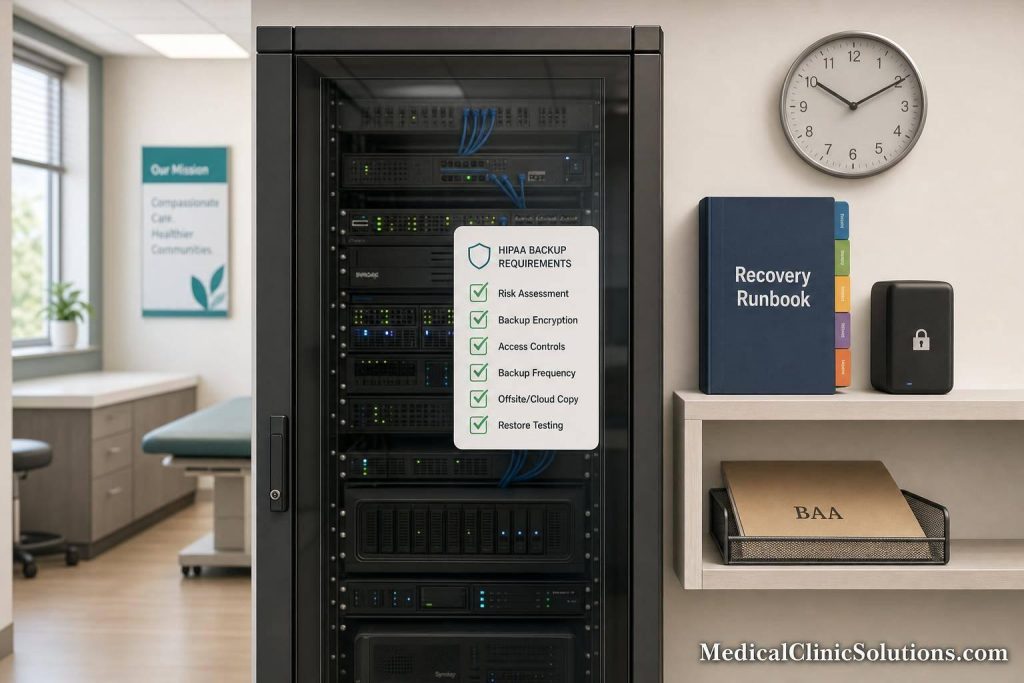
If your clinic can’t restore ePHI fast, your backup plan is not doing its job. HIPAA expects more than saved files. I need a written plan that covers backups, system recovery, downtime work, testing, and recovery order for the systems my clinic uses.
Here’s the short version:
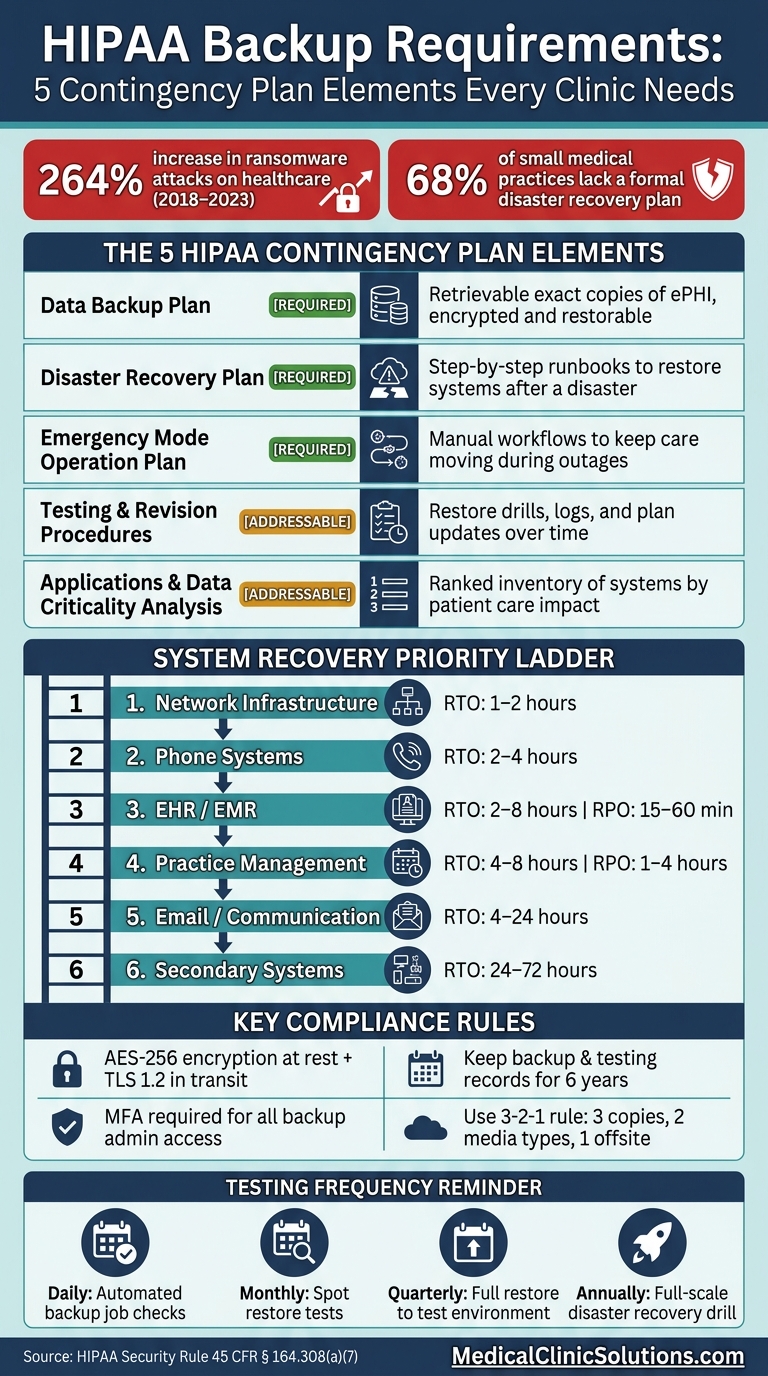
- HIPAA’s contingency planning rule covers 5 parts
- 3 parts are required: data backup, disaster recovery, and emergency mode work
- Backups must be exact, retrievable copies of ePHI
- My plan should set RTOs and RPOs for each system
- I should use offsite storage, encryption, MFA, and access limits
- I need to test restores often, not just run backup jobs
- I should keep backup and testing records for 6 years
- If a vendor stores ePHI, I need a BAA
- This matters because ransomware attacks on healthcare groups went up 264% from 2018 to 2023
- It also matters because about 68% of small medical practices do not have a formal disaster recovery plan
A backup file alone is not enough. I also need written restore steps, downtime steps for care teams, and proof that the plan works under stress. That is the core standard.
A simple way to think about it is:
| Area | What I need to cover |
|---|---|
| Backup | Copies of ePHI that I can retrieve and restore |
| Recovery | Step-by-step instructions to bring systems back |
| Downtime | How staff keep working when systems are down |
| Testing | Restore checks, drills, and fixes after failures |
| Priority | Which systems come back first and why |
If I build, document, secure, and test those five areas, I’m much closer to meeting HIPAA backup rules in a clinic setting.
HIPAA Contingency Plan: 5 Required Elements for Clinic Backup Compliance
Top 5 HIPAA Compliant Cloud Backup Services
What the HIPAA Security Rule Requires
HIPAA requires clinics to write down how they will back up ePHI, restore systems, keep care moving during downtime, and show that the plan actually works as part of their broader clinic security systems. From there, the job is pretty simple in theory: connect each rule to a real backup or recovery task inside the clinic.
The 5 contingency plan elements clinics must address
HIPAA splits the contingency plan into five parts. Three are required for every covered clinic: the Data Backup Plan, the Disaster Recovery Plan, and the Emergency Mode Operation Plan. Two are addressable, which means a clinic must either put them in place or document another safeguard that does the same job: Testing and Revision Procedures and an Applications and Data Criticality Analysis.
Each part handles a different piece of recovery. That matters because a backup job by itself is not a disaster recovery plan. You also need written restore steps.
Core backup expectations for ePHI
The Data Backup Plan standard uses a very specific phrase: "retrievable exact copies" of ePHI. That wording matters.
A backup has to be complete, usable, and restorable, not just sitting in storage somewhere. It should also be encrypted, protected by access controls, and logged. Clinics should use checksums or test restores from time to time to make sure a backup copy has not been corrupted. HIPAA does not require one set tool or platform. A clinic can use cloud backup, on-premises storage, or a hybrid setup, as long as the backups are protected and can be retrieved when needed. Backup records should be kept for at least 6 years.
Table: Data backup plan vs. disaster recovery plan vs. emergency mode operations
These elements are much easier to handle when each one has a clear job.
| Plan Element | HIPAA Purpose | What the Clinic Must Document | Practical Clinic Example |
|---|---|---|---|
| Data Backup Plan | Create and maintain retrievable exact copies of ePHI | Backup schedules, encryption methods, storage locations (local/cloud) | Nightly automated backups of the EHR database to a secure cloud |
| Disaster Recovery Plan | Restore lost data and resume operations after a disaster | Step-by-step restoration runbooks, recovery team roles, RTO/RPO targets | Restoring a full server image from a cloud backup after hardware failure |
| Emergency Mode Operation Plan | Maintain critical business processes during a system outage | Manual workarounds, downtime paper forms, "break-glass" access procedures | Using paper charts and manual prescription pads while the EHR is offline |
| Testing & Revision | Validate and improve the plan over time | Logs of restore tests, drill results, and plan updates | Quarterly test restoring a full patient database to verify integrity |
| Criticality Analysis | Prioritize recovery efforts by clinical impact | Inventory of systems ranked by importance to patient care | Identifying the EHR as Tier 1 (immediate) and billing as Tier 2 |
Clinics should also rank systems by recovery priority. That ranking sets the recovery order for patient-facing systems and shows where the team needs to focus first when a real incident hits.
With the requirements spelled out, the next step is to turn them into a clinic-specific backup plan.
How to Build a HIPAA-Compliant Backup Plan
Define backup scope, systems, and recovery priorities
Start by mapping every system that touches ePHI before you set up backups. That includes any system that creates, stores, or sends patient data: EHR/EMR platforms, practice management software, medical billing software, imaging systems like PACS, e-prescribing tools, email, and file shares.
It’s also easy to miss the quieter places where ePHI shows up. Data exports, reports, analytics copies, integration staging areas, message queues, and system logs may all contain it. The same goes for workstations, mobile devices, and other endpoints used in care delivery. And if a third-party SaaS vendor stores any of that data, the clinic is still on the hook. Before that vendor becomes part of the backup plan, confirm that a Business Associate Agreement (BAA) is in place.
After you know what’s in scope, set recovery priority. Some systems need to come back first because everything else depends on them. Network and phone systems sit at the front of the line for that reason. A simple starting point is the table below, which lays out common recovery priorities and target ranges by system type.
| System Category | Recovery Priority | Typical RTO | Typical RPO |
|---|---|---|---|
| Network Infrastructure | 1 – Foundation | 1–2 hours | N/A |
| Phone Systems | 2 – Communication | 2–4 hours | N/A |
| EHR / EMR | 3 – Clinical Ops | 2–8 hours | 15–60 minutes |
| Practice Management | 4 – Scheduling/Billing | 4–8 hours | 1–4 hours |
| Email / Communication | 5 – Coordination | 4–24 hours | 4–24 hours |
| Secondary Systems | 6 – Archives/Admin | 24–72 hours | 24+ hours |
RTO = Recovery Time Objective (how long you can be down). RPO = Recovery Point Objective (how much data loss is acceptable).
Write this down in a plain backup scope list. For each system, note what data it holds, how it’s backed up, and who owns it.
Set backup frequency, storage location, and security controls
HIPAA does not give you a fixed backup schedule. What it does require is a backup cadence that makes sense based on system criticality and each system’s RPO. Put simply: systems tied to patient care need backups more often than admin tools.
For storage, use the 3-2-1 rule:
- Keep 3 copies of data
- Store them on 2 different media types
- Keep 1 copy offsite or in a geographically redundant cloud location
It also makes sense to add an immutable or air-gapped copy to help resist ransomware. WORM (Write-Once-Read-Many) storage or object locks can keep backup sets from being altered.
Security controls matter just as much as storage design. Backup data should be encrypted at rest with AES-256 and in transit with TLS 1.2 or higher. Access to backup consoles and cloud storage admin panels should require Multi-Factor Authentication (MFA) and role-based access. Backup servers should also sit on isolated network segments, which helps limit exposure if a workstation gets infected.
Write procedures the clinic can actually follow
A backup procedure has to work when people are stressed, short on time, and trying to restore care. So keep it plain. Staff should know who runs backups, where copies live, how a restore gets requested, who can approve emergency access, and where logs are stored.
Name a backup governance owner. Then list the people responsible for day-to-day management and emergency response. Build step-by-step restore runbooks that show the recovery order clearly: network infrastructure first, then the EHR, then secondary applications. Log every backup job and every restore attempt, and keep those records somewhere auditors can review.
The goal is simple: make the instructions easy to follow during both routine work and outages. Next, test restores and update the plan after any system change.
How to Test Recovery and Keep the Plan Current
Run restore tests and verify data integrity
Once the backup plan is on paper, you need to prove it can bring back ePHI. Untested backups are unproven backups.
A solid testing rhythm keeps this from turning into guesswork:
- Daily automated checks to confirm backup jobs finished without errors
- Monthly spot restores
- Quarterly full restores to a test environment
- One annual full-scale drill that restores systems and tests downtime workflows
For each test, document the date, the systems tested, whether the test passed or failed, how long the restore took, and what corrective action followed. Then confirm the restored data matches the source exactly by using checksums. On top of that, have staff verify that restored records work inside a test charting or scheduling workflow. If a file comes back but the front desk or care team can’t use it, that restore didn’t do its job.
| Evidence Category | What to Document |
|---|---|
| Technical Logs | Backup job reports, error logs, audit trails |
| Integrity Proof | Checksum or hash matches between source and restore |
| Performance Metrics | Actual restore time (RTO) and age of restored data (RPO) |
| Clinical Validation | Screenshots of restored applications and staff sign-offs |
| Remediation Records | Issues found during tests and how they were resolved |
Each test should lead to action. Use the results to adjust recovery targets and fix weak spots before they turn into a bad day for the clinic.
Set realistic recovery targets for clinic operations
RTOs and RPOs need to match what an outage does to day-to-day clinic work: appointment schedules, provider availability, and billing deadlines. That’s the point. A target that looks fine in a spreadsheet may fall apart when patients are waiting and staff can’t chart.
Quarterly restore tests should confirm that actual recovery time lines up with those targets, not just that data comes back.
Update the plan after system changes, incidents, or audits
Recovery plans drift. Systems change, vendors change, and staff changes too. So treat the contingency plan like a living document, not a file that gets written once and forgotten.
Review it when there are:
- New EHR/EMR software modules
- Cloud migrations
- New clinic locations
- Vendor changes
- Security incidents
- Failed tests
- Audit findings
Staff turnover matters just as much. A plan that depends on one person being available is not a plan. Update contact lists and shift ownership before the next incident hits.
Keep version-controlled change logs with approval dates and owners so auditors can follow the plan’s history. After any update, refresh staff training records and run a role-based drill so the team can follow the revised steps.
Restore-test results can also help you compare backup tools, storage, and vendor support.
How to Choose Backup and Disaster Recovery Tools for a Clinic
Features that support secure backup and restoration
Use your restore-test results and recovery targets to compare tools. The goal is simple: pick a tool that fits the way your clinic actually recovers data, not just the way a sales demo says it should. It should line up with your recovery targets, fit your restore workflow, connect with your EHR, practice management, and file systems, and show proof that recovery works in practice.
At a bare minimum, look for AES-256 encryption at rest and TLS 1.2 or higher in transit. You’ll also want Multi-Factor Authentication (MFA) for admin access, role-based access control, and immutable backup copies that can’t be changed or deleted. For EHR and practice management data, require application-consistent backups.
Granular recovery matters too. If one patient record needs to come back, your team shouldn’t have to rebuild the whole environment just to restore it.
Questions to ask before signing a contract
Next, make sure the vendor can meet those targets outside the pitch deck. Before you sign anything, get direct answers to a few key questions:
- Will you sign a Business Associate Agreement (BAA)? Any vendor that handles ePHI must sign one.
- Where are your data centers located, and what security certifications do they hold?
- Do you offer zero-knowledge encryption, where only the clinic holds the keys?
- What are your guaranteed Recovery Time Objectives (RTO) and Recovery Point Objectives (RPO)? These should match your clinic’s RTO and RPO.
- What is the documented restore process? Ask for the exact steps your staff would follow.
- Do you retain backup records for at least six years? HIPAA requires it.
Conclusion: What every clinic backup plan should cover
Once you’ve chosen a tool, put it into your contingency plan and staff training. A HIPAA-compliant backup plan isn’t just software sitting in the background. It’s a documented, tested, and updated process that covers retrievable exact copies of ePHI, clear restoration procedures, defined recovery targets, and proof that the full process works when it’s needed.
The 68% of small medical practices that lack a documented disaster recovery plan aren’t always ignoring the issue on purpose. In many cases, they just don’t know where to begin. Medical Clinic Solutions connects American medical professionals with software and services for clinic security systems, EMR/EHR platforms, and other practice technology.
FAQs
What counts as ePHI in my backup scope?
Your backup scope should cover every system that stores, processes, or transmits electronic protected health information (ePHI).
That means more than just your EHR. It also includes imaging archives, databases, file shares, billing platforms, clinical ancillary systems, and SaaS applications that hold patient information.
For compliance, start with a clear inventory of these data sources. Then document which systems are part of your backup sets.
If a system touches ePHI, it should be accounted for. No gray area, no guesswork.
How often should my clinic test restores?
HIPAA doesn’t set a fixed testing schedule. What it does require is a documented, risk-based plan that shows your backups are retrievable and working.
A common setup looks like this:
- Daily backup checks
- Weekly spot restores
- Monthly restores of critical data
- Quarterly full-system rehearsals
- Annual disaster recovery exercises
For each test, document the date, the systems tested, and the results against your recovery objectives.
When does a backup vendor need a BAA?
A backup vendor needs a Business Associate Agreement (BAA) any time it creates, receives, maintains, or transmits ePHI for your clinic.
Why? Because the vendor works with systems that store patient data. Under HIPAA, that makes the vendor a business associate.
That also means one thing is non-negotiable: you need a signed BAA before any ePHI is shared or processed. A standard terms of service agreement doesn’t cover this.