
Cloud-Based vs On-Premise EMR: Which Fits Your Budget
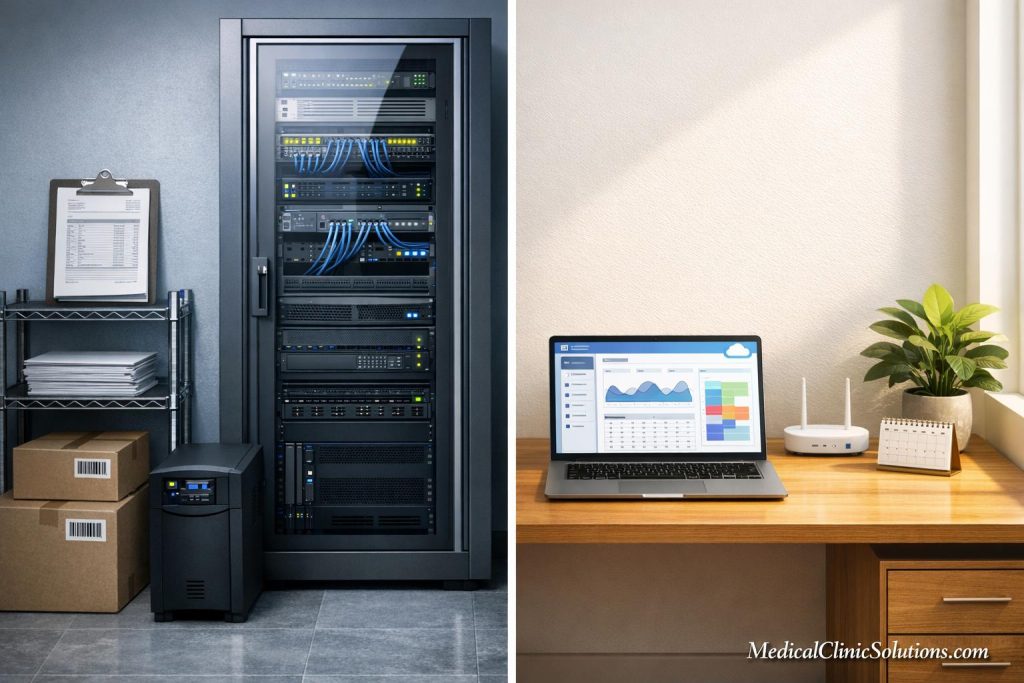
When choosing between cloud-based and on-premise EMR systems, your decision hinges on cost structure, practice size, and IT resources. Here’s a quick breakdown:
- Cloud-Based EMR: Lower upfront costs, predictable monthly fees ($200–$700 per provider), and vendor-managed maintenance. Ideal for small to medium practices with limited IT support. Five-year costs for a solo practice average $55,500.
- On-Premise EMR: Higher initial investment ($40,000–$126,000+), ongoing IT expenses, and more control over data. Suited for larger practices with in-house IT teams. Five-year costs for a solo practice average $81,500.
Quick Comparison
| Feature | Cloud-Based (OpEx) | On-Premise (CapEx) |
|---|---|---|
| Upfront Costs | $9,000–$46,000 | $40,000–$126,000+ |
| Monthly Fees | $200–$700 per provider | $50–$200 per provider |
| IT Support | Included | $6,000–$12,000 annually |
| Hardware Refresh | Not required | Every 3–5 years ($6,000–$18,000) |
| 5-Year TCO (Solo) | $55,500 | $81,500 |
Key Takeaways
- Cloud systems are best for smaller practices seeking scalability and simplicity.
- On-premise systems work well for larger organizations prioritizing control and customization.
- Consider long-term costs, IT resources, and your practice’s growth plans when making your choice.
For more details, read on to understand the costs, features, and hidden expenses of each model.
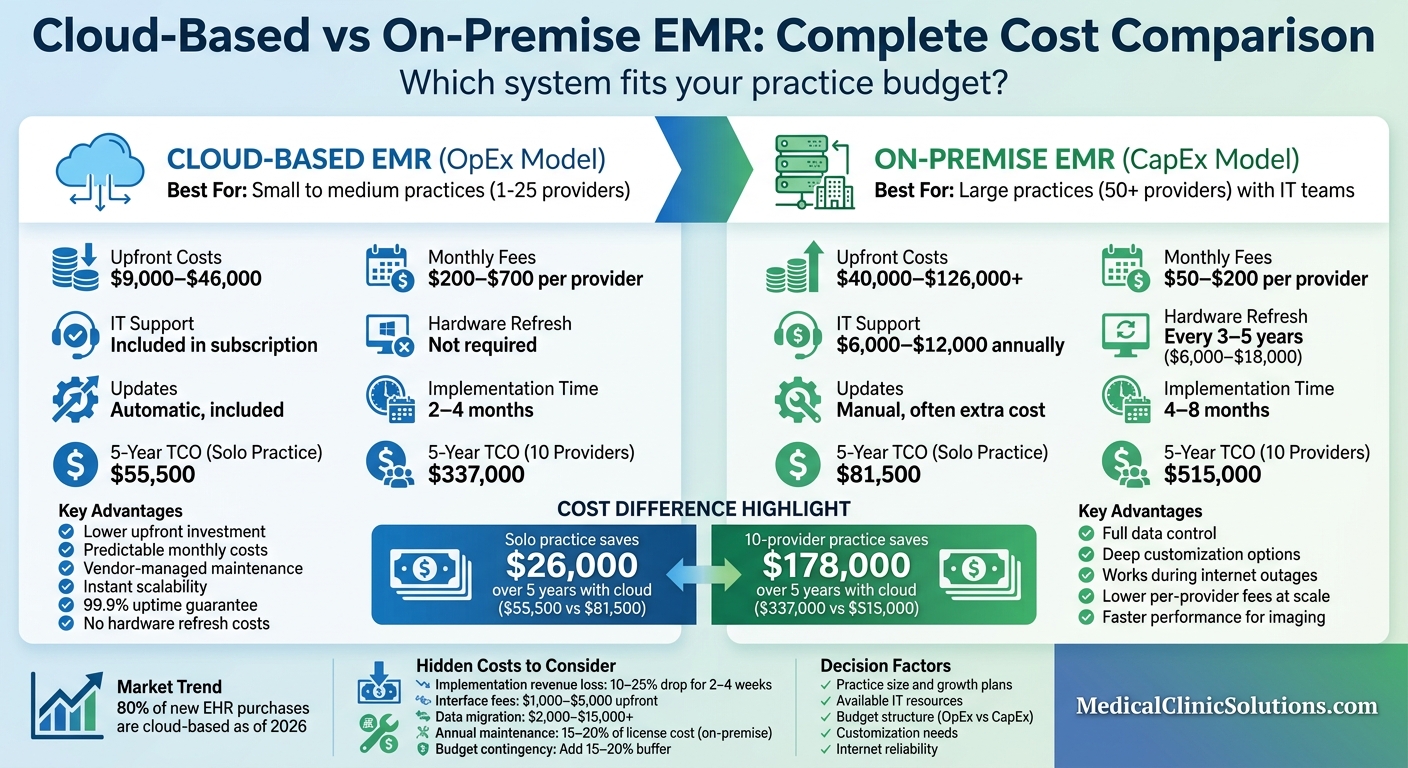
Cloud-Based vs On-Premise EMR Cost Comparison: 5-Year TCO Analysis
From On-premise to Cloud-based EMR Systems: Embracing Digital Transformation
Cloud-Based EMR: Costs and Advantages
Cloud-based EMRs operate on servers managed by the vendor and are accessed via web browsers. This setup removes the need for practices to invest in physical hardware or maintain a dedicated IT infrastructure. By 2026, it’s expected that 80% of new EHR purchases will be cloud-based, showing a clear shift in the industry toward subscription-based models. This change simplifies financial planning for practices of all sizes.
With this operating expense (OpEx) model, practices pay a recurring subscription fee while the vendor takes care of infrastructure, security updates, and system maintenance. This spreads costs evenly over time and avoids unexpected expenses like hardware failures or mandatory upgrades. For small to medium-sized practices without in-house IT teams, this means fewer surprises and a more predictable cash flow.
Subscription Fees and Initial Costs
Monthly subscription fees for cloud-based EMRs typically range from $200 to $700 per provider. However, specialized platforms, such as those for behavioral health, can start as low as $49 to $150 per month. These fees often include essential services like hosting, security, data backups, and customer support – services that would require separate contracts and additional staff with an on-premise system.
Initial setup costs for cloud EMRs are significantly lower compared to on-premise systems. For small practices, implementation costs generally range between $1,000 and $10,000, covering essentials like data migration, user training, and system configuration. Implementation is also quicker, typically taking 2–4 months for small practices, compared to the 4–8 months needed for on-premise installations.
However, not all features are included in the base subscription. Optional modules, like electronic prescribing for controlled substances, can cost $30–$65 per month, while lab interfaces may range from $500 to $1,500 annually per connection. To avoid surprises, it’s essential to verify which modules are included and factor in any additional costs when budgeting.
Maintenance and Automatic Updates
With cloud-based EMRs, vendors handle all system maintenance tasks, such as server patching, database tuning, and security updates. Over a five-year period, a solo practice spends roughly $2,500 on IT support with a cloud system, compared to about $30,000 for an on-premise setup.
"When you include the real cost of IT labor – which is the cost that on-premise TCO analyses most often undercount – cloud wins at every practice size up to roughly 100 providers."
- ehrsource.com
Cloud systems automatically update to stay compliant with the latest ICD-10 codes and CMS regulations, saving both time and money. Vendors typically guarantee 99.9% uptime in their service agreements, ensuring reliability. This centralized security approach is especially important given the record 725 healthcare data breaches in 2023.
Additionally, cloud solutions eliminate the need for costly hardware refresh cycles. On-premise systems require server replacements every 3–5 years, with each refresh costing $6,000 to $8,000. With cloud-based systems, these expenses are absorbed by the vendor as part of the subscription fee, reducing the financial burden on practices.

On-Premise EMR: Costs and Advantages
On-premise EMR systems run on servers located right within your practice. Unlike cloud-based options, these systems require you to purchase perpetual software licenses upfront, giving you full control over your hardware, data, and infrastructure. While this model involves a significant initial investment, it appeals to practices that prioritize data sovereignty and customization. With on-premise systems, your patient data stays onsite, allowing you to implement security protocols tailored to your specific needs. Since these systems operate on your local network (LAN), they remain functional even during internet outages, which is especially critical for practices in areas with unreliable connectivity.
However, this level of control comes with responsibilities. Practices must maintain stringent HIPAA physical safeguards, such as locked server rooms, climate control, and fire suppression systems. Given that 725 healthcare data breaches were reported in 2023, keeping these systems secure requires ongoing investment and expertise.
"On-premise systems have higher upfront costs but potentially lower long-term TCO for larger practices with existing IT infrastructure."
- Karen Lawes Maguire, Senior Healthcare Software Analyst
As of 2026, on-premise systems still account for 30–40% of the installed EHR base, particularly in larger organizations and government facilities that demand full control over their data. Let’s dive into the costs associated with this model.
Initial Costs and Hardware Requirements
The upfront costs for on-premise EMR systems can be steep. For small to medium practices, initial implementation typically ranges from $15,000 to $70,000 or more. Perpetual software licenses cost between $3,000 and $25,000+ per provider, while server hardware and networking equipment add $5,000 to $30,000. If your system requires database licensing (e.g., Microsoft SQL Server), expect to spend an additional $3,500 to $15,000+.
Other costs include implementation and configuration services ($5,000 to $50,000+), data migration ($2,000 to $15,000+), and staff training, which adds another $1,000 to $5,000+. The entire setup process can take 4–8 months for small practices – nearly twice as long as cloud-based systems.
To put things into perspective, a 500-physician hospital reportedly spent $85 million in its first year implementing an Epic EMR system, with $80 million of that going toward implementation costs. The Mayo Clinic’s Epic rollout exceeded $1.5 billion over five years, making it one of the most expensive healthcare technology projects in history. These upfront costs pave the way for ongoing expenses, which we’ll explore next.
Recurring Expenses and IT Support Needs
The initial investment is just the beginning. Annual maintenance and support fees are typically 15–20% of the original software license cost. For instance, a $50,000 license would incur about $7,500 to $10,000 annually in vendor support fees. Additionally, IT support is essential. Solo practices might spend around $500 per month (approximately $6,000 annually) for IT services, while a mid-sized practice with 10 providers could face IT costs of $300,000 over five years.
Hardware also needs periodic updates. Hardware refresh cycles every 3–5 years typically cost between $6,000 and $18,000 per cycle. Unlike cloud-based solutions, on-premise systems require manual upgrades, which can be disruptive and demand skilled IT personnel.
Over a five-year period, the total cost of ownership (TCO) for a solo practice using an on-premise system is estimated at $81,500, compared to $55,500 for a cloud-based option. Much of this cost difference comes from IT labor and hardware expenses. These recurring costs highlight the importance of aligning the on-premise model with your practice’s long-term IT strategy and financial planning.
Cost Comparison: Cloud-Based vs On-Premise EMR
When deciding between cloud-based and on-premise EMR systems, the cost structure plays a major role. Cloud-based systems follow an Operational Expenditure (OpEx) model, offering predictable monthly fees, while on-premise systems operate under a Capital Expenditure (CapEx) model, requiring a substantial upfront investment.
Let’s look at some real-world numbers. For a solo practice, the 5-year total cost of ownership (TCO) for a cloud-based EMR is about $55,500, compared to $81,500 for on-premise systems. That’s a $26,000 difference, largely due to savings on IT labor and hardware upgrades. For a larger practice with 10 providers, cloud systems cost approximately $337,000 over five years, while on-premise systems come in at $515,000.
"Cloud EHR now accounts for roughly 80% of new EHR purchases – but on-premise still serves 30-40% of the installed base."
- EHRSource
There’s also a tax advantage to consider: cloud subscriptions are fully deductible as operating expenses, while on-premise investments depreciate over time.
CapEx vs OpEx: Key Financial Differences
Cloud-based systems require less upfront spending – typically $9,000 to $46,000 for a small practice. These costs cover implementation, training, and basic hardware. On-premise systems, however, demand a much larger initial investment, ranging from $40,000 to $126,000+, with significant portions allocated to perpetual licenses ($15,000–$50,000) and server infrastructure ($10,000–$30,000).
While on-premise systems have lower monthly software fees, practices must budget for additional expenses like $500 to $1,000 per month for IT support through a Managed Service Provider (MSP). They also face annual maintenance fees equal to 15–20% of the original license cost. Here’s a quick breakdown:
| Cost Category | Cloud-Based (OpEx) | On-Premise (CapEx) |
|---|---|---|
| Upfront Investment | $9,000–$46,000 | $40,000–$126,000+ |
| Monthly Per-Provider Fee | $200–$700 | $50–$200 |
| IT Support (Annual) | Included in subscription | $6,000–$12,000 (MSP) |
| Hardware Refresh | Not required | Every 3–5 years ($6,000–$18,000) |
| Updates & Patches | Automatic, included | Manual, often extra cost |
| 5-Year TCO (Solo Practice) | $55,500 | $81,500 |
Unexpected Fees and Extra Costs
Beyond the standard costs, there are hidden expenses that can significantly impact total ownership costs. For example, during the implementation phase, practices often experience a 10–25% revenue drop over 2–4 weeks. For a 3-provider practice, this could mean $54,000 in lost revenue in just two months.
"The software subscription is only 40-60% of total cost. Hidden expenses – implementation, training, data migration, and productivity loss – can add $15,000-$50,000+ for a small practice."
- EHRSource
Other potential costs include:
- Interface fees: Setting up connections to labs, imaging centers, or pharmacies can cost $1,000 to $5,000 upfront, with ongoing fees of $50 to $200 per month.
- Storage overage charges: For cloud systems, practices with high imaging volumes may incur $100 to $500 per month in extra storage fees.
- Server risks: On-premise systems face the threat of server failures, which can result in days of downtime and revenue loss if backups aren’t in place.
- Annual price increases: Many cloud vendors include 3–8% annual price hikes at contract renewal.
- Early termination penalties: These range from $2,000 to $10,000 for cloud contracts.
- Data migration: Moving data from a legacy system costs anywhere from $2,000 to $15,000+, depending on complexity.
To prepare for these unexpected expenses, it’s wise to set aside a 15–20% contingency budget beyond the quoted price.
Choosing the Right EMR for Your Practice Size
The size of your practice plays a major role in deciding which EMR system is the best fit. It’s about balancing operational needs with financial realities.
Small and Medium Practices: Balancing Growth and Costs
For practices with one to 25 providers, cloud-based EMR systems often make the most financial sense. The numbers back this up: a solo practice using a cloud-based system can expect a five-year total cost of ownership (TCO) of around $55,500, compared to approximately $81,500 for an on-premise system. That’s a difference of $26,000, largely due to savings on IT labor and hardware upgrades.
One of the biggest perks of cloud systems is their scalability. Adding providers or locations is as simple as upgrading your subscription – no need for expensive server upgrades or capital planning. On the other hand, on-premise systems require careful planning and additional hardware investments. For instance, a 10-provider practice might face a five-year TCO of $337,000 with a cloud-based system, compared to about $515,000 for an on-premise setup.

Smaller practices also face challenges when negotiating costs. Solo practitioners often pay about three times more per provider than larger groups with 50 or more physicians. Cloud vendors handle infrastructure, updates, and security patches – services that could cost between $60,000 and $120,000 annually for in-house IT or $500 to $1,000 per month with a Managed Service Provider (MSP).
For larger organizations, however, the decision-making process becomes more complex.
Large Practices and Hospitals: Control and Customization
While cloud systems are ideal for smaller practices, larger organizations often weigh different factors, such as the need for customization or complete control over data. These considerations sometimes make on-premise systems a better choice despite their higher upfront costs.
For groups with 50 or more providers, the numbers shift. Cloud systems still dominate the market, accounting for around 80% of new purchases. However, for organizations with existing IT infrastructure, the upfront investment in on-premise solutions can pay off when deep customization or specific workflow needs are a priority.
Consider the Mayo Clinic’s implementation of Epic, which cost over $1.5 billion over five years, concluding around 2023. Similarly, a hospital system with 500 physicians spent $85 million in its first year – $80 million on implementation, $1.5 million on licensing, and $3.6 million on support. These types of investments make sense only for organizations with dedicated IT teams and unique operational requirements that cloud systems can’t easily address.
Large practices also benefit from economies of scale. Organizations with 300 or more providers can negotiate lower per-provider fees, ranging from $100 to $250 per month, compared to the $200 to $700 per month often paid by smaller practices. On-premise systems also provide faster performance, particularly for image-heavy specialties like radiology or pathology, where sub-millisecond speeds over local networks are a major advantage.
However, the trade-off is complexity. On-premise systems for large health systems typically require 4 to 8 months for implementation, compared to 2 to 4 months for cloud systems. Additionally, hardware refreshes every three to five years can cost $6,000 to $18,000, with annual maintenance fees of 15–20% of the original license cost.
Growth Potential, Security, and Future Planning
The choice of an EMR system is more than just a technical decision – it’s a blueprint for your practice’s future. Whether you’re eyeing expansion, bringing in new providers, or integrating advanced technologies, the system you select will either support or limit your ability to scale. Beyond immediate needs, this decision shapes your growth trajectory and security framework for years to come.
Growth Potential: Adapting to Expansion
Cloud-based EMR systems are designed to grow with you. Adding new providers? It’s as simple as upgrading your subscription. Opening a new location? Your team can access the same system instantly, without any additional setup. This kind of instant scalability removes barriers to growth, ensuring your operations keep pace with your ambitions.
On the other hand, on-premise systems require a completely different level of effort. Expanding capacity means purchasing new servers, reconfiguring networks, and possibly upgrading your physical infrastructure. What might take minutes with a cloud system could stretch into weeks or months with an on-premise setup. For practices with aggressive growth goals, these hardware limitations can be a major roadblock. And let’s not forget the cost – scaling an on-premise system often involves significant upfront expenses, from buying new equipment to hiring IT specialists for installation and configuration.
The healthcare industry is steadily moving toward cloud solutions, largely because they offer greater flexibility and predictable costs. The difference between cloud and on-premise systems highlights how your EMR choice can directly impact your ability to plan and execute long-term growth strategies.
Security: Safeguarding Patient Data and Ensuring Compliance
Security isn’t just a feature – it’s a necessity. Beyond regulatory requirements, a data breach can be financially devastating. In 2023, the healthcare sector faced an average data breach cost of $10.93 million, the highest across all industries. That same year, 725 healthcare data breaches impacted 500 or more individuals, with 79% of incidents stemming from hacking or IT vulnerabilities.
Cloud-based systems centralize security management. Providers offer AES-256 encryption for stored data, TLS 1.2+ for data in transit, automated updates, and multi-factor authentication. They also monitor security 24/7 through dedicated Security Operations Centers. Vulnerabilities are patched quickly – often within hours – and disaster recovery is built in through geographic redundancy, ensuring your data is duplicated across multiple data centers. Many cloud vendors also promise 99.9% uptime in their Service Level Agreements, minimizing downtime risks.
In contrast, on-premise systems place the entire security responsibility on your practice. Your IT team – or a Managed Service Provider – must handle everything: applying patches, managing firewalls, securing the physical server location, and configuring off-site backups. HIPAA compliance adds another layer of complexity, requiring documented backup testing to ensure data can be restored in case of a disaster. Unfortunately, falling behind on patches is a leading cause of security vulnerabilities.
While both cloud and on-premise models can meet HIPAA standards, the approach to compliance varies. With cloud systems, the responsibility is shared: you control access, while the vendor secures the infrastructure. They also sign Business Associate Agreements (BAAs), ensuring compliance oversight. On-premise systems, however, shift the entire compliance burden onto your practice. If you’re considering a cloud vendor, make sure your contract includes a data export clause in C-CDA or FHIR format. This ensures you can transfer your data if you ever decide to switch providers, avoiding vendor lock-in.
Conclusion: Finding the Right EMR for Your Budget
Choosing the right EMR system means looking beyond the sticker price and understanding the Total Cost of Ownership (TCO) over the next five to ten years. Subscription fees typically cover only 40–60% of the first-year costs. Additional expenses – like implementation, training, data migration, and hardware – can add up quickly. That said, most practices see a return on their EMR investment within 10 months.
The size of your practice plays a big role in determining the ideal EMR system. Solo practices often face higher per-provider costs due to limited negotiating power, while larger groups can leverage volume discounts. For practices with fewer than 100 providers, cloud-based systems usually offer better value when IT labor costs are factored in. Solo practices, in particular, tend to see lower TCO with cloud solutions. On the other hand, larger practices with existing IT infrastructure might find on-premise systems more cost-effective, especially if they require significant customization. This underscores the importance of aligning both upfront and ongoing costs with your practice’s resources and long-term goals.
To make informed financial decisions, request detailed quotes that outline implementation, interface, and training fees. You can often negotiate multi-year contracts for 10–25% discounts and capped annual increases of 3–5%. Be sure to include a 15–20% contingency in your budget for unexpected expenses. Additionally, plan for a short-term revenue dip – typically a 10–25% reduction – during the first 2–4 weeks as your team adapts to the new system.
Ultimately, the best EMR system is one that fits your current budget while supporting your growth and operational needs. While 80% of new EHR purchases are now cloud-based, these solutions aren’t a one-size-fits-all answer. Consider factors like internet reliability, IT resources, and your expansion plans to choose an EMR that will serve your practice well into the future.
FAQs
What costs are usually NOT included in an EMR quote?
When considering an EMR system, it’s important to remember that the quoted price often leaves out several key costs. These can include implementation fees, training for staff, data migration, ongoing support services, hardware upgrades, and third-party integrations. Together, these additional expenses can add 15–20% or more to the initial estimate, significantly impacting the overall budget.
How do I estimate 5-year total cost for my practice size?
To calculate the 5-year total cost, start by accounting for upfront expenses like implementation, training, and data migration. Then, include ongoing costs such as annual per-provider fees. Don’t forget to add a 15–20% contingency to cover hidden costs like hardware upgrades or system integrations. Once you’ve tallied these, multiply the annual costs and upfront fees by five years, and then factor in the contingency. This approach will help you create an estimate tailored to the size and needs of your practice.
What happens if my internet goes down with a cloud EMR?
If your internet connection fails while using a cloud-based EMR, you could experience temporary challenges accessing patient records or completing essential tasks. To tackle these risks, having a solid disaster recovery plan in place and investing in redundant systems can make a big difference. Preparing for potential outages ahead of time can help keep interruptions to your practice to a minimum.