
5 Methods for Collecting Patient Feedback
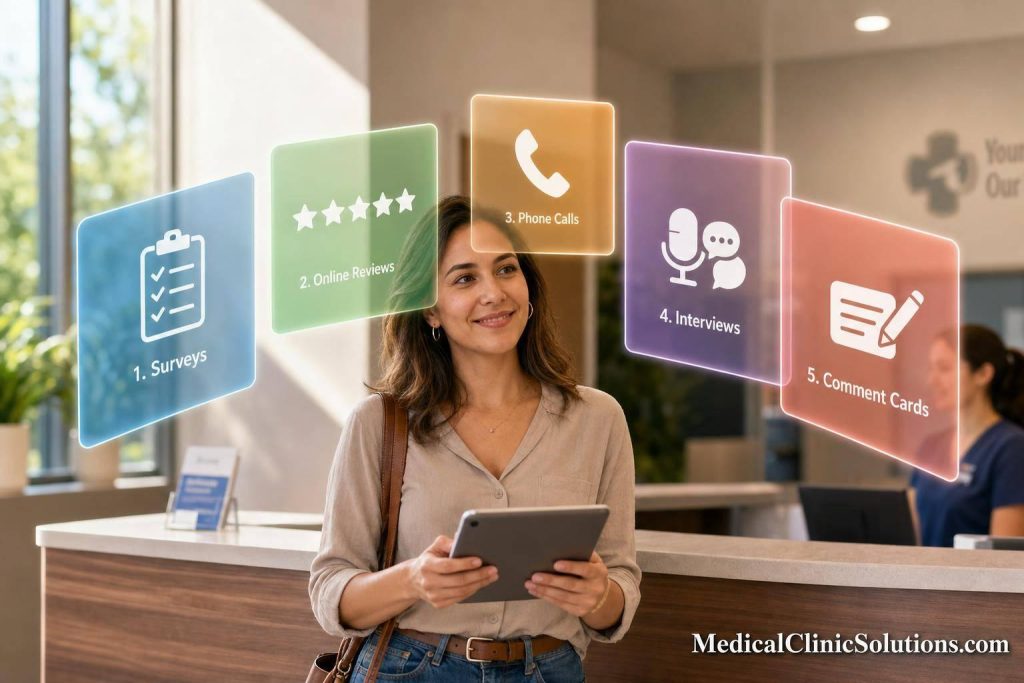
If you want more patient feedback, timing matters as much as the method. In most cases, I’d ask for it 24 to 48 hours after a visit, use reviews within 30 to 60 minutes of checkout, and keep surveys short because response rates often land around 15% to 35%.
Here’s the short version:
- Surveys work best for regular post-visit feedback at scale
- Online reviews help with public reputation and should be requested right after checkout
- In-person interviews help explain why a problem keeps showing up
- Phone calls are useful after discharge or when a survey answer needs more detail
- Comment cards fit patients who prefer paper or don’t use digital tools
One point stands out: no single method gives you the full picture. I’d use a mix of private feedback tools for fixing service issues, then track public reviews to see what patients say where others can read it.
7 Easy Ways to Collect Real Patient Feedback
Quick Comparison
| Method | Best Time to Ask | Main Use | Effort |
|---|---|---|---|
| Surveys | 24–48 hours after visit | Routine tracking | Low |
| Online Reviews | 30–60 minutes after checkout | Public reputation | Low |
| In-Person Interviews | After care transitions or repeat issues | Root-cause detail | High |
| Phone Calls | 24–48 hours after visit or discharge | Follow-up and service recovery | High |
| Comment Cards | During visit or at checkout | In-clinic feedback from non-digital patients | Low to moderate |
The main takeaway is simple: ask at the right time, use more than one channel, and sort feedback by theme so your team can act on it fast.
When to Collect Patient Feedback
Ask for feedback while the visit is still fresh, but not so fast that patients haven’t had a moment to think it over. The sweet spot is 24 to 48 hours after the visit, when patients tend to give clearer, more useful feedback.
After In-Office Visits and Checkout
The time right before and right after a patient leaves your office works well for feedback about wait times, front-desk service, scheduling, and the checkout process. A tablet or kiosk at checkout can collect feedback before details slip away. It also gives your team a chance to fix issues before the patient walks out the door.
For checkout problems, same-day feedback makes sense. For care transitions, it’s better to follow up later.
After Discharge, Telehealth, and Follow-Up Care
With care transitions, patients usually need a little time to process instructions and next steps. For discharge, telehealth, and follow-up care, feedback gathered 24 to 48 hours later often leads to more specific comments. By then, patients can better judge whether discharge instructions were clear, whether the telehealth visit was easy to use, and whether they felt supported during the transition.
That timing also helps you spot gaps in instructions, access, or handoff care. Automated email or text surveys sent through your EHR system can reach patients at the 24–48 hour mark on a steady schedule, without adding extra work for staff.
1. Surveys
When the timing is right, surveys are the most scalable way to get patient feedback. They give you structured input through email, SMS, or the patient portal. The best channel depends on how your patients already like to communicate.
SMS surveys are your best bet when you need fast replies, especially from younger patients. Keep them short – 1 to 3 questions is ideal – and stick to simple rating scales. Email surveys make sense for patients who check email often. They’re low-cost, easy to automate, and can handle 5 to 8 questions without feeling too heavy. Patient portal surveys work well for people who already use the portal for records, messages, or scheduling. You can place them right where patients are already active.
For post-visit outreach, send the survey 24 to 48 hours after the appointment. That window tends to work well because the visit is still fresh. Typical response rates fall between 15% and 35%, and anything above 30% is a strong result. A single reminder, sent 3 to 4 days after the first survey, can lift responses by 30% to 50%. On the flip side, each extra question can cut response rates by 2% to 3%.
Anonymous surveys often lead to more honest negative feedback. Patients may feel less pressure if they don’t think they’re critiquing their provider face-to-face. At the same time, adding an optional contact field gives your team a way to follow up within 24 hours when needed.
Use the channel that fits the kind of feedback you need – fast and light, or a bit more detailed.
| Channel | Response Speed | Feedback Depth | Best Touchpoint |
|---|---|---|---|
| SMS | Very High | Low (1–3 questions) | 24–48 hours post-visit |
| Moderate | Moderate (5–8 questions) | 24–48 hours post-visit | |
| Patient Portal | Variable | Moderate | During active care or follow-up |
2. Online Reviews
Online reviews are public. That makes them useful in a different way than surveys.
Surveys tend to give you deeper, private feedback. Reviews do something else: they shape how future patients see your practice before they ever walk through the door. More than 70% of patients check Google reviews before choosing a healthcare provider. Reviews usually don’t go into much detail, but they reach a much larger audience. And in most cases, newer reviews carry more weight than older ones. So timing matters just as much as the review itself. Response handling matters too.
Because reviews are public, the ask needs to be immediate and simple. The best window is within 30 to 60 minutes after checkout, while the visit is still fresh. A practical setup is to hand patients a card with a QR code at checkout that links straight to your Google review page. Another option is an automated SMS sent as soon as the patient is marked checked out in your EMR system. Either way, send the request while the visit is still top of mind, ideally within 30 to 60 minutes of checkout.
Reviews also show how patients talk about your practice in public. They can make recurring service problems stand out fast. Public replies, though, need to stay HIPAA-safe. Never confirm that someone is a patient, and never share health details. If a review is negative, keep your reply neutral and move the conversation offline. Improper responses can result in civil penalties.
| Feature | Detail |
|---|---|
| Feedback Depth | Low – short, high-level impressions |
| Privacy Level | Public – HIPAA-compliant handling is required |
| Best Touchpoint | At checkout with a QR code, or via automated SMS within 30–60 minutes post-visit |
Use review trends to spot service issues that keep coming up, then route those issues into your internal feedback workflow.
3. In-Person Interviews
When surveys point to a problem but don’t show why it’s happening, in-person interviews help close that gap. They give staff a chance to ask follow-up questions and get to the reason behind unclear or worrying survey results. This works especially well during care transitions, after visits, or when the same service issue keeps showing up and needs a clearer explanation.
The best interviews stay focused on details people can speak to clearly. Ask about communication, wait times, and whether the patient felt respected. Skip broad satisfaction questions like "How happy were you with your visit?" because they usually don’t lead to fixes you can act on.
Interviewers should stay neutral and clearly explain confidentiality so patients feel safe giving honest feedback.
| Feature | Detail |
|---|---|
| Feedback Depth | High – allows follow-up questions and root-cause discovery |
| Best Touchpoint | During care transitions, after visits, or when survey data flags a recurring issue |
| Consent | Feedback used beyond internal review requires informed consent |
Use this method when you need context that a survey or review can’t provide.
4. Phone Calls
Phone calls work well for patients who would rather talk to a staff member than fill out a form. They’re especially useful after discharge or when a survey response needs more context. The best time to call is 24 to 48 hours after the visit, when the experience is still fresh but the patient has had a little time to think it over.
The biggest upside is the chance for real-time follow-up. Staff can ask another question on the spot, clear up vague feedback, and get the story behind a rating. That matters when a patient’s answer needs context, not just a number.
There’s a tradeoff, though. Phone calls are resource-intensive because each one takes staff time and manual follow-up. Some patients may also hold back during a live conversation, especially if they’re sharing criticism, compared with what they might say on an anonymous form. At the same time, calls can reach patients with limited digital access or low comfort with tech, including people who tend to avoid online forms.
| Feature | Detail |
|---|---|
| Feedback Depth | High – supports follow-up questions and real-time clarification |
| Best Touchpoint | 24–48 hours post-visit, or after discharge and other complex care transitions |
| Privacy Level | Moderate – live conversation can limit candor on sensitive topics |
| Resource Level | High – requires dedicated staff time and manual effort |
5. Comment Cards
For patients who don’t respond to digital requests, comment cards are often the easiest option at checkout. Paper cards and suggestion boxes make it simple to gather fast feedback without phones, email, or patient portals. Put them in waiting areas or at the checkout desk, and patients can fill one out before they walk out.
The biggest upside is anonymity. When no name or login is attached, people are often more direct, especially if they have a complaint. This can also be a better fit for older patients and anyone who would rather use paper than a screen.
The downside is pretty clear: someone on staff has to collect the cards, read them, and enter the responses by hand. That slows things down and can lead to mistakes or missing data. Compared with automated digital tools, comment cards take more time to review.
There’s also one big plus tied to timing. Because patients leave feedback before they go, staff may be able to step in right away. Comment cards work best at the point of care – which gives teams a chance to fix a problem before the patient leaves, something digital methods can miss.
| Feature | Detail |
|---|---|
| Feedback Depth | Open-ended comments with limited structure. |
| Best Touchpoint | During the visit – especially in waiting areas or at checkout. |
| Privacy Level | High – perceived anonymity encourages candid feedback. |
| Resource Level | Low cost, but manual processing is required. |
Comparing the 5 Feedback Methods
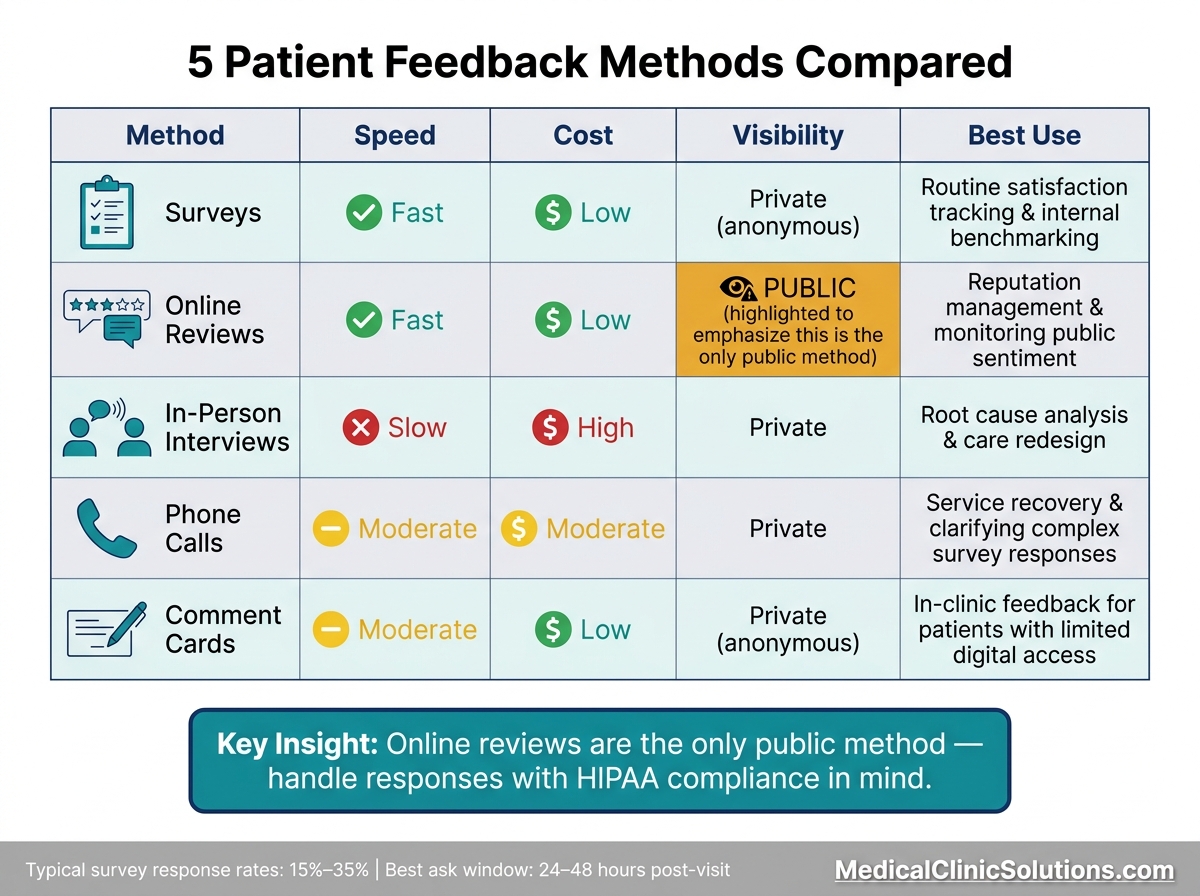
5 Patient Feedback Methods Compared: Speed, Cost & Best Use
No single method works for every case. This table makes it easier to match each channel to its speed, cost, visibility, and best use.
| Method | Speed | Cost | Visibility | Best Use |
|---|---|---|---|---|
| Surveys | Fast | Low | Anonymous private | Routine satisfaction tracking and internal benchmarking |
| Online Reviews | Fast | Low | Public | Reputation management and monitoring public sentiment |
| In-Person Interviews | Slow | High | Private | Root cause analysis and care redesign |
| Phone Calls | Moderate | Moderate | Private | Service recovery and clarifying complex survey responses |
| Comment Cards | Moderate | Low | Anonymous private | In-clinic feedback for patients with limited digital access or language barriers |
The biggest split here is visibility. Online reviews are public, while the other four methods stay internal. That changes how you use the feedback. Public feedback can affect reputation right away. Private feedback is often better for fixing workflow issues, spotting service gaps, or doing both side by side.
When it comes to cost and speed, surveys and online reviews are the easiest to run at scale. They give you a lot of input without a heavy lift. In-person interviews go much deeper, but they take more staff time and more planning. They make sense when survey results are hard to read or when you need root-cause detail instead of surface-level comments.
Phone calls sit in the middle. They’re useful for service recovery and for clearing up survey responses that don’t tell the whole story. Comment cards also fill an important gap, especially in-clinic, where some patients may have limited digital access or face language barriers.
After collection, sort feedback by channel and theme so the next review step is faster and more targeted. Then group responses by source and theme so your team can act on them fast.
How to Review and Act on Patient Feedback
Collecting feedback is only half the job. What matters more is what you do next.
Use a simple workflow so patient comments don’t just sit in a spreadsheet. Review all feedback on a set schedule, keep it in one log across every channel, and tag each item by theme, such as wait times, communication, billing, discharge, and follow-up. When the same complaint shows up in both surveys and comment cards, that’s a much stronger signal than a one-off note from a single source.
A solid feedback process turns patient input into clear action items.
Group Feedback by Channel and Theme
Bring feedback from every source into one place, then sort it by channel and by issue type. That makes patterns easier to spot. If patients keep pointing to the same problem across different formats, you’re probably looking at something that needs attention now, not later.
Once you’ve grouped the feedback, move the highest-risk items into triage.
Flag Urgent Issues and Assign Next Steps
After sorting feedback, separate urgent problems from longer-term patterns. Alerts can help staff catch urgent concerns as they come in. For each item, assign:
- one owner per department
- a deadline
- a review date
For longer-term fixes, discuss feedback during regular quality meetings. And when patient feedback leads to a change, tell patients about it. That small step shows people they were heard, and it can build more trust over time.
Conclusion
After looking at each method, the big question isn’t which one wins. It’s how they work together.
No single method shows the full patient experience. The best setup uses a mix of channels, with each one doing a different job.
Use SMS or email when you need scale. Use comment cards or phone calls for patients who prefer offline options. And use interviews when you need deeper context.
Start with the methods that fit your practice today. Then add more as your team builds the ability to respond to what patients are telling you.
One more thing: watch for feedback fatigue. If you ask too often, people tune out. It helps to limit how often you ask and give each method a clear purpose.
The goal is simple: collect the right feedback and act on it.
FAQs
How many feedback methods should a practice use?
A practice should use multiple feedback methods – usually three to five – to gather a broad range of patient insights.
What should we do with negative patient feedback?
Handle negative patient feedback with a clear, respectful process. Thank the patient, apologize for their experience, and move the conversation to a private channel. That protects patient privacy and helps support HIPAA compliance.
It also helps to review feedback on a regular basis so you can spot repeat issues. If you make changes based on what patients say, tell them. That can help rebuild trust, show patients their input matters, and make them more likely to share honest feedback.
How can we avoid survey fatigue?
Keep feedback simple, clear, and respectful of patients’ time. Ask short questions. Stick to one idea per question. And make it clear that taking part is optional.
It also helps to give patients a few ways to respond, such as digital surveys, secure text messages, in-office kiosks, or paper forms. Sending surveys soon after an interaction can make feedback easier to give while the experience is still fresh. A clear note about confidentiality can also help patients feel more comfortable sharing honest responses without adding pressure.