
EHR Compliance and Audit Readiness Tools
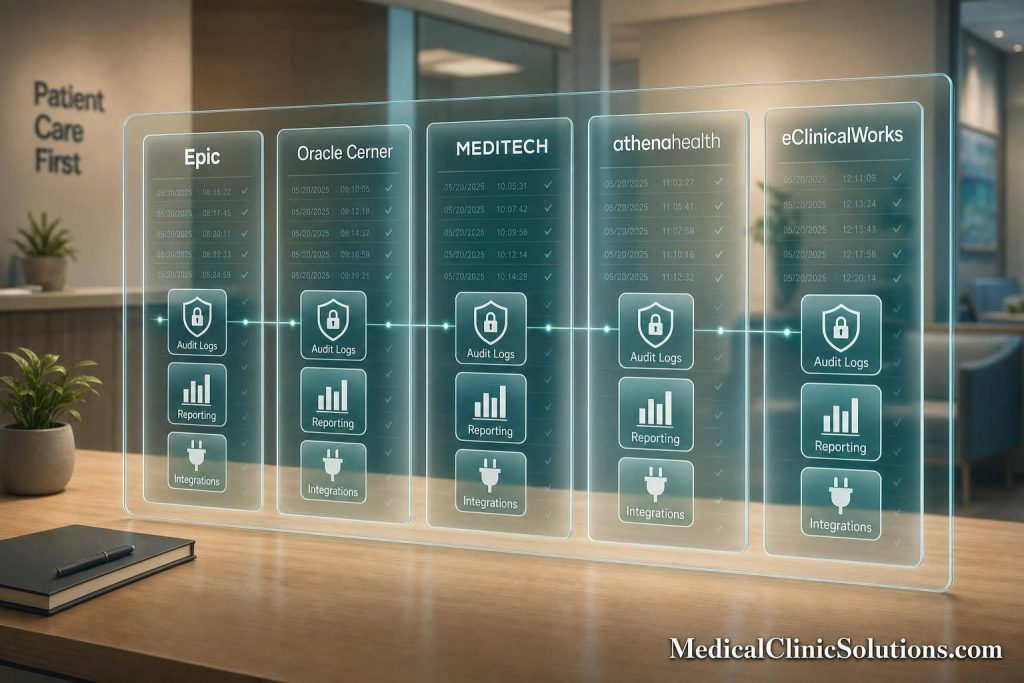
If an OCR, payer, or CMS review starts today, your EHR must show who accessed what, when, where, and what changed – fast. With U.S. physician EHR use now above 90%, the system is often the first place auditors look.
I’d boil this article down to one point: these five EHRs do not handle audit readiness the same way. Epic and Oracle Cerner lean toward deep logging and larger security setups. MEDITECH sits in the middle with solid event tracking plus API visibility. athenahealth and eClinicalWorks can work well for many clinics, but they often lean more on reports, add-ons, or outside monitoring.
If I were comparing them, I’d focus on four things right away:
- Audit logs: chart access, edits, deletes, prints, exports, signatures, break-glass use
- Documentation controls: note history, late entries, amendments, change tracking
- Reporting: audit exports, filtered activity reports, attestation support
- Connected tools: SIEM, FHIR apps, identity tools, privacy monitoring, retention systems
You also need to keep one HIPAA point in mind: the vendor runs the platform, but your practice still owns access settings, staff use, training, and ePHI handling.
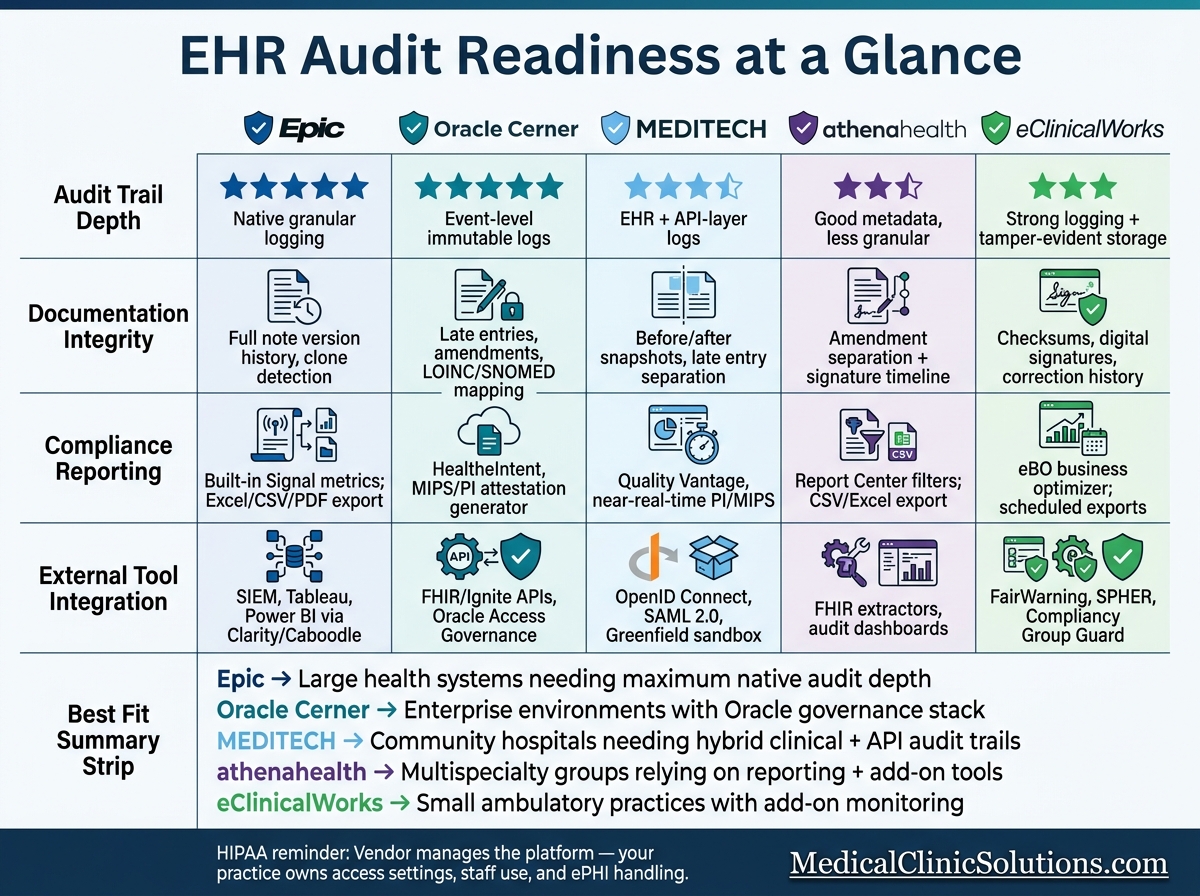
EHR Audit Readiness Comparison: Epic vs Oracle Cerner vs MEDITECH vs athenahealth vs eClinicalWorks
What is an Audit Trail in Healthcare? (Explained – 2026)
Quick Comparison
| Platform | Best known for | Main audit strength | Main watch-out |
|---|---|---|---|
| Epic | Large-system audit depth | Very detailed user and note history logging | More setup and governance work |
| Oracle Cerner | Structured charting + security controls | Event-level logs tied to Oracle tools | Older setups can make cross-system reporting harder |
| MEDITECH | EHR + API-layer audit visibility | Patient audit trails that also reflect API activity | Data structures can slow reporting work |
| athenahealth | Searchable reports and add-on support | Good activity filters and export options | Some audit proof may rely on outside tools |
| eClinicalWorks | Ambulatory reporting and monitoring links | Strong logging plus outside privacy-monitoring options | Native audit depth is less clear than larger enterprise systems |
My short take: if you want more proof from the EHR itself, look first at Epic or Oracle Cerner. If you want a middle ground, look at MEDITECH. If you want a lighter ambulatory setup, athenahealth or eClinicalWorks may fit better.
That’s the lens for the rest of the article: not who markets best, but which platform can hand you clean audit proof by the deadline.
1. Epic
Epic stands out when a practice needs detailed logging and built-in audit reporting.
It tracks user activity through Chronicle and connected modules, showing who did what, when they did it, and what changed before and after.
Audit Trail Depth
Epic records far more than simple chart access. It also logs edits, deletions, prints, exports, and signatures. Those actions matter in payer audits, especially when reviewers want to see whether a note was finished before or after a claim went out. If billing happens first and the note is completed later, that can look like retroactive documentation. Epic’s exact timestamps make that gap easy to spot.
Epic’s break-glass access also logs emergency overrides, requires a reason, and alerts privacy officers.
Documentation Integrity
Epic’s Note History keeps every version of a note. That makes it easier to spot cloned text, late entries, and later edits.
Compliance Reporting
Epic includes built-in reporting tools that help compliance teams pull access trends, high-risk events, and policy exceptions. The Signal feature pre-calculates clinician activity metrics, which can help teams track documentation burden alongside compliance exposure.
Reports can be exported in Excel, CSV, or PDF for audits and internal review.
External Tool Integration
Epic can send audit data to analytics and SIEM tools through Chronicle, Clarity, and Caboodle. Clarity and Caboodle support SQL-based and dimensional reporting with tools like Tableau, Power BI, and Crystal Reports. For real-time threat detection, Epic audit logs can also feed straight into SIEM platforms to flag odd behavior, like mass chart access or off-hours queries.
There’s one catch: every App Orchard integration needs its own BAA. Epic’s standard BAA does not cover third-party apps.
That level of detail is a big plus, but it also means more setup and tighter governance.
2. Oracle Cerner
Oracle Cerner, now Oracle Health, builds audit readiness around PowerChart logging, structured documentation, and Oracle-connected reporting. Epic tends to lean more on broad native reporting. Oracle Health stands out for how PowerChart audit trails, PowerForms, and Oracle governance tools work together.
Audit Trail Depth
Oracle Health creates immutable, time-stamped records of system activity, including viewing, creating, modifying, deleting, printing, and signing records. PowerChart logs the user’s identity, action type, workstation ID, and exact timestamps for each event. Break-glass access gets its own separate log, which matters when teams need to show who accessed a chart under emergency conditions.
Documentation Integrity
Oracle Health tracks Late Entries, Amendments, and Modifications. That gives teams a clearer record of what changed and when. PowerForms adds more structure by capturing data mapped to LOINC and SNOMED CT, which helps cut down on free-text ambiguity.
Compliance Reporting
For audit prep, Oracle Health’s value isn’t just the logging itself. It’s the ability to turn those logs into attestation records and access-control evidence. This data is also vital when integrating with medical billing software to ensure claim accuracy.
HealtheIntent, now Oracle Health Data Intelligence, helps organizations identify and stratify patient cohorts for CMS programs such as Advanced Primary Care Management (APCM). Oracle also offers a Regulatory Central EHR Certification ID Generator for Promoting Interoperability (PI) and MIPS attestation. On the access side, PowerChart’s role-based access and automatic session logoff help support HIPAA safeguards.
External Tool Integration
Oracle Health supports FHIR-based integrations through Ignite APIs and SMART on FHIR. That lets third-party tools launch inside PowerChart while keeping clinical context intact and preserving code mapping to LOINC and SNOMED CT.
It also extends beyond the chart itself. Oracle Access Governance automates provisioning and termination, while Diplomat MFT logs secure file transfers for compliance. For audits, that matters because the trail shouldn’t stop at the EHR. The code mapping and transfer logs need to stay intact across every connected tool.
3. MEDITECH

MEDITECH uses a two-layer audit model for audit readiness. It logs activity in both the EHR and the REST SQL layer, which means API access shows up in standard patient audits.
Audit Trail Depth
MEDITECH’s Audit Trail and Document Change Log record the user, action, workstation, and timestamp for view, create, modify, delete, print, sign, and co-sign events. It also keeps before-and-after snapshots for changed fields and separates Late Entries, Amendments, and Modifications.
That level of detail matters. If someone changes a chart note, prints a record, or signs an item after the fact, the system keeps a clear trail of what happened and when.
Documentation Integrity
MEDITECH limits third-party access with PI3-compliant CCDs, and tools like Blue Elm‘s DR Auditor can reconcile repository and live-system records.
In plain English, that helps teams compare what’s stored in the repository with what’s still in the live system. If records drift apart, the gap is easier to spot.
Compliance Reporting
MEDITECH tracks offering access through query workflows, discharge forms, and enrollment logs. Quality Vantage supports near-real-time PI and MIPS monitoring, while middleware such as OpenGate can export data from Magic, C/S, 6.x, and Expanse to SQL Server, XML, or Excel.
That gives compliance teams a few different paths to pull proof when they need it, whether they’re checking patient access activity or moving data into a reporting setup.
External Tool Integration
This becomes especially important when audit evidence needs to hold up across portals, APIs, and downstream reporting tools. MEDITECH supports third-party apps that meet its requirements. Authentication works with portal credentials, OpenID Connect, or SAML 2.0. Greenfield lets developers test APIs before production.
4. athenahealth
athenahealth stands out when audit prep leans more on reporting and add-on compliance tools than on deeper built-in governance controls. Its approach centers on detailed audit metadata, searchable reports, and extra compliance tools that help teams get ready for review. For each interaction, athenahealth logs the user’s identity, the action, the timestamp, the workstation, and the before-and-after field values. That gives teams a clear record of what changed, when it changed, and who made the change.
Audit Trail Depth
athenahealth tracks higher-risk actions like ePrescribing, role changes, security updates, and PHI exports. It also supports a break-glass workflow for emergency access. In that workflow, users must enter a justification before opening a restricted record, and that justification is saved in the audit log. Its Portal Access Audit History also records portal grants, removals, and contact-detail changes.
This kind of logging matters most when records are updated after the original visit or service.
Documentation Integrity
athenahealth separates amendments, modifications, and late entries, while keeping the original text and timestamps for each change. It also records signature metadata that shows when an encounter was opened, when note content was entered, and the exact moment the author signed the document. That timeline helps lower the risk of post-service note completion slipping by unnoticed.
Compliance Reporting
These records matter most when compliance teams need to pull them fast during a review.
Administrators can filter athenaNet activity logs by patient, user, or department in Report Center. Reports can be exported to CSV or Excel for audit review. The platform can also flag:
- after-hours access
- high-volume chart viewing
- VIP or employee record browsing
External Tool Integration
When built-in reporting doesn’t go far enough, athenahealth extends into outside audit and retention tools. It connects to audit dashboards, evidence archives, and FHIR-based extractors for retention and outside audit support.
5. eClinicalWorks
Based on the audit controls covered above, eClinicalWorks stands out most for logging and outside monitoring. It combines built-in audit logs with reporting features and add-on monitoring tools.
Audit Trail Depth
The platform logs authentication, chart access, orders, e-prescribing, medical coding software exports, and permission changes. Each log entry records the user, their role, a timestamp, the patient identifier, the action type, and the device or IP address. It also supports break-glass access and stores the reason in the log.
Audit logs are kept in tamper-evident or immutable storage and encrypted at rest. Continuous log analysis flags unusual activity, such as mass chart access or spikes after hours.
Logging, of course, is only part of the picture. The record itself also needs to keep its full history.
Documentation Integrity
eClinicalWorks uses checksums, digital signatures, and validation checks to spot unauthorized changes to records and attachments. Corrections keep the original entry and record the full change history. Original entries remain untouched, while corrections keep the author, timestamp, and reason. Role-based access control limits who can edit certain parts of the record, so write access stays tied to defined job functions.
Compliance Reporting
The platform’s main reporting layer is Business Optimizer (eBO), which supports denial management, claims comparison, and scheduled exports. Reports can be scheduled and emailed, which makes recurring evidence packages for compliance reviews and payer audits easier to pull together. eBO also supports custom report writing for organizations with more specific reporting needs.
When built-in reports fall short, outside monitoring can cover what’s missing.
External Tool Integration
eClinicalWorks also connects to FairWarning, SPHER, and Compliancy Group‘s The Guard for privacy monitoring, log analysis, retention, and policy tracking. That combination matters most when reporting, retention, and monitoring need to work in sync.
Whether that setup is enough comes down to how much reporting and monitoring a practice needs.
Pros and Cons by Platform
Each platform listed above comes with clear strengths and clear weak spots when it comes to audit readiness. And the table below shows what each EHR can support – not what you get out of the box.
That distinction matters. A setup that works fine for a low-volume practice may fall short if your team deals with heavy audit activity, deeper reporting needs, or a lot of outside monitoring.
| Platform | Strengths for Audit Readiness | Limitations to Watch |
|---|---|---|
| Epic | Granular user-activity logging; connectors for automated compliance reporting and real-time monitoring | Vendor-specific metrics make cross-system benchmarking harder, and governance demands are high |
| Oracle Cerner | Event-level logging and enterprise security controls | Cross-system benchmarking is harder, especially in older on-prem deployments |
| MEDITECH | Reliable clinical and financial event logging | Proprietary data structures make cross-system reporting harder |
| athenahealth | Pre-built connectors that support automated compliance documentation and real-time audit trail monitoring | Audit evidence often depends on outside identity and monitoring tools, and native logs are less granular than enterprise-tier systems |
| eClinicalWorks | Ambulatory-focused reporting | Native audit depth is less transparent than the larger enterprise platforms |
The main tradeoff is pretty simple: how much native logging you want from the EHR itself versus how much outside monitoring you plan to layer on top.
How to Choose the Right Audit-Ready EHR Stack
Choosing the right setup comes down to three things: your scale, your audit exposure, and whether compliance should live inside the EHR or sit in add-on tools. At the end of the day, the question is simple: can your platform produce audit proof fast enough when a real review deadline hits?
Start by matching the EHR to the controls you need most. That might be deeper logging, faster reporting, or outside monitoring. For large organizations, a layered model usually makes more sense. Mid-size groups often do best with a hybrid setup. Smaller practices tend to get more mileage from a built-in model. In many small ambulatory settings, an all-in-one EHR is the better fit because audit logging, reporting, and access control all stay in one system.
Integration flexibility also matters. SAFER Guide attestation now matters for MIPS-eligible clinicians, so EHRs that support FHIR-based exchange can cut a lot of manual compliance work. When integration is weak, teams usually end up doing audit prep by hand.
That tradeoff shows up pretty clearly by practice type:
| Practice Type | Audit-Readiness Priority | Best Platform Fit | Integration Approach |
|---|---|---|---|
| Large Health System | Enterprise risk management & RBAC | Epic, Oracle Cerner | Layered: EHR + SIEM and compliance management suites |
| Multispecialty Group | Interoperability & centralized policy control | athenahealth, Oracle Cerner | Hybrid: built-in clinical tools + layered risk management |
| Community Hospital | SAFER Guide attestation & contingency planning | MEDITECH | Hybrid: EHR clinical data linked to automated audit-prep packets |
| Small Ambulatory Practice | MIPS/HEDIS reporting & low admin overhead | eClinicalWorks | Built-in: native compliance tools plus add-on monitoring only where needed |
The real test is evidence retrieval. Can your team export clean proof fast when an OCR request arrives? That’s where good-looking feature lists stop mattering and actual audit readiness starts to show.
If the choice still feels fuzzy, use a comparison resource to narrow the field. U.S. practices can use Medical Clinic Solutions to compare EHR systems and compliance-support services in one place.
FAQs
What makes an EHR audit-ready?
An EHR is audit-ready when it has the safeguards, logs, and records needed to show compliance and data integrity.
Key elements include unique user IDs, role-based access, immutable time-stamped audit trails, encryption for data at rest and in transit, a current security risk analysis, signed business associate agreements, and regular internal audits.
Do I still need outside monitoring tools?
It depends on how complex your practice is and whether you need one place to manage compliance.
Modern EHR systems usually cover the basics, such as audit trails, role-based access, and automated reporting. But that may not be enough on its own. Regulators may expect systematic, ongoing monitoring that goes beyond basic software logs.
Dedicated compliance tools can bring policy management, training tracking, and regulatory updates into one place across your organization. They can also pull data from your EHR, HR, and billing systems into a single dashboard, which makes it easier to spot risks and get ready for audits.
How fast should my team be able to pull audit proof?
Ideally, your team should be able to produce the audit documents you need in seconds, not hours. Audit readiness means moving away from a manual scramble that drags on for days or weeks and into a continuous state of readiness.
With automated compliance tools, your practice can quickly export complete, tamper-evident audit packets. That means you’re ready every day, not just when an audit shows up.