
Best Tools for Custom Patient Feedback Forms
If a survey tool won’t sign a BAA, I’d rule it out right away. That’s the first filter. After that, I’d compare form logic, EHR connection, reporting, and price.
Here’s the short version:
- Jotform is my pick for small clinics that want strong form control without a heavy setup.
- Qualtrics and NRC Health Listen fit large health systems that need EHR links, CAHPS support, and follow-up workflows.
- SurveyMonkey works if you want healthcare templates and can pay for its top HIPAA tier.
- Typeform is best when patient experience on the form itself matters more than deep workflow features.
- LimeSurvey fits teams with IT staff that want to host and shape more of the stack themselves.
- RepuGen is built for practices that care about feedback plus online reviews in one flow.
A few numbers stand out:
- SMS surveys can top 50% completion, while email-only campaigns often sit around 12% to 18%.
- Custom or enterprise setups can take 6 to 14 weeks and may cost $4,800 to $12,000+ up front.
- When survey data writes back into the EHR, teams save about 8.2 staff hours per week.
So if I were choosing, I’d use this order:
- BAA and HIPAA setup
- Can responses write back to the chart?
- How much logic and branching do I need?
- How much can I spend over 3 years, not just per month?
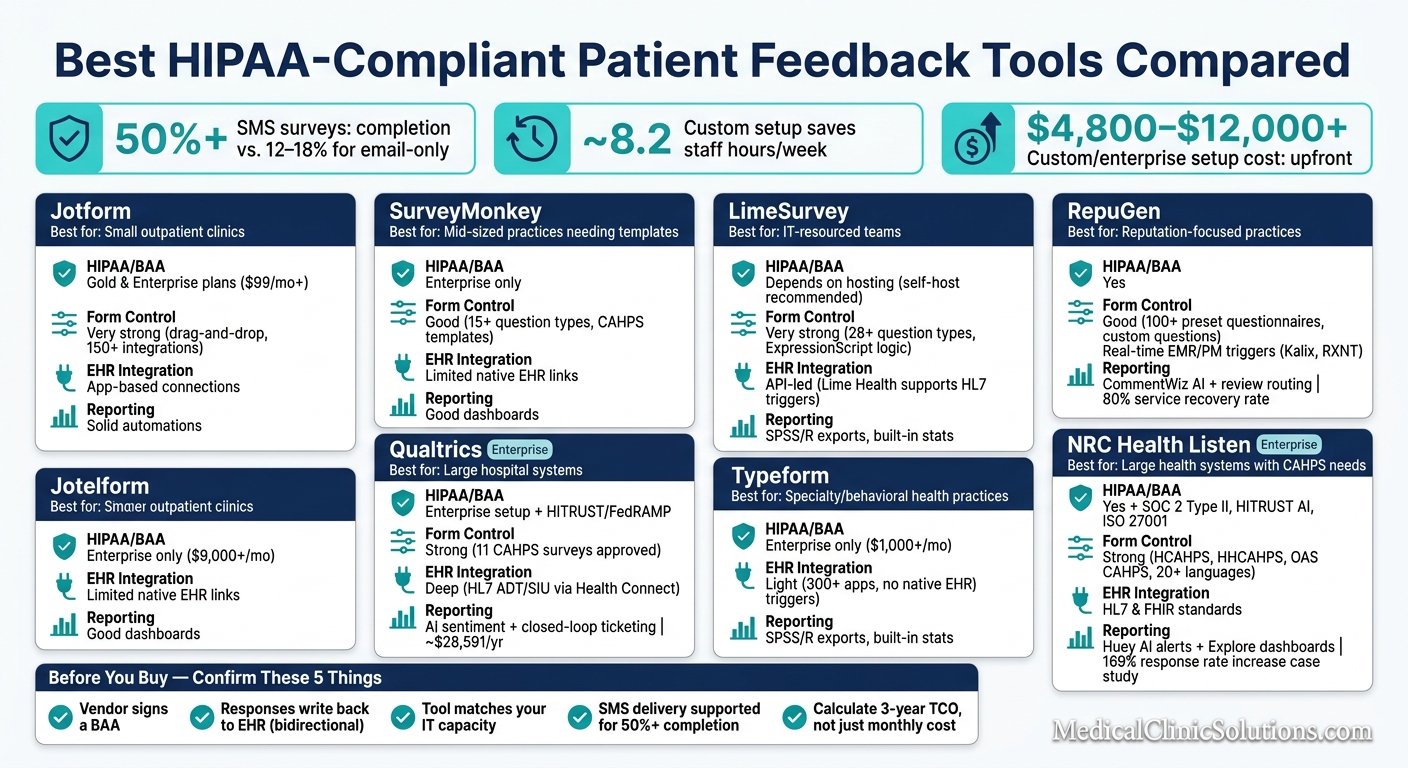
Best HIPAA-Compliant Patient Feedback Tools Compared
HIPAA-Enabled Medical Form Builder
Quick Comparison
| Tool | HIPAA / BAA | Form Control | EHR / Workflow | Reporting / Follow-Up | Best Fit |
|---|---|---|---|---|---|
| SurveyMonkey | Enterprise only | Good | Limited native EHR links | Good dashboards | Mid-sized practices |
| Jotform | Gold/Enterprise | Very strong | Many app connections | Solid automations | Small outpatient clinics |
| Qualtrics | Enterprise setup | Strong | Deep healthcare links | Strong AI and ticketing | Hospital systems |
| Typeform | Enterprise only | Good | Light healthcare workflow | Limited follow-up tools | Specialty practices |
| LimeSurvey | Depends on hosting | Very strong | API-led | Built-in stats, exports | IT-led teams |
| RepuGen | Yes | Good | EHR / PM triggers | Review and recovery focus | Reputation-focused practices |
| NRC Health Listen | Yes | Strong | HL7/FHIR | Strong service recovery | Large health systems |
If you need simple feedback collection, off-the-shelf tools can work. If you need survey data to move inside care workflows, I’d look at enterprise or custom setups first.
1. SurveyMonkey
SurveyMonkey supports HIPAA only on an Enterprise account with a signed BAA. It can also negotiate custom BAAs, but that usually means a higher price tag.
HIPAA readiness
Once HIPAA is turned on, the account gets a 30-minute automatic session timeout, SSO through SAML 2.0, SSL encryption, and alerts tied to PHI-related actions. There’s a catch, though: after the account is HIPAA-enabled, it can’t go back to standard mode. If the BAA ends, the account is closed and the data is later deleted.
That setup makes SurveyMonkey usable for PHI, but it also limits how much room you have to change course later.
Form customization
SurveyMonkey gives you more than 15 question types, including NPS, matrix ratings, ranking, and sliders, plus skip logic, answer piping, and multi-condition display logic. It also comes with healthcare templates such as CAHPS Clinician & Group, HCAHPS, and AHRQ Patient Safety Culture surveys.
If you want to get a survey live without building every question flow from scratch, that template library helps.
EHR/workflow integration
SurveyMonkey does not have native EHR integrations with Epic or Cerner. For PHI surveys, the safer route is to use web links instead of email invitations, since a forwarded email link could expose PHI.
Analytics & automation
Its built-in dashboards include filtering, cross-tabulation, and sentiment analysis. On HIPAA-enabled accounts, AI features like Thematic Analysis and Analyze with AI are turned off for compliance reasons.
So while SurveyMonkey covers the basics well, it’s a weaker fit if you need deep EHR connectivity or heavy AI-driven automation.
Best for practices that need HIPAA-enabled surveys and ready-made healthcare templates, but not deep EHR integration. The next tool moves closer to form-builder flexibility, with a different compliance tradeoff.
2. Jotform
Jotform is HIPAA-ready on its Gold and Enterprise plans. Gold costs $99/month when billed annually or $129/month when billed monthly. Lower-tier plans don’t qualify for HIPAA use. That makes Jotform a good fit for practices that want more control over form design than they’d get from a survey tool built mostly around templates.
HIPAA readiness
To turn on HIPAA compliance, you sign a BAA in your account settings. After that, Jotform uses AES-256 encryption at rest and TLS 1.2 or higher in transit, along with audit logs and role-based access controls.
One detail matters here: alerts don’t include PHI. Staff have to log in to see submissions. That adds a useful layer of protection.
Jotform also includes a HIPAA Compliance Checker to help confirm whether connected third-party apps meet HIPAA requirements too. And Jotform Sign supports automated signing orders for multi-party consent workflows. If your practice collects PHI through structured surveys, that setup works well.
Form customization
This is where Jotform stands out most.
Its no-code drag-and-drop builder supports:
- Conditional logic
- Answer piping
- Ratings
- Matrix questions
- File uploads
- Medical fields
- Card Forms for a one-question-at-a-time flow
All of those features are supported in the platform’s builder.
Forms are responsive by default, so they work on phones, tablets, and kiosks without extra setup. You also get branding controls for logos, colors, fonts, and custom CSS. In plain terms, if you want a form to look and behave a certain way, Jotform gives you room to do it.
EHR/workflow integration
Jotform supports 150+ native integrations, including HIPAA-compliant paths for Salesforce and Google Workspace.
Analytics & automation
Report Builder turns responses into charts and graphs. You can also send thank-you emails, notify staff, and route responses to specific departments automatically.
Its strongest point is flexible form building with HIPAA support, which helps bridge the gap between simple intake tools and the more enterprise-focused options next.
3. Qualtrics Patient Experience
Qualtrics moves beyond flexible survey building and into enterprise patient experience management. It fits healthcare organizations that need more than a basic survey tool. You get pre-built surveys for clinical and support touchpoints, EHR workflow connections, and AI-driven analytics.
HIPAA readiness
Qualtrics supports HIPAA compliance only after a Business Associate Agreement (BAA) is in place and a HIPAA-enabled tenant environment is set up. Practices also need to confirm role-based access control, SSO with MFA, and data-minimization settings, like blocking IP capture. The platform also holds HITRUST CSF and FedRAMP certifications.
Qualtrics is an enterprise patient-experience platform first and a survey tool second. That matters. It’s built to manage the full care feedback lifecycle, not just gather responses.
Form customization
The platform includes pre-built surveys for portals, apps, ER, inpatient, outpatient, billing, and scheduling. It supports question types such as Multiple Choice, Matrix Tables, NPS, Sliders, Heat Maps, and signature capture built for mobile use.
Surveys can go out through:
- SMS
- QR codes
- Embedded web forms
- Mobile apps
It also supports multilingual distribution and is approved for 11 CAHPS surveys.
EHR/workflow integration
Qualtrics connects to EHR systems through its Health Connect extension. It uses HL7 messaging standards, specifically ADT and SIU event feeds, to sync patient data into the Qualtrics XM Directory. That setup aligns with industry standards and HIPAA rules for data exchange.
The Patient Experience Hub then uses that data to run rounding programs and track performance across care teams.
Analytics & automation
That same enterprise setup carries over into reporting and closed-loop follow-up. Dashboards for executives, CX managers, and hospital supervisors give each group access to the data that fits their role. AI-driven sentiment analysis reviews open-text responses and pulls out operational drivers from patient comments.
There’s also a built-in closed-loop ticketing system that automatically triggers follow-up tasks when a patient flags an issue. On top of that, Qualtrics benchmarks patient experience data from more than 500 hospitals across all 50 U.S. states.
All of that depth comes with enterprise cost and complexity. The median annual spend is about $28,591, with first-year implementation fees between $8,400 and $10,000. For independent or small group practices, that’s a big investment. For health systems handling regulatory reporting and multi-site feedback programs, the added depth may make sense.
The next tool shifts away from enterprise depth and toward simpler form creation.
4. Typeform

After the more compliance-heavy platforms above, Typeform feels like the most conversational pick. Instead of showing a full form all at once, it walks patients through one question at a time. That simple shift can cut friction and help lift response rates. So while it isn’t a workflow-first platform, it often delivers a better front-end experience.
HIPAA readiness
Compliance is the big limiter here. Typeform is HIPAA-compliant only on its Enterprise plan. The Basic, Plus, and Business plans can’t be used to collect PHI, and you need a signed BAA before using it for that purpose. Enterprise pricing is custom-quoted, but it often starts at $1,000+ per month.
There’s also one setup detail that can trip up practices: Typeform doesn’t include an automatic HIPAA toggle. Email notifications have to be set up by hand so patient responses don’t appear in the message body. And if PHI passes through any connected app, that app needs its own BAA too.
Form customization
Typeform stands out for its single-question flow, Logic Jumps, and AI drafting. Logic Jumps send patients down different paths based on how they answer. For example, a low satisfaction score can trigger a follow-up question asking what went wrong. Its AI form builder can also turn a plain-text prompt into a draft survey.
EHR/workflow integration
Typeform connects with 300+ apps, but it doesn’t offer the same native EHR depth as healthcare-focused tools. It also doesn’t have a native e-signature field. That means practices that need consent forms have to bring in a third-party tool, and that tool must be HIPAA-compliant and covered by a separate BAA.
Analytics & automation
Typeform doesn’t include built-in closed-loop follow-up, and it won’t sync submissions into patient records without middleware. Logic Jumps help with conditional routing, and the AI builder makes form setup faster, but patient experience platforms usually go further when it comes to workflow automation.
Typeform works best for practices that want a polished patient-facing survey and only light workflow support. It’s a better match for low-risk patient satisfaction surveys, where conversational UX matters more than deep workflow control. If your team needs tighter control over logic, deployment, and data handling, the next option makes more sense.
5. LimeSurvey
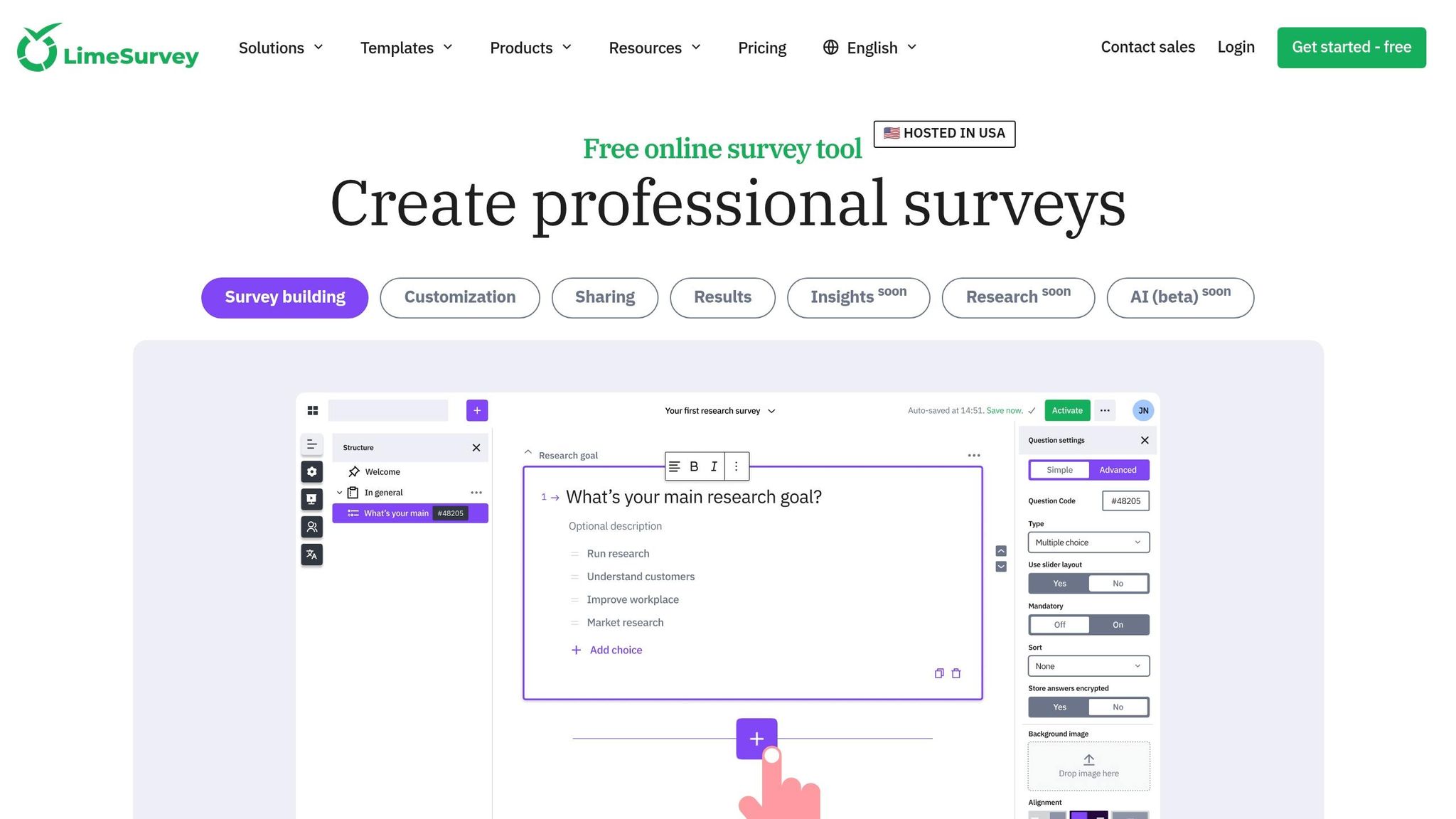
LimeSurvey is open-source and can be self-hosted, which gives practices more control over data and survey logic. That makes it a strong fit for teams that want tighter control over patient information. The tradeoff is pretty simple: more control usually means more setup.
HIPAA readiness
For healthcare teams, HIPAA readiness depends on where LimeSurvey is hosted. Self-hosting on a HIPAA-compliant server is the cleanest path for practices that need direct control over patient data. There’s also a paid cloud-hosted version for teams that want to skip the technical setup.
Form customization
This is where LimeSurvey shines. It includes more than 28 question types, such as matrices, rating scales, numerical inputs, and questions with images or rich text.
Its ExpressionScript logic supports advanced skip logic and branching, so surveys can change on the fly based on earlier answers. That’s useful when a patient’s response should lead to a different follow-up path instead of forcing everyone through the same form.
Healthcare-focused templates, including HCAHPS and patient satisfaction surveys, are available out of the box. LimeSurvey also supports 80+ languages, and its theme system gives teams control over HTML, CSS, and JavaScript. Surveys are responsive by default, so they work across phones, tablets, and desktops.
In short, if a practice needs forms that line up closely with clinical workflows, LimeSurvey gives a lot of room to shape them.
EHR/workflow integration
This is usually the most technical part. LimeSurvey doesn’t offer native plug-and-play EHR connectors. In most cases, teams build integrations through APIs.
For more specialized healthcare workflows, Lime Health supports HL7-triggered survey distribution and supports large-scale clinical deployments.
Analytics & automation
LimeSurvey also supports:
- Token-based invitations
- Automated reminders
- Built-in statistics
- Exports to SPSS or R for deeper analysis
LimeSurvey is best suited to practices with IT resources that want maximum control over form design and data handling. If you want a lighter setup with less technical ownership, the next option is simpler to deploy.
6. RepuGen
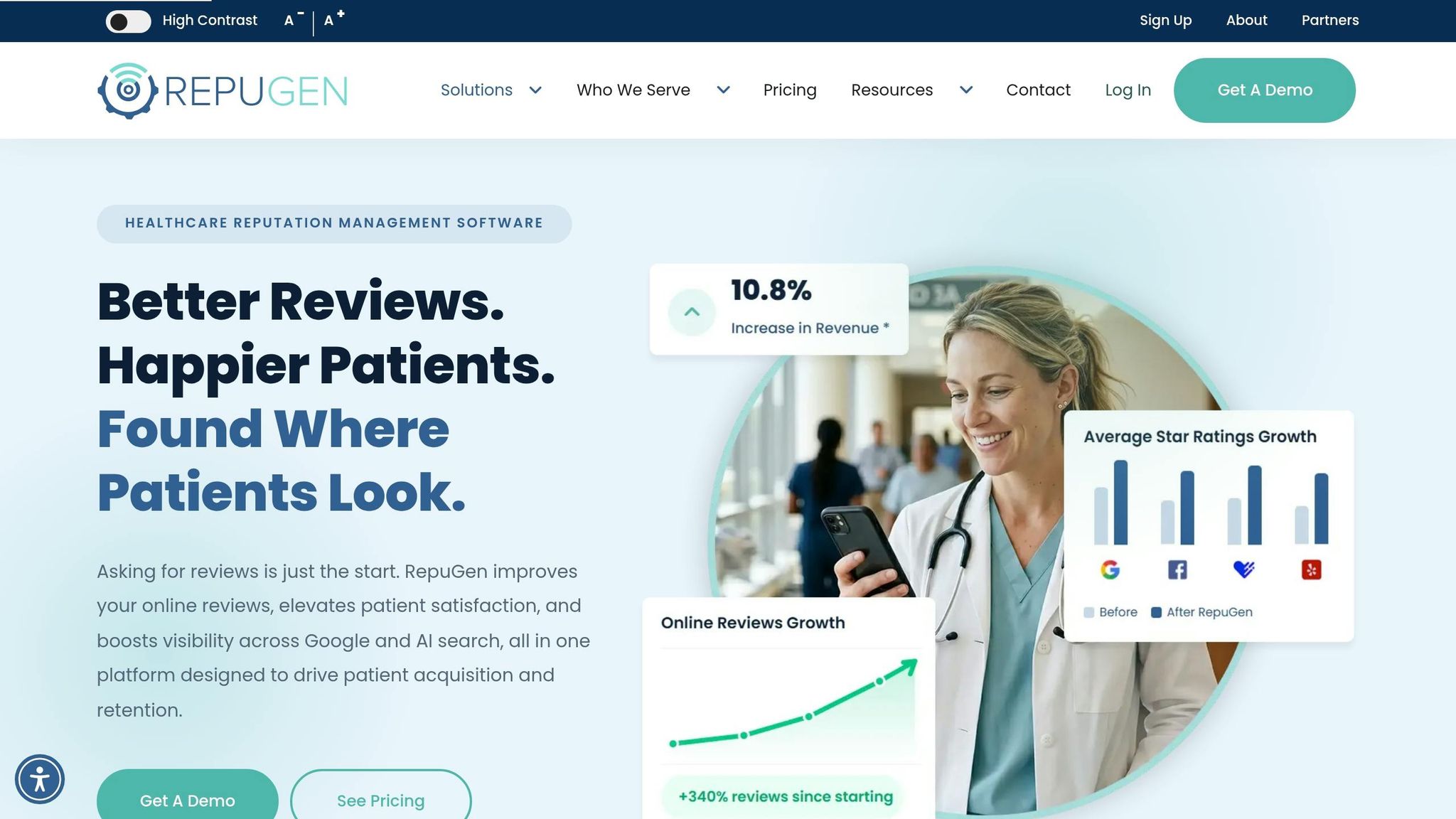
RepuGen is made for healthcare practices that want patient feedback and online reputation management in the same place. You can see that focus in the way it sends surveys and routes negative responses.
HIPAA readiness
RepuGen is HIPAA-compliant, with encryption and role-based access controls to protect PHI.
Form customization
Practices can build multi-question surveys from a bank of 100+ preset questionnaires or write custom questions from scratch. Surveys can include the patient’s name and provider’s name, and the platform also supports anonymous feedback. Spanish-language surveys are available out of the box.
EHR/workflow integration
RepuGen connects in real time with EMR/EHR and practice management systems, including Kalix and RXNT, so survey delivery can run on autopilot. Requests can go out when an appointment is marked "attended" or "complete", using SMS or email. That timing matters: 47% of patients leave a review within the first 24 hours after a visit.
Analytics & automation
CommentWiz reviews patient comments to spot repeat themes and sentiment patterns, while ReplyWize helps staff draft fast, consistent replies to online reviews. Real-time alerts flag negative internal feedback so teams can step in privately before an unhappy patient posts in public. That setup supports up to an 80% service recovery rate.
The case studies help make the pitch concrete:
- Triad Radiology Associates increased its average rating from 2.3 to 4.4 stars and grew reviews by 474%, from 54 to 310.
- Tennessee Oncology reached a 34.0% to 34.9% survey conversion rate and held 97.7% positive sentiment.
Pricing is quote-based. Kalix EMR subscribers can get a discounted add-on, and there is a 6-month free review-tracking trial.
Its main edge is simple: RepuGen fits best when feedback collection and reputation management need to work side by side.
7. NRC Health Listen
NRC Health Listen is a strong match for health systems that need CAHPS coverage, multilingual feedback, and service recovery tied to daily workflow. In plain English, it brings survey collection, patient context, and follow-up into one system.
HIPAA readiness
NRC Health supports HIPAA, SOC 2 Type II, HITRUST AI certification, and ISO 27001. It uses AES-256 encryption at rest and TLS 1.3 in transit, plus audit logging, role-based access control (RBAC), and multi-factor authentication (MFA). BAAs are available, and the platform also includes consent management, data anonymization, and data minimization protocols.
Form customization
NRC Health supports a broad CAHPS survey set, including HCAHPS, HHCAHPS, OAS CAHPS, CAHPS Hospice, ICH CAHPS, Child CAHPS, and the PIX survey for psychiatric inpatient facilities starting in 2026. Its nGage tool collects open-ended feedback through voice, video, or text. Surveys are available in 20+ languages, including Spanish, Arabic, Chinese, and Hindi.
EHR/workflow integration
The platform uses HL7 and FHIR data standards to connect with EHR systems. MyStory and MyView add patient context and stated priorities directly into the clinical workflow, so feedback can move to the care team without extra handoffs.
Analytics & automation
Huey™ AI powers service-recovery alerts and AI-assisted replies for negative feedback through the nAct module. The Explore platform gives teams self-serve dashboards and reports for outreach performance, NPS, and HCAHPS analysis.
One result stands out. In a five-hospital system in Eastern Virginia, NRC Health helped drive a 169% increase in patient response rates, moving from 7,342 to 19,755 annual responses, along with a 9.9% system-wide improvement in overall satisfaction within two years.
Pricing is subscription-based and quote-only. NRC Health Listen fits health systems that want enterprise compliance, deep EHR integration, and built-in service recovery.
If you need more control than a packaged platform allows, the next section compares custom builds with off-the-shelf tools.
Custom Healthcare Software vs. Off-the-Shelf Tools
The main choice here is pretty simple: do you just need a survey tool that collects feedback, or do you need a workflow that does something with that feedback on its own?
Once you compare tools side by side, the next step is the deployment model.
Off-the-shelf tools are usually the fast path. They can go live in a few days or within a couple of weeks, cost less at the start, and the vendor handles hosting and maintenance. Custom workflows take more time to roll out – usually 6 to 14 weeks – and they tend to cost more upfront. But they can do something off-the-shelf tools often can’t: write survey responses back to the EHR. That difference matters most for practices that need automation, not just data collection.
Implementation fees for custom or enterprise-grade workflows usually fall between $4,800 and $12,000+. Even so, there can be a payoff. When survey responses flow back into the EHR, organizations save an average of 8.2 staff hours per week compared with manual processes or one-way data flows. And there’s another cost angle that gets missed a lot: organizations that pick vendors based only on licensing cost end up spending 34% more over three years than those that look at total cost of ownership from the start.
| Feature | Off-the-Shelf Tools | Custom / Enterprise Platforms |
|---|---|---|
| Setup Time | Days to 2 weeks | 6–14 weeks |
| Integration Depth | One-way data export | Survey responses written back to the EHR |
| Upfront Cost | Low to moderate | $4,800–$12,000+ |
| Flexibility | Template-based; limited logic | Deep branching; automated clinical triggers |
| Maintenance | Hosted and maintained by the vendor | May require paid professional services ($200–$350/hr) |
Here’s the practical test: if your staff still has to bounce between the EHR and a survey dashboard to match up responses, a custom workflow may make more sense.
One more thing matters no matter which route you take: any tool that handles patient feedback with PHI needs a signed BAA.
Next, the article breaks down each tool’s pros, cons, and best-fit use case.
Pros, Cons, and Best Fit by Tool
This table strips each option down to its main give-and-take.
| Tool | Main Pros | Main Cons | Best-Fit Practice Type |
|---|---|---|---|
| SurveyMonkey | Healthcare templates and solid logic | HIPAA only on top tier | Specialty practices and mid-sized teams |
| Jotform | Flexible builder with HIPAA-ready tiers | Less advanced reporting than enterprise platforms | Small outpatient clinics and cost-conscious practices |
| Qualtrics Patient Experience | Deep analytics and EHR integration | Enterprise cost and complexity | Large hospital systems and academic medical centers |
| Typeform | One-question-at-a-time UX | Limited healthcare-specific compliance controls | Specialty practices that value conversational intake, such as therapy and behavioral health |
| LimeSurvey | Maximum form control and self-hosting option | Requires IT resources; no native EHR connectors | Practices with technical staff that need deep customization |
| RepuGen | Feedback collection and review management in one workflow | Narrower focus; less suited to clinical research or complex branching | Reputation-focused practices |
| NRC Health Listen | Broad CAHPS coverage with built-in service recovery | Subscription pricing is quote-only; enterprise scale required | Health systems needing regulatory survey support and EHR integration |
In plain English, the next call comes down to four things: compliance, integration depth, budget, and workflow automation.
If you want to narrow the field fast, match the tool to the way your practice actually runs day to day.
| Practice Type | Best Fit | Why |
|---|---|---|
| Small outpatient clinic | Jotform | Low cost, easy setup, no dedicated IT needed |
| Specialty practice | Typeform | Conversational style lifts engagement for niche patient groups |
| IT-resourced practice | LimeSurvey | Full control over form logic and data hosting |
| Hospital system | NRC Health Listen | CAHPS coverage, EHR integration, and service recovery |
| Reputation-focused practice | RepuGen | Routes high scores to public-review requests and low scores to private follow-up |
| Mid-sized group or multi-site system | Qualtrics Patient Experience | Deep analytics and native EHR integration at enterprise scale |
| Mid-sized team needing templates | SurveyMonkey | Healthcare templates and branching logic without heavy IT overhead |
The next section walks through how to line up these options with your practice’s exact requirements.
How to Pick the Right Tool for Your Practice
Start with compliance. Before you spend time on demos or trials, confirm that the vendor will sign a BAA. That clears the first hurdle. After that, look at your IT bandwidth and how deeply the tool needs to connect with your systems.
Your team setup matters more than many clinics expect. If your practice doesn’t have dedicated technical staff, a no-code drag-and-drop tool is usually the smart pick. It makes branching forms easier to build and helps you get live faster. On the other hand, if you need survey responses to write back into the chart, you’ll want to confirm bidirectional EHR integration. In plain English, that means checking for native API or webhook support for your EHR.
Response volume and budget should also guide your plan choice. Smaller practices can often stay on lower-cost tiers. Larger groups should look past the annual license and calculate 3-year TCO instead. That means setup, integration work, and staff labor on top of subscription costs.
Delivery method can make a big difference too. SMS surveys can achieve completion rates above 50%, compared with 12% to 18% for email-only campaigns. If you also need in-office coverage, it makes sense to add kiosk or QR code options for clinic use. And no matter which channel you choose, the form should be mobile-responsive. If it feels clunky on a phone, patients may drop off fast.
Use this checklist to score each option quickly:
| Factor | Check |
|---|---|
| HIPAA/BAA | Confirm the vendor signs a BAA before any demo or trial |
| Integration | Ask if responses write back to the patient chart automatically (bidirectional) |
| IT Capacity | Choose no-code tools if you lack technical staff; choose API-capable tools if you need deeper workflow automation |
| Channel | Prioritize SMS for higher completion rates; add kiosk or QR options for in-office coverage |
| Budget | Calculate 3-year TCO including setup, integration, and staff labor – not just licensing |
| Volume | Match your monthly volume to the plan tier |
Conclusion
After looking at compliance, customization, integration, and reporting, the best choice comes down to fit, not features alone.
Jotform is the best pick for flexible, drag-and-drop form building. Qualtrics works well for enterprise healthcare workflows. NRC Health makes sense when benchmarking and reporting matter most. RepuGen is a good match for reputation-focused feedback, especially when service-recovery workflows send satisfied patients to public review sites and route critical feedback to private follow-up.
What matters most is how the tool fits your compliance needs, how deeply it connects with your systems, and how your team puts the data to work. Before you buy, confirm BAA coverage, EHR write-back, and your 3-year total cost.
FAQs
Do I need a BAA before testing a patient feedback tool?
Yes. You need a signed Business Associate Agreement (BAA) before collecting patient feedback that could be tied to a person’s identity or health status.
Here’s why: patients may include PHI in open-ended responses. Once that happens, the platform handling the data becomes a business associate.
No signed BAA? Then the vendor is not HIPAA compliant for that use case. Before you test anything or start collecting responses, make sure your specific plan includes BAA coverage.
How can I tell if a tool will write survey responses into my EHR?
Check whether the provider explicitly lists native EHR or EMR integration. General integrations may help with data export, but they usually don’t offer the deeper automation needed to place patient feedback directly into a medical chart.
It also helps to look for mentions of clinical-context integration and whether the platform can link responses to specific patient records.
Should I choose a no-code form builder or a custom workflow?
It comes down to your practice’s needs, your team’s technical bandwidth, and how closely you want form data linked to day-to-day work.
Use a no-code, HIPAA-compliant form builder when you need simple standalone forms or anonymous feedback. Go with a custom workflow when forms need to trigger follow-up actions, connect with EHRs, or automate multi-step processes.
Either way, check for a signed BAA, encryption, and access controls for protected health information.