
Best Medical Practice Management Tools for 2026
Managing a medical practice in 2026 requires tools that simplify operations like scheduling, billing, and patient communications. The right Practice Management Software (PMS) can improve efficiency, reduce claim denials, and boost revenue. Here are five top solutions tailored to different practice sizes and needs:
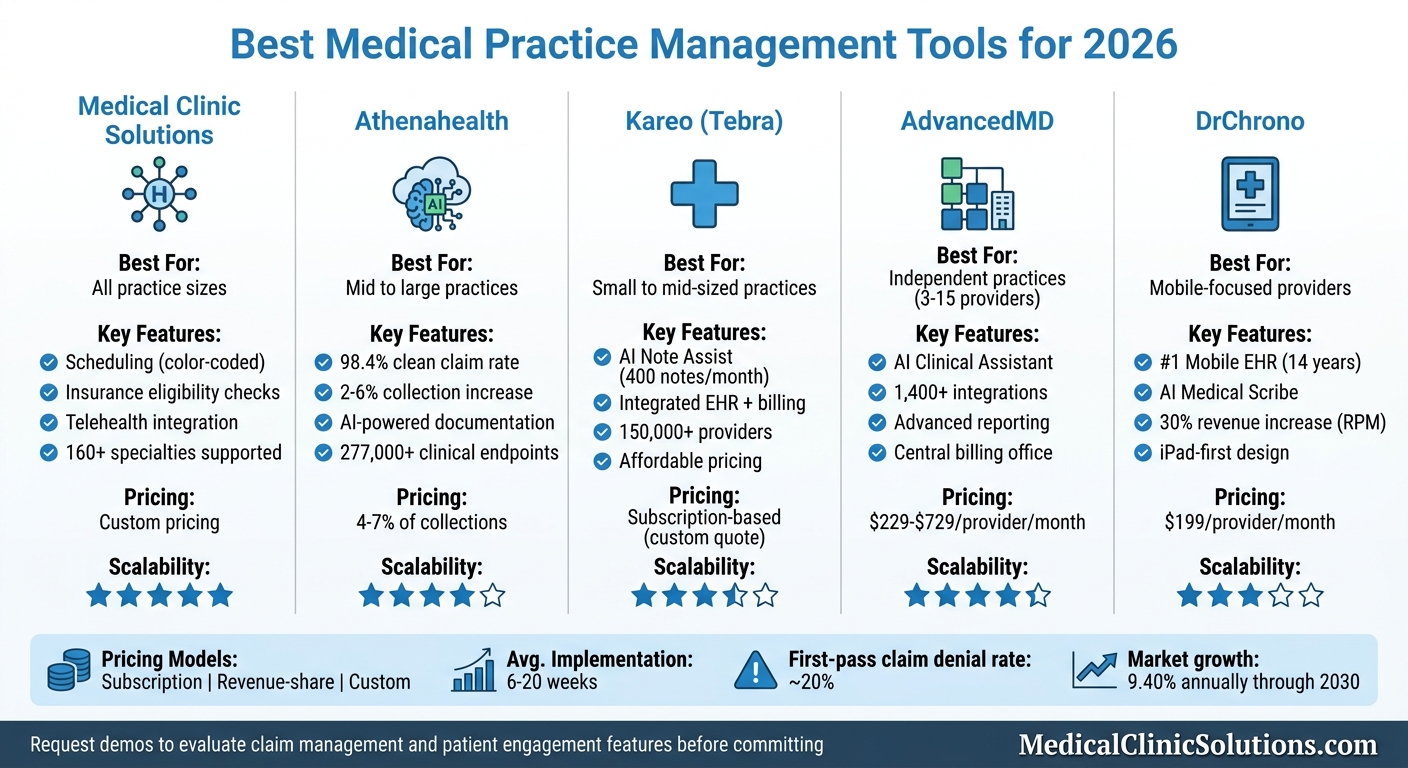
- Medical Clinic Solutions: A matching hub offering tools for scheduling, insurance checks, and telehealth. Ideal for practices of all sizes.
- Athenahealth: A cloud-based platform with AI-powered revenue cycle management and scheduling. Best for mid-sized to large practices.
- Kareo (Tebra): Affordable and user-friendly, designed for small to mid-sized practices with integrated EHR and billing.
- AdvancedMD: A modular system with advanced reporting and customization, suited for independent practices with 3-15 providers.
- DrChrono: A mobile-first platform with AI tools for documentation and billing, perfect for on-the-go providers.
Quick Comparison
| Tool | Best For | Key Features | Pricing Structure |
|---|---|---|---|
| Medical Clinic Solutions | All practice sizes | Scheduling, insurance checks, telehealth | Custom pricing |
| Athenahealth | Mid to large practices | AI-driven RCM, scheduling, patient engagement | 4–7% of collections |
| Kareo (Tebra) | Small to mid-sized practices | Affordable EHR, billing, patient engagement | Subscription-based |
| AdvancedMD | Independent practices | Modular design, advanced reporting | $229–$729 per provider/month |
| DrChrono | Mobile-focused providers | Mobile-first, AI tools, customizable templates | Starts at $199 per provider/month |
Choosing the right PMS depends on your practice size, specialty, and budget. Request demos to evaluate features like claim management and patient engagement before committing.
Medical Practice Management Software Comparison 2026: Features, Pricing & Best Use Cases
5 Best Electronic Health Records (EHR) Software: Top Medical Practice Management Tools
1. Medical Clinic Solutions
Medical Clinic Solutions acts as a go-to resource for American medical professionals, connecting them with software and services that simplify practice management. Instead of offering a single software product, it serves as a matching hub, helping clinics find the right tools – whether it’s EMR/EHR systems, telemedicine platforms, medical billing services, or clinic security systems.
Features for Clinic Operations
Medical Clinic Solutions provides tools designed to make clinic operations smoother. These include automated, color-coded appointment scheduling, self-service patient portals, and HIPAA-compliant telehealth systems that integrate directly with EHRs. On the administrative side, the platform supports automated insurance eligibility checks, electronic claims submissions, and patient reminders, helping reduce no-shows and improve efficiency.
Scalability for Clinic Sizes
The cloud-based solutions offered through Medical Clinic Solutions are flexible enough to adapt to practices of all sizes. From solo practitioners to large multi-location groups, these tools scale to meet different operational needs. For smaller or newly established clinics, the focus is on features like automated scheduling and precise claims processing to speed up payment cycles.
Integration Capabilities
Medical Clinic Solutions supports over 160 medical specialties with its connected systems. The cloud-based setup ensures smooth data sharing between billing, telehealth, EHR systems, and external partners like labs, specialists, and insurance providers. This allows for automated patient eligibility checks and enhances collaboration, ensuring better treatment continuity and overall efficiency. These integration features make it easier to maintain streamlined operations across the entire practice.
2. Athenahealth
Athenahealth offers a cloud-based platform, athenaOne, that combines EHR, revenue cycle management, and patient engagement tools. Supporting over 160,000 providers, the platform connects to more than 277,000 clinical endpoints, including hospitals, labs, and pharmacies. Machine learning is integrated directly into key workflows like documentation, coding, and appointment scheduling.
Features for Clinic Operations
Athenahealth’s AI-powered tools enhance efficiency across clinic operations. For example, Ambient Notes suggests documentation content based on encounter data, while Waitlist Scheduling automatically fills canceled appointments. Additionally, its insurance verification feature extracts data directly from card images.
The platform’s revenue cycle management is particularly effective, achieving a 98.4% clean claim submission rate. Practices using athenahealth typically see a 2% to 6% increase in collections after implementation.
"We’ve gotten 40 hours a week back. We repurposed those hours to higher-value work, like improving the patient experience." – Spine Colorado, PC
These capabilities make it a strong fit for practices of all sizes.
Scalability for Clinic Sizes
Athenahealth’s cloud infrastructure is designed to scale, making it suitable for solo practitioners and large multi-specialty groups alike. It is particularly effective for practices with 1–75 providers. Notably, it earned the #1 KLAS 2026 ranking in Practice Management for independent practices with 11–75 physicians.
The implementation timeline depends on the size of the practice:
- Solo practices: 6–8 weeks
- Mid-sized groups: 10–14 weeks
- Large multi-specialty organizations: 16–20 weeks
This flexibility ensures the platform can adapt to the growing technological demands anticipated in the coming years.

Pricing and Affordability
Athenahealth’s pricing model is tied to practice performance, costing 4–7% of collections, with a per-provider minimum of about $140/month. Implementation fees range from $2,000 to $5,000 per provider, and an optional managed billing service adds another 2–3% of collections. While this percentage-based pricing is attractive for smaller clinics, it may be less cost-effective for high-revenue practices compared to flat-rate options.
3. Kareo
Kareo, now rebranded as Tebra, offers an integrated "EHR+" platform tailored for independent medical practices. With over 150,000 healthcare providers using the system, it supports a wide range of specialties such as primary care, mental health, pediatrics, dermatology, and chiropractic care. Its all-in-one design merges clinical documentation, billing, and patient engagement into a single platform, making workflows more efficient.
Features for Clinic Operations
One standout feature of Tebra is AI Note Assist, which simplifies clinical charting by generating up to 400 AI-powered notes per month per provider for $99 monthly. The platform also includes electronic prescriptions, telehealth capabilities, and electronic lab orders. For scheduling, Tebra offers smart provider calendars, online patient booking, and digital intake forms to help manage waiting room traffic. Automated appointment reminders further minimize no-shows.
On the billing side, Tebra provides tools like real-time insurance eligibility checks, claims management, and Tebra Payments, which charges 2.75% + $0.30 per transaction. Features like charge capture and coding aim to reduce claim denials, while integrated reporting helps track revenue cycle performance. These tools are designed to support clinics as they grow.
"Tebra has been the easiest EMR I’ve ever worked on in the past 20 years. Being able to check eligibility is amazingly easy." – G2 Reviewer
Scalability for Clinic Sizes
Tebra is designed for independent, ambulatory practices rather than large hospital systems. It works well for solo providers as well as mid-sized clinics with multiple providers, shared schedules, and centralized billing needs. Practices can choose to use the EHR, Billing, and Patient Experience modules individually or as a package. However, it doesn’t include features like Admission, Discharge, and Transfer (ADT) systems, which are essential for large-scale inpatient care.
Integration Capabilities
Tebra enhances its functionality by connecting with key diagnostic providers such as Quest Diagnostics and LabCorp for electronic lab orders and results. Through Surescripts, it supports e-prescribing, and integration with billing clearinghouses and payment processors like Stripe simplifies claims processing. The platform also supports HL7 and FHIR protocols, enabling data exchange with other healthcare applications. For practices with specialized needs, custom API development is available, with implementation timelines typically ranging from 3 to 6 months.
Pricing and Affordability
Tebra employs a mixed pricing model that includes both module-based subscriptions and transactional fees. While subscription rates require custom quotes, usage-based fees include $0.99 per electronic claim attachment, $1.10 per paper claim, and $99 per month for AI Note Assist. Practices without an activated provider face a $150 monthly minimum fee.
4. AdvancedMD
AdvancedMD is a cloud-based platform hosted on Amazon Web Services (AWS), specifically designed for independent medical practices. It’s particularly suited for practices with 3 to 15 providers and serves tens of thousands of providers across the United States.
Features for Clinic Operations
AdvancedMD offers a range of tools aimed at streamlining clinic operations. One standout feature is its AI Clinical Assistant, which uses ambient listening and transcription to capture clinical conversations and convert them into five different note formats. The AI Action Items feature analyzes visit transcripts to update patient records, including problems, allergies, medications, and lab orders.
Recent updates to the Enhanced Scheduler have improved load times, column scrolling, and personalization. The billing module includes real-time coverage detection, paperless claim attachments via Waystar, and automated processing for canceled or no-show fees. Additionally, the platform provides more than 40 specialty templates with a drag-and-drop builder for customization. From contract signing to going live, implementation typically takes between 8 and 14 weeks.
"AdvancedMD is transforming private practice healthcare technology with intelligent automation built to streamline clinical, financial, and patient workflows." – AdvancedMD
These tools make it easier for clinics to scale their operations and adapt to changing needs.
Scalability for Clinic Sizes
The platform’s modular design allows small practices to start with essential EHR or practice management modules and add features like telehealth, patient engagement, and reputation management as they expand. For multi-location practices, the Central Billing Office feature integrates all providers and locations into a single system with unified dashboards and reporting. However, practices with over 50 providers or complex organizational needs may find the platform less suitable as they grow.
Integration Capabilities
AdvancedMD integrates seamlessly with other healthcare systems through its Partner Marketplace, which includes over 1,400 integrations and more than 50 billing partner options. Its open API architecture supports FHIR R4 APIs, ensuring it meets the interoperability standards required by the 21st Century Cures Act. The Interoperability Exchange connects the platform to major labs, imaging centers, health information exchanges, and immunization registries. Recent updates in 2026 have strengthened its integration with Waystar, enabling real-time coverage detection and paperless claim submissions.
Pricing and Affordability
AdvancedMD uses a modular pricing structure. Costs start at approximately $229 per provider per month for either EHR or practice management. The EHR + practice management bundle is priced at around $429 per provider per month, while the full suite – including EHR, practice management, billing, telehealth, and patient engagement – ranges between $629 and $729 per provider per month.
For managed billing services, fees typically fall between 3–7% of collections, and implementation fees range from $2,000 to $5,000 or more. Multi-year contracts are standard, and early termination fees may apply, so practices should carefully negotiate terms before signing.
5. DrChrono
DrChrono stands out as a mobile-first platform, holding the top spot in Black Book‘s Mobile EHR rankings for 14 straight years. It was the first Apple Mobility Partner in healthcare and launched the first iPad medical records app back in 2011. This early focus on mobile clinical documentation set the stage for its role in modern, integrated practice management.
Features for Clinic Operations
DrChrono’s mobile-first foundation is paired with AI-driven tools designed to simplify daily operations. Its AI Medical Scribe automates documentation tasks and even predicts patient no-shows. Features like a self-check-in kiosk mode and automated appointment reminders make front-desk workflows more efficient. The platform supports over 20 medical specialties with customizable templates, and its tight integration with iOS tools (like Apple Pencil for annotations) makes mobile documentation seamless.
"The billing system in DrChrono is so easy that it makes other EHRs look like you need a PhD to figure them out! I love the billing profile feature, as it has reduced my billing work by about a third." – Charlene Black, MegMed Health
The billing profile feature is a game-changer, cutting billing-related tasks by around 33%. This is especially helpful for practices managing their own revenue cycles.
Integration Capabilities
DrChrono’s integration options make it easy to connect with third-party services. It links directly with labs, imaging centers, and immunization registries. It also supports remote patient monitoring through platforms like IntelliH, pulling data from Bluetooth devices (e.g., glucometers, blood pressure monitors) directly into patient charts. This feature can increase revenue by as much as 30%. Additionally, DrChrono works with several payment processors, including Stripe, Square, and Authorize.net, and integrates with clearinghouses like Change Healthcare.
Pricing and Affordability
DrChrono offers five pricing tiers, starting at $199 per provider per month. Each plan includes integrated mobile apps, and practices needing full Revenue Cycle Management services can opt for custom pricing. Its mobile-first design reflects the forward-thinking approach shaping today’s practice management solutions.
Comparison of Features and Pricing
Finding the right tool for your clinic means balancing its features with a pricing model that aligns with your operations. In 2026, payment structures for these tools typically fall into three categories: flat monthly subscriptions, per-provider fees, or revenue-share plans.
| Tool | Best For | Key Strengths | Pricing Structure | Notable Limitations |
|---|---|---|---|---|
| Medical Clinic Solutions | Comprehensive Operations | Unified platform; advanced workflow automation | Custom pricing | Longer implementation time for full adoption |
| Athenahealth | Financial Management | Claim submission tracking; RCM optimization | Revenue-share / On request | Billing errors; claim processing issues |
| Kareo | Small Practices | Affordable RCM; practice growth tools | Subscription / On request | Limited scalability for larger groups |
| AdvancedMD | Independent Practices | Advanced reporting; fully integrated suite | Subscription / On request | Higher setup time and cost for smaller clinics |
| DrChrono | Customization | Highly adaptable; automates data entry | Quote-based | Initial configuration can be complex |
This table gives a quick snapshot of the tools, but there are a few more factors to consider during your evaluation process.
One critical aspect is potential savings. For instance, reducing documentation time could save up to 50%, and improving claim collection rates can have a significant financial impact. A real-world example: Magnolia Family Urgent Care boosted their first-pass claims rate from under 50% to about 93%.
Scalability and usability are equally important. Consider a pay-for-use solution that minimizes training challenges while improving revenue capture. Before committing, request a demo to assess the interface and workflow. According to KLAS Research, only 38% of organizations felt their EHR implementation fully met expectations, often due to training gaps.
Lastly, as you prepare to switch platforms, take time to audit your records for duplicates or missing fields. Coding errors and incomplete documentation are common culprits behind claim denials – about 20% of claims are denied on the first submission. Choosing a tool with strong claim editing features can help reduce these administrative headaches.
Conclusion
Choosing the right practice management tool comes down to aligning the software’s features with your practice’s specific size and specialty. For smaller practices or solo providers, straightforward and budget-friendly options like Kareo – with its flat-fee pricing – can be a great fit.
Mid-sized and expanding practices often need more advanced functionality. AdvancedMD stands out here, offering integrated workflows and detailed reporting capabilities. On the other hand, large healthcare organizations handling substantial claim volumes might benefit from athenahealth, which uses a revenue-share model (4–7% of collections) to enhance financial performance, even if its billing support has occasional inconsistencies. If mobility is a priority, DrChrono provides an iPad-friendly platform tailored for on-the-go providers.
When evaluating tools, request a demo that walks you through the entire revenue cycle – from charge entry to payout. Also, watch for hidden costs, such as data migration fees, training expenses, and per-transaction charges, which can add up beyond the monthly subscription.
The right software can lead to fewer claim denials, quicker payment cycles, and smoother patient payment processes. These benefits are critical as practice management evolves to meet the demands of 2026. With the U.S. market projected to grow at an annual rate of 9.40% through 2030, selecting the right tool now can set your practice up for long-term efficiency and success.
FAQs
How do I choose the right PMS for my practice size?
When selecting a Practice Management System (PMS) for your healthcare practice, it’s important to focus on a few key areas:
- Practice size and complexity: A smaller practice might benefit from straightforward, easy-to-use tools, while larger practices often require systems that can handle more intricate operations and scale as needed.
- Operational needs: Pinpoint the features that matter most to your practice. For example, do you need tools for managing financials, streamlining clinical workflows, or both?
- Room for growth: Opt for a system that can evolve with your practice, accommodating growth and ensuring compliance with regulations.
The goal is to find a PMS that aligns with your practice’s unique needs and simplifies your day-to-day operations.
What hidden costs should I expect beyond monthly pricing?
When considering medical practice management tools, it’s not just the monthly subscription fees you need to think about. There are often hidden costs that can catch you off guard. These might include implementation fees, data migration, staff training, hardware upgrades, and ongoing maintenance. Together, these additional expenses can bump up the total cost by 15–20% or more. Make sure to factor these into your budget to avoid unpleasant surprises down the road.
What should I ask for in a practice management software demo?
When you’re looking into practice management software, it’s important to ask the right questions to find a solution that works for you. Here are a few key points to consider:
- How does it manage essential tasks? Ask about its capabilities for scheduling, billing, and maintaining patient records. These are the backbone of any practice, so the software needs to handle them efficiently.
- What’s the onboarding process like? Find out how long it takes to get up and running and what kind of support is available during the setup.
- Will it work with your current systems? Check if the software can integrate seamlessly with tools you’re already using.
- What about data migration? Understand what’s involved in transferring your existing data into the new system.
- Can it be tailored to your needs? Look for options to customize features or automate repetitive tasks to save time.
By focusing on these areas, you’ll have a clearer picture of whether the software aligns with your practice’s workflows and day-to-day operations.