
Ultimate Guide to VoIP-EMR Integration
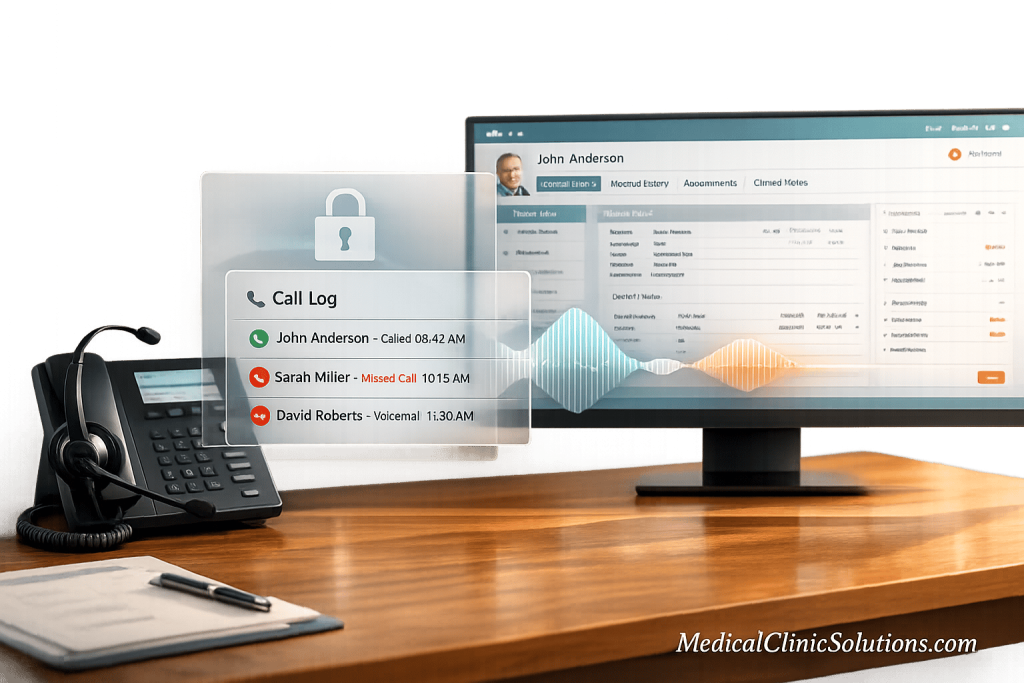
Managing patient calls and keeping accurate records can be challenging for clinics. Integrating VoIP (Voice over Internet Protocol) with EMR/EHR (Electronic Medical/Health Records) systems simplifies this process by connecting phone systems directly to patient records. This enables features like automatic data syncing, caller ID matching, and real-time updates, saving clinics time and reducing errors.
Key Benefits:
- Improved Patient Communication: Caller ID "screen pops" show patient details instantly, reducing hold times and repetitive questions.
- Reduced Administrative Work: Automates tasks like call logging and appointment reminders, saving 3–4 minutes per call.
- Cost Savings: Cuts telecom expenses by 40–68% compared to traditional phone systems.
- HIPAA Compliance: Ensures secure communication with encryption, access controls, and audit logs.
Must-Have Features:
- Screen Pop: Instantly displays patient info during calls.
- Click-to-Call: Initiate calls directly from patient charts.
- Call Logging: Automatically syncs call history into EMR.
- Analytics: Tracks missed calls, wait times, and staff performance.
Security Essentials:
- Use encrypted communication (SRTP, TLS 1.2+).
- Require Business Associate Agreements (BAA) for HIPAA compliance.
- Implement role-based access controls and regular audits.
VoIP-EMR integration not only improves efficiency but also enhances patient experiences while maintaining strict compliance with healthcare regulations. Whether you’re aiming to save time, reduce costs, or improve patient care, this integration is a smart investment for modern clinics.
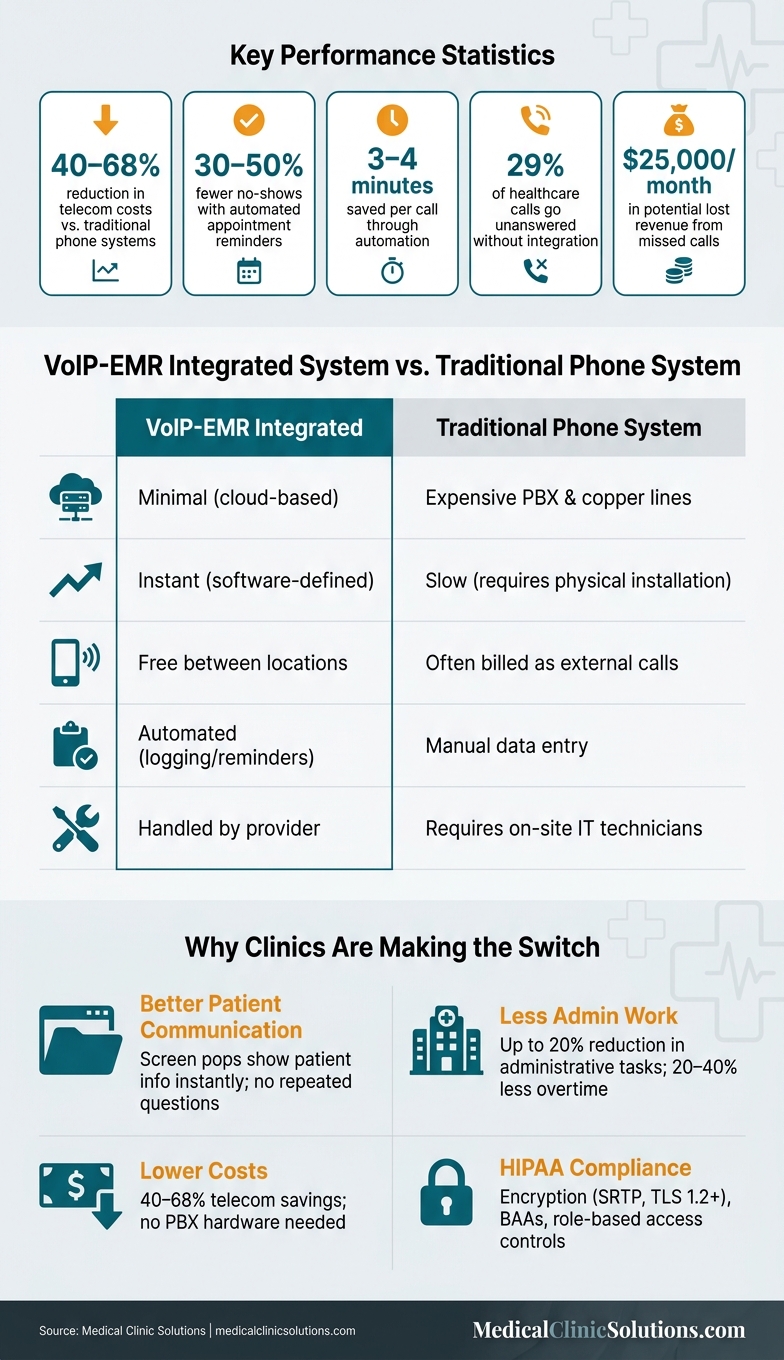
VoIP-EMR Integration vs. Traditional Phone Systems: Key Benefits & Stats
Best VoIP for Healthcare Practices? MSP Review of Weave’s EHR-Integrated Phone System
Benefits of VoIP-EMR Integration for Clinics
Integrating VoIP systems with EMR platforms brings significant advantages in communication, administrative processes, and cost efficiency.
Better Patient Communication
With VoIP-EMR integration, patient charts are displayed instantly during calls, making interactions smoother and reducing the need for repeated information sharing. The system also automates appointment reminders, cutting no-show rates by 30% to 50%. Additionally, every call, voicemail, and text message is automatically logged, ensuring accurate records without extra effort.
This seamless access to patient data allows clinics to deliver more personalized and efficient care, improving the overall patient experience.
Less Administrative Work for Staff
Staff can make calls directly from a patient’s chart, with the system automatically documenting the interaction. This eliminates the need for manual data entry and ensures real-time updates. Integrated workflows can even trigger tasks like insurance eligibility checks during calls, further reducing administrative burdens.
"Healthcare organizations that successfully integrate their communication systems with their EHR and practice management software can see a reduction in administrative tasks by up to 20%." – Tuba Bashte, Featured Author
By automating repetitive tasks, clinics can decrease overtime spent on phone management by 20% to 40%. This frees up staff to concentrate on patient care, enhancing both efficiency and job satisfaction.
Lower Costs and Room to Grow
Switching to a VoIP-EMR integrated system can slash telecom costs by 40% to 68% compared to traditional phone setups. Since cloud-based VoIP eliminates the need for expensive PBX hardware and physical phone lines, clinics save on both initial investment and ongoing IT maintenance.
Scaling these systems is also simple. Whether adding a new provider, opening another location, or expanding the front desk team, adjustments can be made through an online portal – no additional hardware required. Internal calls between locations are free, further reducing costs as clinics grow.
These features make VoIP-EMR integration an ideal choice for clinics looking to optimize resources while maintaining high-quality patient care.
| Feature | VoIP-EMR Integrated System | Traditional Phone System |
|---|---|---|
| Hardware | Minimal (cloud-based) | Expensive PBX & copper lines |
| Scalability | Instant (software-defined) | Slow (requires physical installation) |
| Internal Calls | Free between locations | Often billed as external calls |
| Admin Tasks | Automated (logging/reminders) | Manual data entry |
| Maintenance | Handled by provider | Requires on-site IT technicians |
Key Features to Look for in a VoIP-EMR Integration
Choosing the right VoIP-EMR integration is critical for enhancing clinic workflows and delivering better patient experiences. While the benefits – like streamlined communication and reduced administrative workload – are clear, the system’s features determine how effectively it supports your clinic’s needs. The right tools should combine seamless communication with clinical precision, ensuring smoother operations and deeper integration.
Core Communication Features
A reliable VoIP system starts with strong communication capabilities. Features like intelligent call routing ensure patients are connected directly to the appropriate department, whether it’s billing, scheduling, or clinical teams. Another essential tool is voicemail-to-email transcription, which converts voicemails into text and delivers them to the right staff member, ensuring no patient message is overlooked.
A unified platform that integrates voice, video, SMS, and team messaging into one interface prevents staff from juggling multiple apps during patient interactions. Tools like presence indicators allow staff to check clinician availability before transferring calls, minimizing unnecessary delays and "bounced" transfers. Additionally, VoIP systems can reduce dropped calls by over 70%, which is a significant boost to patient trust and satisfaction.
EMR Integration-Specific Features
Not all VoIP systems are built for healthcare, which is why EMR-specific features are crucial. One standout feature is the screen pop – when a patient calls, their information (e.g., name, date of birth, and upcoming appointments) automatically appears on the staff member’s screen, eliminating the need for repetitive questions.
"Integration makes that automatic. When a patient calls, your staff shouldn’t have to ask ‘what’s your name and date of birth?’ before they can help." – Callifi
Integrated click-to-call simplifies workflows by letting staff initiate calls directly from patient charts, ensuring that records stay up-to-date without extra steps. Another key feature is automatic call logging, which syncs every call – whether incoming, outgoing, or missed – into the patient’s communication history within the EMR. This eliminates manual data entry and ensures all interactions are documented. For clinics focused on reducing claim denials, real-time insurance eligibility verification during calls is a game-changer, allowing staff to address potential issues on the spot.
These features not only enhance communication but also ensure that patient records and workflows are seamlessly connected.
Analytics and Reporting Tools
Analytics transform a VoIP system into a powerful tool for operational insights. Real-time dashboards provide visibility into metrics like queue lengths, wait times, and staff availability. Historical data helps clinics identify trends, such as peak hours when missed calls are more frequent.
Missed calls can have a significant financial impact, potentially costing a clinic up to $25,000 in lost revenue each month. Tracking metrics like missed call rate, queue abandonment, and average handle time allows clinic managers to address inefficiencies before they escalate. Advanced systems also record call details, including intent and outcomes, and sync this structured data directly into the EMR for a comprehensive view of patient interactions.
| Metric | What It Reveals |
|---|---|
| Missed Call Rate | Gaps in patient access and potential revenue loss |
| Queue Abandonment | Understaffing during busy periods |
| Average Handle Time | Staff productivity and areas for improvement |
| No-Show Rate | Effectiveness of appointment reminders |
| Referral Conversion | Missed opportunities from incomplete follow-ups |
Security and HIPAA Compliance in VoIP-EMR Integration
When clinics combine VoIP systems with EMR/EHR platforms, keeping patient data secure is critical. With over 275 million individuals impacted by healthcare data breaches in 2024, safeguarding sensitive information is both a legal and financial necessity. The healthcare sector has faced the steepest breach costs for 14 years straight, with the average incident costing $7.42 million. Protecting patient information isn’t just about following regulations – it’s about avoiding significant financial losses.
Data Encryption and Secure Transmission
Encryption is the backbone of a secure VoIP-EMR system. To protect voice calls during transmission, use SRTP, and secure signaling with TLS 1.2 or higher. For data stored at rest – like voicemails, call recordings, or AI-generated transcripts – AES-256 encryption is a must. Without these protections, patient conversations and records could be at risk.
But encryption alone isn’t enough. Access controls are equally important. Every staff member should have their own unique user ID – shared logins are a no-go. Multi-Factor Authentication (MFA) should be enabled on all devices, and role-based access controls (RBAC) should ensure only authorized personnel can access sensitive information. Systems also need to auto-logout after 15–30 minutes of inactivity to prevent unauthorized use on unattended devices.
AI transcription adds another layer of risk. Many VoIP platforms use third-party AI tools (like OpenAI or Anthropic) to summarize voicemails. If these third parties don’t have a Business Associate Agreement (BAA) in place with your VoIP provider, it could result in an unauthorized disclosure of electronic Protected Health Information (ePHI) – even if the data is encrypted.
While technical safeguards are essential, regulatory compliance ensures ePHI is fully protected.
HIPAA Compliance Requirements
Before handling any patient data, clinics must sign a Business Associate Agreement (BAA) with their VoIP provider.
"Using a VoIP provider without a BAA is a federal violation – penalties range from $145 to $2,190,294 per violation, with potential criminal prosecution." – Shawn Boehme, Director of Sales, PanTerra Networks
The BAA should cover every feature your clinic uses – voicemail transcription, SMS, call recording, and AI summaries. Some vendors exclude certain features from their standard agreements, so it’s crucial to confirm the scope before signing. Keep in mind that standard SMS services are never HIPAA-compliant. Any text containing PHI must go through an encrypted messaging system covered by a BAA.
The consequences of non-compliance are steep. For example, North Memorial Health Care paid $1.55 million after allowing a business associate access to ePHI without a BAA. Gulf Coast Pain Consultants faced a $1.19 million penalty in 2024 due to shared login credentials and former employees retaining access to systems.
HIPAA also mandates the use of tamper-proof audit logs to track all system activity, including logins, PHI access, and administrative changes. These logs must be retained for at least six years. Ignoring this requirement can be costly – Warby Parker was fined $1.5 million in 2024 for failing to implement procedures to regularly review system activity. Additionally, every time a new system, like VoIP-EMR integration, is introduced, your clinic must update its internal risk assessment. Regulators actively check for this during audits, making continuous monitoring a key part of staying compliant.
How to Implement VoIP-EMR Integration
Successfully integrating VoIP with an EMR system requires careful preparation. It’s not just about picking the right vendor – your groundwork before launch is just as important. Between 80% and 85% of AI-integration projects fail due to issues like poor data handling or flawed integration processes. By following these steps, you can ensure your implementation supports the communication, administrative, and cost improvements discussed earlier.
Assessing Your Current Systems and Needs
The first step is to fully understand your existing systems and workflows. Map out the entire patient call flow for various scenarios – such as new patient inquiries, refill requests, billing questions, and urgent calls. This helps pinpoint weak spots in your current process where data might be lost or mishandled.
Two critical technical questions should guide your assessment: Does your EMR support bi-directional API access? And are scheduling rules accessible through that API? Systems with only read-only access can’t support live scheduling or real-time note updates. If scheduling rules aren’t available, double-booking issues might arise, creating headaches after launch.
"If the vendor can’t explain exactly which fields they read, which fields they write, and how they handle failures, you’re not looking at an implementation plan. You’re looking at a demo." – Sarah Mitchell, Simbie AI
Here’s a quick summary of the key areas to evaluate before moving forward:
| Assessment Category | Essential Questions |
|---|---|
| EMR Capability | Does the system allow bi-directional API access? Are scheduling rules exposed? |
| Workflow | Who answers first? Where does data land? Who handles exceptions? |
| Infrastructure | Is your internet connection stable? Is there a backup plan for power or data? |
| Compliance | Will the vendor sign a BAA for all plan tiers? Is data encrypted both at rest and in transit? |
Once you’ve completed this evaluation, you can move on to planning and configuring the integration.
Planning and Configuring the Integration
A structured rollout plan can make all the difference. Try a 30-day timeline:
- Days 1–7: Map workflows.
- Days 8–14: Validate vendors and review BAAs.
- Days 15–21: Configure the system and conduct pilot testing.
- Days 22–30: Finalize the cutover and closely monitor the system.
It’s crucial to involve frontline staff – not just IT – during the planning phase. Clinics that include clinicians in the process often see adoption rates above 90%.
During configuration, pay special attention to every point where Protected Health Information (PHI) might appear. This includes voicemails, call recordings, transcripts, and SMS logs. Even if no clinical details are discussed, information like a patient’s phone number combined with the call time and department (e.g., "Oncology") could still expose PHI. For added security, disable voicemail-to-email forwarding unless it’s encrypted and covered by your BAA.
After configuration, ensure your staff is fully trained and the system is rigorously tested.
Staff Training and System Testing
Training should focus on integrating the new workflow, not just on using the software. Staff need to understand HIPAA-specific guidelines, such as what can be left in a voicemail, when to opt for secure messaging over SMS, and how to handle call recording consent based on state laws.
If your clinic uses AI transcription or automated summaries, make sure staff know these tools aren’t perfect. They should feel confident reviewing and correcting any errors. Testing should cover all possible scenarios, including:
- Emergency triage
- After-hours call routing
- Refill requests
- Failover situations with limited connectivity
"If your test script doesn’t include failure cases, you’re not testing the implementation. You’re rehearsing the demo." – Sarah Mitchell, Simbie AI
Once the system goes live, conduct weekly access reviews during the first month. This ensures role-based permissions are correctly configured and that no unauthorized users have access.
How to Choose a VoIP-EMR Integration Provider
Once your integrated system is up and running, selecting the right provider becomes a cornerstone for maintaining both performance and security. The provider you choose isn’t just a vendor – they become the backbone of your operation. A poor choice can lead to more than just higher costs; it could mean dropped calls during critical hours, HIPAA compliance risks, and even losing patients.
"The cost of a wrong VoIP decision is no longer just a higher invoice – it’s missed appointments, HIPAA exposure, and patient churn." – Shawn Boehme, Director of Sales, PanTerra Networks
What to Look for in a Provider
When evaluating providers, focus on these key areas:
- Uptime and support quality: Providers should offer a service level agreement (SLA) with 99.999% uptime, which translates to less than six minutes of downtime annually. Downtime can disrupt appointments and frustrate patients. For instance, PanTerra Networks promises a 30-second response time with US-based, 24/7 live agents. In contrast, Weave has faced criticism for its support, with over 380 service incidents logged since 2021.
- HIPAA compliance: This is non-negotiable. Ensure the Business Associate Agreement (BAA) covers all features – not just premium tiers – and confirm there are no hidden fees for HIPAA compliance. Ask these critical questions: Will a BAA be signed? Does it cover all features or just certain tiers? Is there an extra cost for the BAA? Full HIPAA coverage is essential for any clinic.
- Phone number reputation management: Clinics making high volumes of outbound calls, such as appointment reminders, risk being flagged as "Spam Likely" by carriers. While STIR/SHAKEN caller ID verification helps validate numbers, active reputation management is needed to prevent calls from being flagged. Without this, even the best scheduling system won’t reduce your no-show rate.
- Language support: For clinics serving diverse patient populations, bilingual or multilingual capabilities are critical. Some systems can switch languages in real-time – like English, Spanish, or French – without dropping the call. This feature is invaluable for clinics with non-English-speaking patients.
Finally, ensure the provider integrates seamlessly with your EMR/EHR system to maintain efficient workflows.
Checking Compatibility with Your EMR/EHR System
Not all integrations are equally effective. A native integration connects the VoIP system directly to your EMR via an API, enabling features like screen pops and click-to-dial. On the other hand, a staging workflow writes data to an intermediary layer for staff review before it enters the clinical record. While both can meet HIPAA standards, native integrations generally offer faster and more efficient workflows.
To ensure compatibility, confirm how the provider connects to your EMR. Here’s a comparison of how major VoIP providers integrate with popular EHR platforms:
| EHR / PMS | DialPhone | RingCentral | 8×8 | Nextiva |
|---|---|---|---|---|
| Epic | Scheduling API (Staging) | Native (Enterprise) | Limited | No |
| Athenahealth | Open API (Scheduling) | Certified Partner | Limited | No |
| Kareo / Tebra | Direct Scheduling API | Via Zapier | No | Via Zapier |
| eClinicalWorks | Scheduling API | Via Zapier | No | No |
| Dentrix | Via Zapier Webhook | Via Zapier | No | No |
(Source:)
Middleware tools like Zapier can fill gaps but often introduce added complexity and compliance risks, especially if protected health information (PHI) passes through a third-party layer not covered by your BAA. Whenever possible, opt for a direct API connection – it’s simpler and more secure. If your EMR supports FHIR R4 standards, prioritize providers already compatible with this framework, as it’s quickly becoming the universal standard for EHR integrations.
Conclusion: Getting the Most Out of VoIP-EMR Integration
To achieve the full potential of integrating VoIP with EMR systems, careful planning, smart provider selection, and consistent post-launch evaluations are essential. Neglecting steps like workflow mapping, vendor vetting, or regular audits can lead to compliance issues and frustration among staff.
Consider this: nearly 29% of healthcare calls go unanswered, and 75% of patients hang up rather than wait on hold. A well-executed VoIP-EMR integration can reduce communication costs by 40–60% and cut administrative workloads by up to 20%. These improvements directly impact revenue, patient satisfaction, and staff morale.
It’s also important to remember that metadata is PHI (Protected Health Information). Even basic details like a patient’s phone number, the time of their call, and the department they reached – such as Oncology – can qualify as protected information, even if no clinical details are shared. This makes strict adherence to HIPAA and BAA standards non-negotiable for call logs and analytics dashboards. Beyond compliance, this approach enhances overall clinic operations.
"A phone system isn’t ‘HIPAA-compliant’ because it’s marketed that way. In practice, it means your phone workflows… are implemented in a way that supports HIPAA requirements." – Derrick McDowell, Content Editor, Front Desk
Long-term success hinges on ongoing governance. This includes regular audits of access permissions, BAAs, vendor reliability, and the security of call metadata. Providers that support continuous updates and routine audits are better suited for sustained performance. As Dr. Elena Mercer, Senior Medical Content Editor at SmartDoctor.pro, aptly put it: "The best vendor is not the one with the most AI buzzwords; it is the one that fits the way your team actually works." Make thoughtful choices, conduct thorough testing, and revisit your setup every quarter to keep things running smoothly.
How Medical Clinic Solutions Can Help
Let’s take a closer look at how Medical Clinic Solutions simplifies the process of integrating VoIP with EMR systems and supports your clinic’s overall efficiency.
Choosing the right VoIP and EMR providers can feel overwhelming. Medical Clinic Solutions cuts through the noise by connecting clinics with thoroughly vetted providers. They evaluate your clinic’s specific needs to compare options, helping you find systems that minimize administrative tasks and reduce costs. Plus, they offer educational resources to guide your decisions, covering key factors like 99.999% uptime guarantees, Quality of Service (QoS) protocols, and HIPAA compliance requirements – ensuring you’re well-prepared when negotiating contracts.
But their support doesn’t stop at vendor selection. Medical Clinic Solutions addresses a wide range of clinic operations, from EMR/EHR systems and phone systems to medical billing, transcription, and HR services. They even provide a tool to quickly estimate the cost of an EHR system for your clinic, giving you a clear sense of what to expect financially.
"Protecting your patient’s sensitive information is a top priority. Ensure that any EHR system you choose complies with HIPAA regulations and has robust data security measures." – Medical Clinic Solutions
If you’re ready to take the next step in streamlining your VoIP-EMR integration, visit medicalclinicsolutions.com. You’ll find tools to evaluate your clinic’s needs and get personalized quotes, setting you on the path to improved efficiency and patient care.
FAQs
Will my EMR support true bi-directional VoIP integration?
Modern EMR/EHR platforms are equipped to handle true bi-directional VoIP integration, allowing for smooth communication between phone systems and electronic records. This means phone systems can trigger actions like screen pops or call logging based on EMR data, while EMRs can also receive updates directly from communication tools.
These integrations rely on widely-used healthcare protocols such as HL7, FHIR, or REST APIs to ensure compatibility and reliability. For clinics seeking tailored solutions, Medical Clinic Solutions offers software and services designed to meet specific operational needs.
What should a VoIP BAA include to ensure HIPAA compliance?
A VoIP Business Associate Agreement (BAA) serves as a critical document for ensuring compliance with HIPAA standards. It should clearly define the permitted uses and disclosures of Protected Health Information (PHI). Additionally, it must require safeguards such as encryption, access controls, and audit logs to secure patient data.
The agreement should also include breach notification procedures, ensuring that any incidents are reported within 60 days. To maintain accountability throughout the chain, subcontractors must also sign BAAs. These steps collectively help safeguard sensitive health information and uphold HIPAA requirements.
How long does a VoIP-EMR integration rollout usually take?
Most medical practices can wrap up a VoIP-EMR integration within 2 to 4 weeks. That said, if your workflows are more intricate or your technical requirements are more demanding, the process might take a few months. On top of that, phone number porting typically adds another 7 to 14 business days to the timeline. With careful planning and guidance from experienced professionals, you can make the process smoother and more efficient.