
7 Solutions for Managing High Patient Volume Efficiently
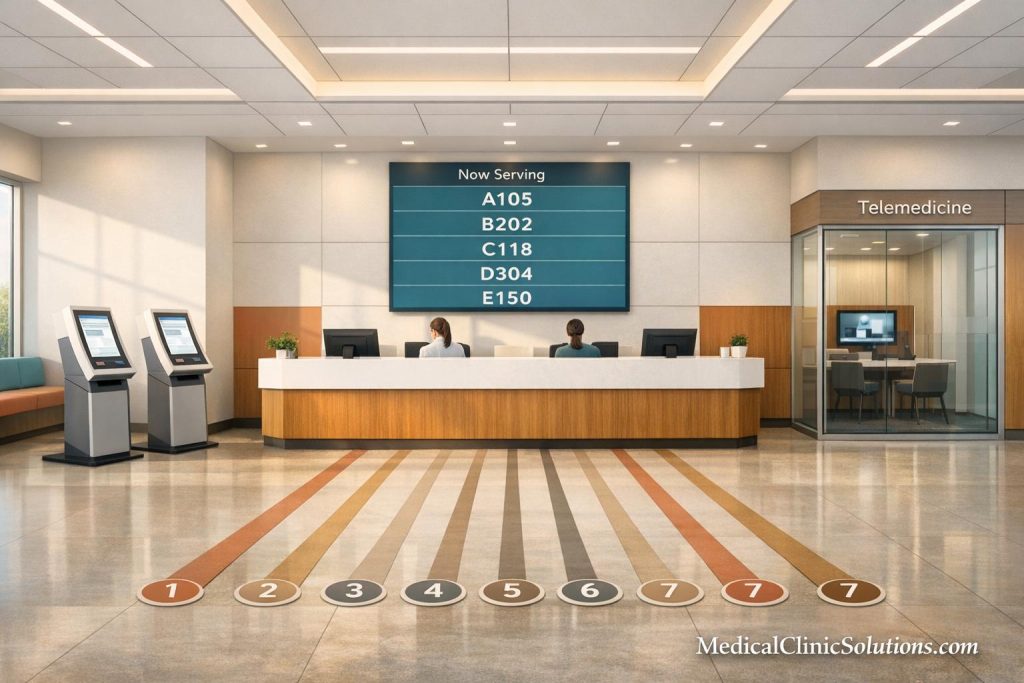
When patient volumes surge, clinics face longer wait times, overwhelmed staff, and reduced satisfaction. Here’s how to fix it:
- Queue Management Systems: Use real-time dashboards and digital check-ins to cut wait times by 5–10 minutes and reduce staffing needs by up to 30%.
- Self-Service Kiosks: Speed up check-ins to under 90 seconds, saving 8–10 minutes per patient and reducing errors.
- AI Scheduling: Automate appointment allocation, reduce no-shows by 30–50%, and increase patient throughput by 20%.
- Multi-Channel Communication: Send automated reminders via text, email, or calls to lower no-show rates and save staff time.
- Telemedicine: Shift non-urgent cases online to free up in-person slots and reduce unnecessary visits.
- Triage Systems: Prioritize urgent cases with structured protocols and fast-track lanes for low-acuity patients.
- Analytics & Feedback: Use real-time data to identify bottlenecks and collect patient feedback to address issues quickly.
Key takeaway: These strategies improve patient flow, reduce delays, and enhance satisfaction while supporting staff efficiency. Aim for door-to-room times under 20 minutes and total wait times of 30 minutes or less.
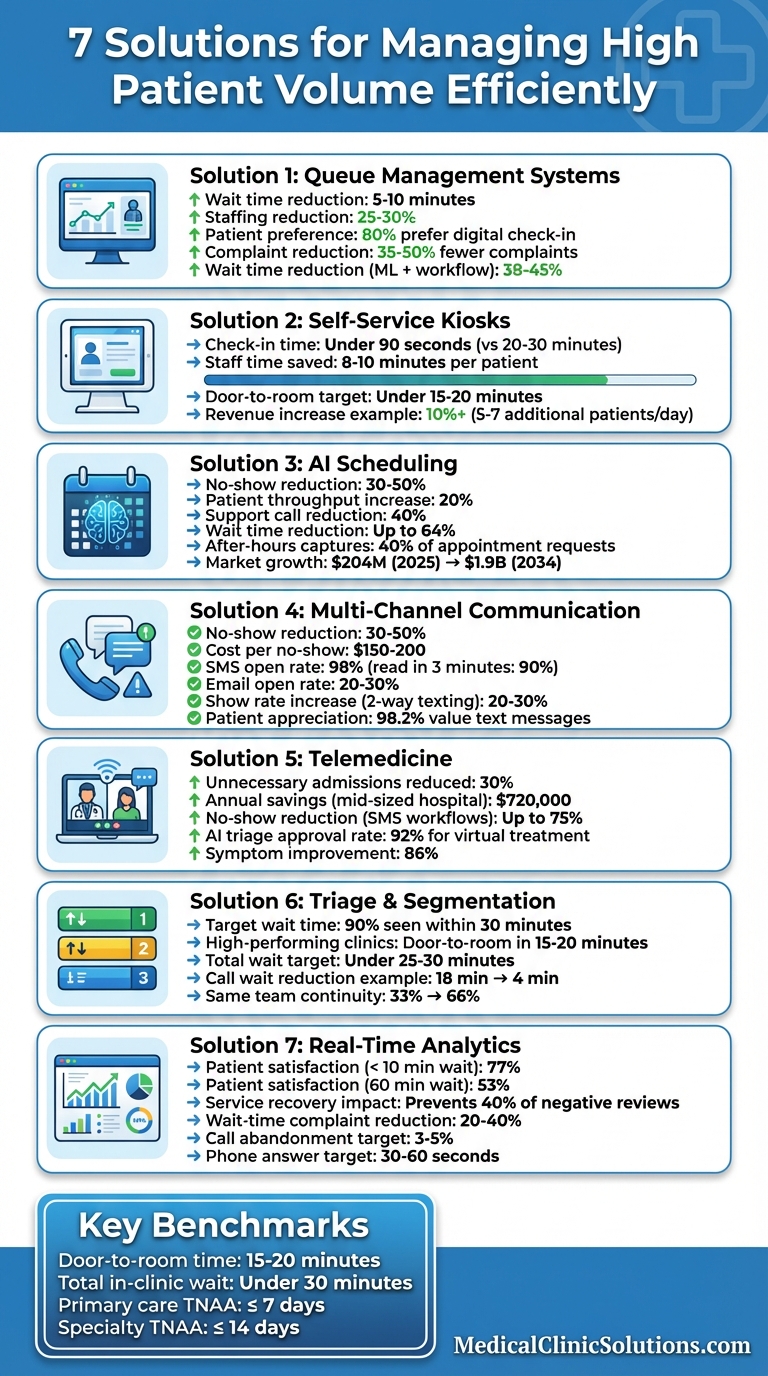
7 Solutions for Managing High Patient Volume: Key Statistics and Benefits
Optimizing enterprise patient flow
1. Use Queue Management and Patient Flow Systems
Queue management systems help turn chaotic waiting areas into well-organized spaces by tracking patient arrivals and monitoring their progress through each stage of care. These tools rely on real-time data to identify where delays occur, whether it’s during check-in, triage, or provider handoffs.
Digital check-in options are increasingly popular – 80% of patients prefer them, and 68% choose providers offering virtual waiting options. Using SMS or QR codes for remote registration can cut wait times by 5–10 minutes while reducing reception staffing needs by 25–30%.
Track Data in Real-Time for Better Operations
Real-time dashboards provide a comprehensive view of the patient journey, from check-in to discharge. These dashboards uncover trends you might otherwise miss, like recurring delays in exam room turnover or staff running behind schedule after lunch. As Cristy Liaw shared:
"Qminder has been our saving grace when organizing queues, monitoring location and staff performance, and adjusting operations accordingly".
This kind of data allows for targeted improvements to patient flow. For instance, if triage consistently backs up at 9:00 AM, staggering patient arrivals by just five minutes can ease congestion. Hybrid systems that combine machine learning with workflow adjustments can reduce wait times by 38–45%, compared to 20–30% with machine learning alone. Additionally, digital signage enhances communication, keeping patients informed throughout their visit.
Add Digital Signage for Patient Updates
Digital signage is a simple yet effective way to keep patients updated. It can display estimated wait times, check-in instructions, or even educational content. Transparency is key – patient satisfaction drops from 77% to 53% when waiting times exceed 60 minutes. Even when delays are unavoidable, providing updates helps manage expectations and reduces the frustration of waiting.
To ensure privacy, these displays use ticket numbers instead of patient names, staying HIPAA-compliant. Automated SMS alerts can further improve the experience, notifying patients when their provider is ready. Clinics that incorporate these modern tools into their waiting areas often see 35–50% fewer patient complaints. Basic virtual check-in platforms typically offer free tiers, while more advanced systems with SMS notifications and analytics cost between $99 and $249 per month.
2. Add Self-Service Check-In Kiosks
Self-service kiosks are a game-changer for patient registration, cutting the process from 20–30 minutes to just under 90 seconds. These kiosks allow patients to update their information and complete registration independently, eliminating the need to wait in line. By streamlining the process, each location can save over 30 minutes daily, while also reducing clerical errors thanks to seamless integration with Electronic Medical Records (EMR).
The real magic happens when kiosks integrate smoothly with your EMR and patient accounting systems. Real-time data synchronization eliminates the need for manual data entry, cutting down on mistakes. Next Level Urgent Care in Houston, Texas, experienced this firsthand after adopting the CheckIns platform in 2024/2025. Their CEO, Juliet Breeze, MD, shared:
"CheckIns allowed us to increase our patient volumes seen in all clinics by metering the patient flow. We estimate that we are seeing between 5-7 additional patients per day which has resulted in increased revenue by more than 10%".
Speed Up Patient Registration
Modern self-service kiosks handle the entire check-in process, from scanning insurance cards to collecting co-payments. This automation eliminates the 8 to 10 minutes of staff time usually spent on each patient registration. With this time freed up, staff can focus on more complex cases. To ensure a smooth rollout, consider placing a dedicated greeter near the kiosks to assist patients during the initial transition.

Reduce Congestion During Peak Hours
Kiosks also help manage peak-hour congestion by enabling virtual check-ins and wait-in-car options. Their dashboards provide valuable analytics, identifying peak times and helping clinics adjust staffing levels accordingly. High-performing clinics aim for a "door-to-room" time of under 15–20 minutes, and kiosks make this goal achievable, even during busy periods. By improving patient flow, these tools ensure a smoother experience throughout the clinic.
3. Improve Appointment Scheduling with AI and Automation
AI-powered scheduling tools are taking patient flow management to the next level, cutting down on wait times and reducing missed appointments. By analyzing 12–24 months of historical data, these systems predict patient demand and allocate appointment slots automatically. This allows practices to reserve slots for urgent cases and make real-time adjustments based on daily volume predictions. One of the most pressing issues in healthcare – no-show rates that range from 18% to 25% nationwide – is also addressed by this technology. These missed appointments cost the U.S. healthcare system about $150 billion each year.
The impact of AI scheduling is clear: clinics using these tools report a 20% increase in patient throughput and a 40% drop in scheduling-related support calls. Patient wait times have decreased by as much as 64%. The market for AI medical scheduling software is expected to grow significantly, from $204 million in 2025 to $1.9 billion by 2034, showcasing the growing reliance on these solutions for handling patient volumes efficiently.
Automate Appointment Slot Allocation
AI uses historical data to pinpoint appointment types that often run over their allotted time. For instance, new patient consultations or procedures requiring extra care might need built-in buffer slots to prevent cascading delays. It also enables smart overbooking by analyzing no-show trends. For example, if Tuesday afternoons typically experience higher no-show rates, AI can safely recommend double-booking certain slots to maximize efficiency without creating long wait times.
When cancellations happen, the system quickly identifies waitlisted patients and contacts them via text, often filling the slot in under 15 minutes. Additionally, AI captures about 40% of appointment requests that come in outside of regular business hours. This level of automation ensures smoother scheduling and better resource utilization.
Connect Scheduling with Practice Management Software
Integrating AI scheduling tools with your EHR or PMS allows the system to both read available slots in real time and automatically confirm bookings. As Mosharof Sabu explains:
"A platform that only reads availability and sends an email notification requiring staff to manually book creates more work than it eliminates."
To make the most of AI scheduling, it’s crucial to set up a detailed rule matrix for each provider, appointment type, and prerequisite (like insurance pre-authorization) before implementation. Chris Harrop, Senior Editor at MGMA, highlights the importance of this groundwork:
"AI can help scale up agreed-upon rules, or it scales up inconsistency."
Start by automating high-volume, routine appointments like annual checkups or follow-ups before expanding to more complex procedures. Multi-touch reminders – sent at 48 hours, 24 hours, and 2 hours before appointments – can also include a one-tap "RESCHEDULE" option to further reduce no-shows.
4. Improve Communication Through Multiple Channels
Modern queue and scheduling systems are only part of the solution to reducing no-shows. Effective communication platforms play a critical role in improving patient flow. Forgetfulness remains a major cause of missed appointments, contributing to 40% to 50% of all no-shows. Automated communication systems address this by sending reminders to scheduled patients. Practices that adopt these systems often see a 30% to 50% reduction in no-shows, with each prevented no-show saving about $150–$200. This approach not only reduces missed appointments but also enhances overall efficiency.
For example, Castle Hills Family Practice in San Antonio successfully lowered its no-show rate by 40% in 2026 after implementing an automated, multi-channel reminder system.
Send Automated Appointment Reminders
A structured reminder schedule can make a big difference. Following a "3-1-0" cadence works well: send the first reminder three days before the appointment to raise awareness, a second one a day before to confirm attendance, and a final reminder two to four hours before the visit with arrival instructions.
Text messages are particularly effective, with a 98% open rate and 90% of messages read within three minutes. In contrast, email reminders have a much lower open rate of 20% to 30%, and over 80% of phone calls from unknown numbers go straight to voicemail.
A primary care practice in Atlanta saw its no-show rate drop from 24% to 14% in just 60 days after implementing a two-way texting system. This change recovered about $78,000 in revenue during the first year and saved staff 10 hours per week that had been spent making phone calls. Keep messages concise – limit them to 160 characters – and include essential details like the patient’s name, provider, appointment date and time, and clear instructions. For patients who don’t confirm through the one-day SMS reminder, follow up with an automated voice call or manual outreach to help secure the schedule.
Allow Two-Way Texting for Patient Questions
Two-way texting takes communication a step further by allowing patients to respond directly. They can confirm, cancel, or reschedule with single-word replies (e.g., "C" for confirm), and these updates are reflected in the practice calendar in real time. This approach has been shown to increase show rates by 20% to 30% compared to one-way reminders. Additionally, 98.2% of patients appreciate receiving text messages from their healthcare providers, and 95.5% report that such updates help them feel more connected to their care team.
Hudson Headwaters Health Network, which operates 89 offices in New York, offers a great example of how technology can enhance communication. Using AI-driven tools, they automated 68.1% of patient calls during business hours, freeing staff to focus on high-risk patients and complex cases. The system also identified potential barriers to attendance, such as transportation issues or insurance problems, before they resulted in missed appointments. Furthermore, automated waitlist management notified patients of last-minute openings, filling 80% to 90% of these gaps without requiring staff intervention. These tools not only streamline communication but also improve patient engagement throughout the practice.
5. Use Telemedicine for Non-Urgent Consultations
Telemedicine takes patient care to the next level by handling low-acuity cases virtually, easing the strain on physical clinics while maintaining quality care.
By shifting non-urgent issues to virtual appointments, you can free up in-person slots for patients who genuinely need face-to-face evaluations. Conditions like urinary tract infections, pink eye, earaches, skin rashes, and upper respiratory infections are often well-suited for video consultations. Virtual care is also ideal for follow-ups, such as reviewing lab results, managing medication refills, or post-procedure check-ins.
In fact, AI-powered telemedicine triage has proven to cut unnecessary hospital admissions by 30%, saving mid-sized hospitals around $720,000 annually. It also helps avoid emergency room visits, which typically cost about $1,200 each.
Reduce Unnecessary In-Person Visits
Clear protocols can guide your team in determining which cases are suitable for virtual care versus those requiring in-person treatment. Asynchronous telehealth tools allow patients to fill out intake forms and questionnaires ahead of time, streamlining check-ins and reducing waiting room congestion. For simple needs like medication refills or routine updates, text-based platforms can handle these efficiently.
A real-world example comes from NHS Lothian in the UK, which launched an AI-driven physiotherapy app for over 1,000 staff members dealing with back pain. The system triaged 97% of cases, approved 92% for virtual treatment, and achieved an 86% improvement in symptoms. Remarkably, 57% of users preferred the AI experience over traditional care. This kind of approach helps reduce the burden on physical clinics without compromising care quality.
Expand Access to Care for Remote Patients
Virtual care options available 24/7 can bridge gaps for patients juggling work, childcare, or other barriers, allowing them to avoid costly emergency visits. This also keeps daytime clinic slots open for urgent cases while still serving those who need more flexible options. Multi-user telemedicine platforms enable nurses, interpreters, or family members to join virtual consultations, replicating in-person care coordination without requiring extra physical space. Virtual waiting rooms even let patients wait from the comfort of their homes or cars.
For elderly or remote patients, SMS-based workflows eliminate the hassle of app downloads or password issues, making telemedicine more accessible. Practices using this setup have seen appointment no-show rates drop by as much as 75%.
6. Set Up Patient Triage and Segmentation
Improving scheduling and communication is a great start, but adding a structured triage system takes patient flow and prioritization to the next level.
Triage helps classify patients based on the urgency of their condition, ensuring critical cases receive immediate attention. When your waiting area is packed, this approach ensures life-threatening situations are addressed right away, while less urgent cases are directed to alternative care pathways, keeping the system from getting overwhelmed.
Standardized methods like the ABCs – Airway, Breathing, Circulation – provide your team with a clear framework for responding to emergencies. Training staff to recognize red flags – like severe bleeding, chest pain, or stroke symptoms – enables them to quickly separate urgent cases from minor ones. Triage algorithms or check-in questionnaires can further streamline this process, directing patients to the appropriate care pathway from the start and avoiding unnecessary bottlenecks. Digital triage platforms that combine historical data with real-time assessments can also enhance decision-making and reinforce a tech-driven workflow.
The Institute of Medicine suggests that 90% of patients should be seen within 30 minutes of their scheduled appointment. High-performing clinics aim for even shorter times – door-to-room in 15–20 minutes and total in-clinic wait times under 25–30 minutes.
Create Structured Triage Protocols
Between April and November 2023, Brookside Group Practice in the UK implemented a digital triage and segmentation system using the Anima platform alongside the Johns Hopkins Adjusted Clinical Groups System. They formed "Patient Health Teams" – comprising a partner GP, associate GP, physician associate, social prescriber, and patient services liaison – to manage "red" and "amber" rated patients. This approach led to impressive results: average call waiting times dropped from 18 minutes in January 2023 to just 4 minutes by December 2023, and the percentage of patients seeing the same health team rose from 33% to 66%.
Adopting structured triage protocols, such as a Red, Amber, Green (RAG) rating system, allows for dynamic prioritization of patients based on digital data, ensuring care pathways are adjusted in real time. Ongoing reassessment is essential – a patient’s condition can change, requiring a shift in priority. During peak hours, assigning extra staff to triage and registration desks can help prevent bottlenecks that might otherwise lead to delays throughout the day.
Once high-risk patients are addressed, introducing fast-track lanes can help speed up care for less urgent cases.

Create Fast-Track Lanes for Non-Urgent Cases
After managing high-acuity patients, it’s equally important to maintain smooth flow for non-urgent cases.
Fast-track lanes are an effective way to move low-acuity patients through the system without tying up resources needed for critical cases. When space is limited, prioritizing patients who can be treated and discharged quickly helps free up resources sooner. Adjusting the sequence of vitals, lab work, and provider visits based on triage categories can also help reduce delays.
For infectious disease concerns, setting up separate, ventilated waiting areas for suspected cases minimizes transmission risks while patients await evaluation. Virtual waiting rooms provide another option, allowing patients to check in remotely or wait in their vehicles, which helps reduce lobby congestion and improves the overall waiting experience. Even if the actual wait time doesn’t change, digital updates can help ease frustration by keeping patients informed.
7. Use Real-Time Analytics and Patient Feedback Systems
Once you’ve optimized triage and workflows, the next step is leveraging real-time analytics and patient feedback to keep improving operations.
Real-time analytics let you see what’s happening as it happens. You can monitor patient arrivals, cancellations, no-shows, and wait times instantly. This data highlights bottlenecks – like slow exam room turnovers, delays in labs, or providers running behind schedule. By using time-stamped data from your EHR and check-in systems, you can map the entire patient journey and pinpoint exactly where delays occur.
Predictive analytics also come into play, helping you anticipate high-demand periods so you can adjust staffing before the rush hits. Key metrics like "Third Next Available Appointment" (TNAA) are useful benchmarks. For example, primary care should aim for a TNAA of seven days or less, while specialties should target 14 days or less. Other metrics, like call abandonment rates (ideally between 3% and 5%) and phone answer times (30–60 seconds), can reveal pre-visit access issues that might cost you patients and revenue.
Monitor Patient Volume with Automated Dashboards
Automated dashboards take raw data and turn it into actionable insights, eliminating the need for manual reporting. These systems track key performance indicators (KPIs) in real time, alerting managers to problems as they happen – not weeks later.
Some key KPIs to watch include:
- Door-to-room time: Aim for 15–20 minutes.
- Provider wait after rooming: Keep this at 10–15 minutes.
- Total in-clinic wait time: Target under 25–30 minutes.
Benchmarks matter here. Patient satisfaction drops from 77% to 53% when wait times hit 60 minutes. Analytics can also help identify no-show patterns and trigger automated reminders for patients at higher risk of missing appointments. Additionally, tailoring appointment lengths to visit complexity – like longer slots for new patients and shorter ones for follow-ups – can maximize efficiency and maintain revenue flow.
While dashboards provide a solid data foundation, real-time patient feedback adds another layer of insight.
Collect Patient Feedback for Improvement
Real-time feedback systems let you address issues before patients leave, which is key for improving their experience. This practice, often called "service recovery", helps resolve concerns on the spot.
"Real-time feedback from Care Analytics takes you inside the care experience faster than ever before. Immediate insights enable you to improve processes, inspire staff to change behavior, and implement service recovery at the earliest possible stage."
- Care Analytics
Tools like SMS surveys, tablet-based questionnaires, button-tap kiosks, and QR codes make it easy for patients to share their thoughts while still at the facility. Negative feedback can trigger alerts for staff to take immediate action. Research shows that addressing issues in real time can prevent 40% of negative online reviews. Urgent care centers using these systems have seen a 20–40% drop in wait-time complaints. This is crucial, considering 84% of patients trust online reviews as much as personal recommendations when choosing a healthcare provider.
To close the loop, communicate the changes you’ve made based on patient feedback. Use newsletters or social media to show patients how their input has led to tangible improvements.
Conclusion
Handling high patient volumes effectively requires striking a balance between speed and quality, and the right tools make all the difference. The seven solutions discussed – queue management systems, self-service kiosks, AI-powered scheduling, multi-channel communication, telemedicine, structured triage, and real-time analytics – address different stages of the patient journey, from the first interaction to check-out. Each tool targets specific challenges that, if ignored, can cause delays to snowball throughout your practice. Together, they create a tech-enabled workflow that improves both patient care and operational efficiency.
Consider this: patients who wait less than 10 minutes report 77% satisfaction, but that number drops sharply to 53% after a 60-minute wait. Beyond satisfaction, inefficiency hits your bottom line hard – missed appointments cost an average of $200 per unused time slot. Additionally, about 60% of patients will hang up if left on hold for more than a minute. These aren’t just numbers; they represent real patients who may decide to look elsewhere for care.
Technology steps in where human limitations create bottlenecks, such as managing multiple tasks at the front desk. Integrated systems can track patient movement, medical status, and staff availability in real time, enabling what experts call "automated capacity management". Importantly, this isn’t about replacing your team – it’s about alleviating their administrative load so they can focus on delivering quality care. This shift lays the groundwork for meaningful improvements.
"Reducing delays is not simply about speed, it is about respect, access, and better care delivery." – MedLaunch
This insight captures the essence of patient-focused technology. Implementing these tools not only enhances efficiency but also fosters patient engagement and cost management. Track key metrics like door-to-room times (aim for 15–20 minutes) and keep call abandonment rates below 5%. Tackle one bottleneck at a time, and involve your front-desk and clinical staff in the process – they have firsthand knowledge of where time is being wasted and which solutions will work best.
FAQs
Which solution should we implement first?
Reducing patient wait times is a smart starting point to boost both satisfaction and operational efficiency.
- Pinpoint workflow bottlenecks: Look for issues like scheduling conflicts or slow check-in processes.
- Leverage digital tools: Implement online scheduling systems and automated reminders to streamline appointments.
- Enhance staff training: Equip your team to handle calls and manage patient flow more effectively.
Taking these steps creates a solid base for introducing further improvements down the line.
How do we integrate these tools with our EHR?
Integrating tools with your EHR means linking your practice management software to ensure smooth data sharing and efficient workflows. This can be done using APIs or built-in interfaces, which allow systems to communicate and automatically update details like appointments, billing, and clinical notes. To make this work, confirm that your EHR supports integration capabilities and provide staff with training to navigate the system effectively. When done right, integration can minimize errors, simplify processes, and enhance patient care by consolidating records into a single, unified platform.
How can we measure if patient flow is improving?
To evaluate progress in patient flow, focus on tracking key metrics such as shorter wait times, more efficient appointment scheduling, and higher patient throughput. Establish clear, measurable objectives – like minimizing delays and cutting down wait times – to provide a benchmark for success. Regularly review these metrics, and complement the data with patient feedback to gain qualitative insights into how changes in workflows, scheduling, and communication systems are performing.