
How to Implement Patient Self-Scheduling in Your Practice
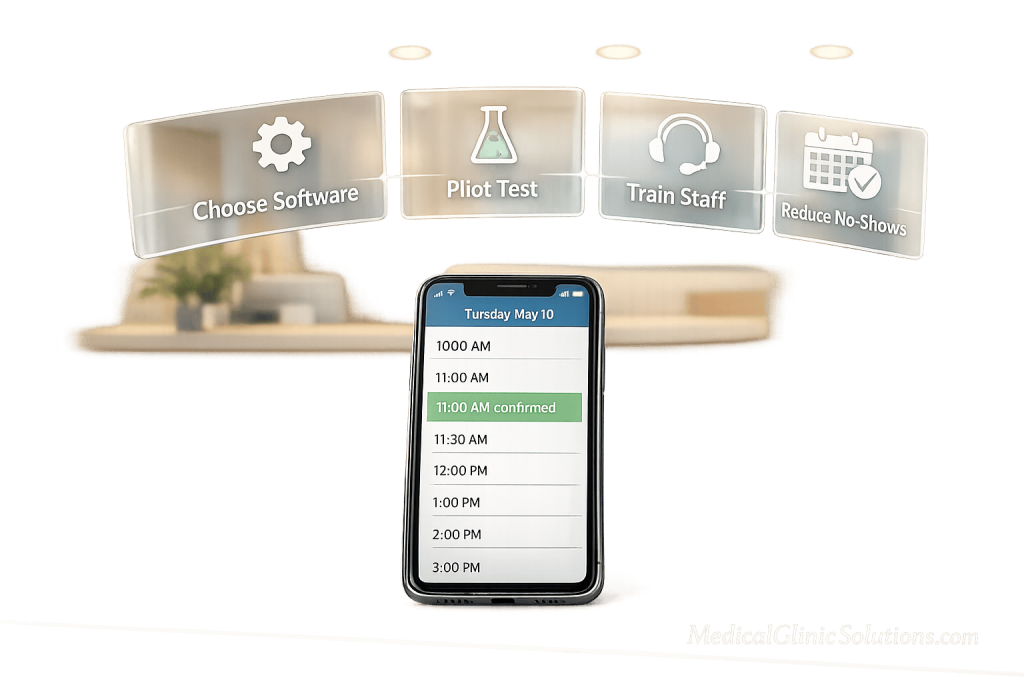
Tired of losing patients to long hold times? Here’s the solution: patient self-scheduling. This system lets patients book, reschedule, or cancel appointments online – anytime, anywhere. It reduces inbound calls by 60%, cuts no-show rates by up to 26%, and ensures 43% of bookings happen after hours when your phones are off. Yet, only 41% of practices use it as of 2025, leaving a huge opportunity for improvement.
Here’s a simple process to get started:
- Review your current workflows: Identify bottlenecks and inefficiencies.
- Choose the right software: Look for tools that integrate with your EHR, verify insurance in real time, and meet HIPAA standards.
- Set clear scheduling rules: Define appointment types, durations, and buffers.
- Run a pilot program: Test with a small group before full rollout.
- Train your staff and educate patients: Ensure everyone knows how to use the system effectively.
- Monitor and refine: Track key metrics like adoption rates and booking accuracy to make ongoing improvements.
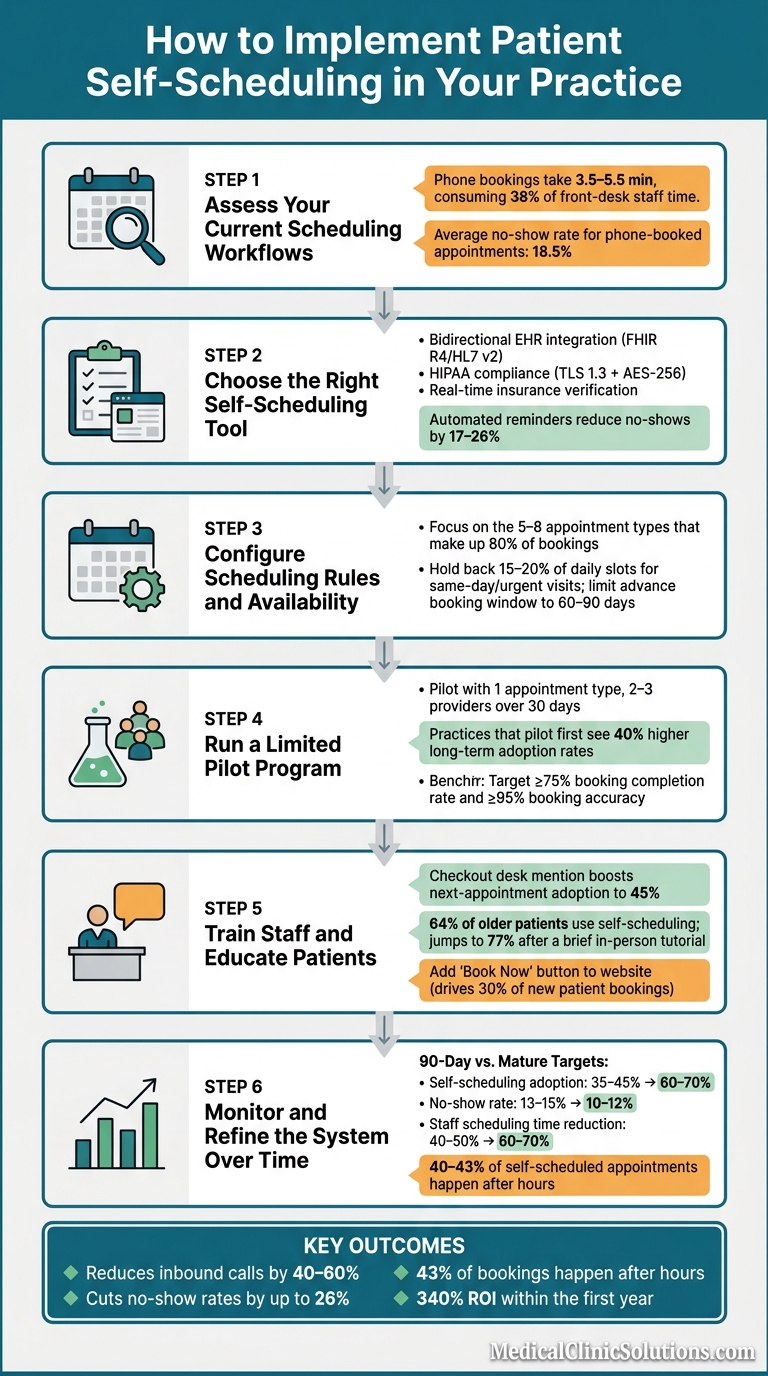
How to Implement Patient Self-Scheduling: 6-Step Guide
Self-Scheduling | AdvancedMD
Step 1: Assess Your Current Scheduling Workflows
Before diving into new scheduling software, take a close look at how your current appointment scheduling process works. Skipping this step is a major reason why self-scheduling implementations often fail. Practices end up automating inefficient workflows, which only perpetuates existing problems. This review sets the foundation for configuring your new system effectively.
Analyze Appointment Trends and Bottlenecks
Start by pulling data from your phone system – look at call volume, average call duration, and peak congestion times. These insights will help you identify where inefficiencies are slowing things down. For example, phone bookings typically take 3.5–5.5 minutes, which eats up about 38% of front-desk staff time. That’s a lot of hours tied up in manual scheduling.
Next, examine your no-show rates by appointment type. On average, phone-booked appointments have an 18.5% no-show rate, with some practices experiencing rates as high as 31%. Identifying which appointment types or providers have the highest no-show rates can help you decide where self-scheduling, combined with automated reminders, could make the biggest difference.
Once you’ve pinpointed these bottlenecks, move on to documenting the specific scheduling rules for each provider.
Map Out Provider Availability Rules
Use the data you’ve gathered to outline the rules that govern appointment bookings. This step is essential for tailoring your software to fit your practice’s needs. For many practices, this is where hidden scheduling complexities come to light. For instance, the average multi-specialty practice juggles 35 to 60 different appointment types, each with unique durations, provider restrictions, and sometimes specific room or equipment needs.
For each provider, list out constraints such as “new patients only on Tuesdays and Thursdays” or limits for same-day sick visits. Highlight appointments that require pre-authorization, special preparation, or clinical triage (like surgeries or certain procedures). These should be excluded from your initial self-scheduling rollout. Getting these details right before configuring your software can mean the difference between a smooth transition and a chaotic launch.
"The goal isn’t to take control away from providers, but to give them a smarter, more efficient way to manage their time." – RiverAxe LLC
Lastly, review your EHR scheduling templates. Mis-tagged slots – whether by provider, location, or visit type – are a leading cause of scheduling errors after self-scheduling tools go live. Double-check that everything is accurate to avoid unnecessary disruptions.
Step 2: Choose the Right Self-Scheduling Tool
Selecting self-scheduling software that aligns with your current workflows is essential. The right tool should complement your existing processes rather than force a complete overhaul. This decision will serve as the foundation of your integration strategy.
Key Features for Integration and Compliance
Focus on tools with bidirectional EHR integration that can both read available appointment slots and update bookings in real time. Opt for platforms that use FHIR R4 or HL7 v2 APIs, which can process appointment data in under 200 milliseconds. Faster synchronization minimizes scheduling conflicts and ensures a smoother experience.
Make sure the tool is HIPAA-compliant by checking for features like TLS 1.3 encryption for data in transit, AES-256 encryption for data at rest, and a signed Business Associate Agreement. Additional safeguards, such as role-based access controls and audit logging, are also critical for maintaining security and compliance.
Another must-have is real-time insurance eligibility verification. This feature automatically checks insurance details during booking, significantly reducing the likelihood of claim denials.
"Real self-scheduling is: a patient in 2026, on their phone, at 10 PM on a Tuesday, books a real appointment slot that is immediately reflected in the EHR schedule, with insurance pre-validated." – Sami Malik, Founder & CEO, Linear Health
Automation and Patient Communication Features
Once you’ve ensured integration and compliance, turn your attention to automation and communication tools that improve the patient experience. Look for systems that send automated reminders via SMS and email at intervals like 72, 24, and 2 hours before appointments. These reminders should allow patients to confirm, cancel, or reschedule with a single tap. Studies show that automated reminders can reduce no-show rates by 17–26%.
Consider tools with waitlist automation as well. When a patient cancels, smart waitlist features can automatically notify other patients about the newly available slot, eliminating the need for staff intervention. Automated waitlist systems fill 67% of canceled slots, compared to just 23% when managed manually.
Lastly, keep pricing in mind. Costs can vary significantly depending on the platform and the size of your practice. Balancing features with budget is key to achieving the efficiencies outlined in Step 1 and ensuring a smooth implementation.
For more guidance on integrating self-scheduling tools with your practice’s systems, visit Medical Clinic Solutions.
Step 3: Configure Scheduling Rules and Availability
Once you’ve analyzed your workflow, it’s time to set up your self-scheduling tool to match how your practice operates. The goal here is to establish clear rules that prevent booking conflicts and lighten the workload for your team.
Set Appointment Types and Durations
Using a standard 15-minute slot for every visit type might seem simple, but it can lead to scheduling bottlenecks. As SchedulingKit explains:
"One-size-fits-all 15-minute appointment slot for every visit type creates bottlenecks."
Instead, focus on the 5–8 appointment types that make up about 80% of your bookings. This keeps the scheduling interface straightforward and reduces the chances of patients selecting the wrong type. Use language that’s easy for patients to understand. For example, replace clinical terms like "IE Lumbar" with something clearer, like "Initial Evaluation".
Here’s a guide to recommended durations, buffer times, and self-scheduling eligibility for common appointment types:
| Appointment Type | Recommended Duration | Buffer Time | Self-Schedulable? |
|---|---|---|---|
| New Patient Visit | 30–45 minutes | 10–15 min | Yes |
| Established Follow-up | 15–20 minutes | 5 min | Yes |
| Annual Wellness/Physical | 30–60 minutes | 10–15 min | Yes |
| Urgent/Same-Day Visit | 15 minutes | 0–5 min | Yes (limited) |
| Telehealth Follow-up | 10–20 minutes | 0–5 min | Yes |
| Complex Procedure | 30–90 minutes | 30 min | No (staff only) |
For multi-step visits, like lab work followed by a consultation, link the slots so the lab always comes first. Make sure to include 5–10 minute buffers for tasks like room turnover and set aside 30–60 minutes daily for charting or other administrative work.
Once your appointment types are defined, you can fine-tune patient flow by adjusting booking windows.
Set Time Blocks and Booking Limits
With appointment types in place, the next step is to manage availability through time blocks and booking restrictions.
Hold back 15–20% of daily slots for same-day or urgent visits. In primary care, this number can go as high as 30–40%. This ensures patients with urgent needs can still find an opening, reducing the likelihood of calls to the front desk. Limit the advance booking window to 60–90 days, as no-show rates tend to rise when appointments are scheduled more than 120 days out.
It’s also smart to set a minimum lead time – for example, block self-scheduling within 2 hours of a slot. This prevents staff from being blindsided by last-minute arrivals. For complex or urgent visit types, consider a "Request and Approval" mode. This allows patients to submit a booking request that staff can review and approve, giving your team more control while still cutting down on phone calls.
"The template you choose is one of the strongest levers you have for cash flow, provider productivity, and patient satisfaction." – Revenue Cycle Blog
Lastly, show patients only 3–5 days of available slots at a time. Displaying too many options can overwhelm patients and actually slow down the booking process. By keeping things simple and focused, you make it easier for patients to schedule the right appointment at the right time.
Step 4: Run a Limited Pilot Program
With scheduling rules set up in Step 3, the next move is to test the system with a small-scale pilot program. Jumping straight into a full launch can lead to unnecessary headaches, but a controlled pilot allows you to address any issues while they’re still manageable.
Define the Scope of Your Pilot
Keep the pilot small and focused. A good starting point is one appointment type with 2–3 providers over a 30-day period. Choose visit types that are straightforward and high-volume, like annual wellness exams or routine follow-ups. Steer clear of appointments that involve pre-authorization, complex triage, or intricate insurance verification for now.
Set clear goals to measure success. For example, aim for a booking completion rate of at least 75% and a booking accuracy rate of 95% or higher, ensuring patients are matched to the correct provider, appointment type, and time slot. Also, monitor EHR synchronization – every booking through the portal should show up in your EHR calendar instantly and without errors. These benchmarks will help you determine if the system is ready for wider use.
"Practices that pilot self-scheduling with a controlled group for 30 days before full launch see 40% higher long-term adoption rates than practices that launch to all patients at once." – HealthIT.gov
Once you’ve set these benchmarks, focus on gathering feedback and refining the process.
Collect Feedback and Adjust Settings
During the pilot, set up two feedback channels: one for patients and one for staff. For patients, send out a quick satisfaction survey immediately after booking – this ensures feedback is fresh and relevant. For staff, hold brief daily check-ins with the front-desk team to understand how the new system fits into their workflow.
Check your EHR calendar daily to catch any mismatches or double bookings before they impact patients. Data shows that 27% of self-scheduling drop-offs occur during appointment type selection, and 19% are caused by slow loading times. These issues are fixable once identified. If mis-bookings are frequent, consider replacing clinical jargon with plain-language descriptions – this simple change can reduce booking errors by up to 62%.
"The pilot period surfaces workflow issues, integration bugs, and patient confusion points that are much easier to fix at small scale." – MGMA’s 2025 Technology Implementation Guide
Use the insights from your pilot to fine-tune scheduling rules, appointment labels, and staff workflows. The goal is to smooth out the process so patients can easily access care when the system is fully rolled out.
Step 5: Train Staff and Educate Patients
Once the system is fine-tuned, the next step is to focus on training your staff and educating patients. This ensures smooth adoption and helps everyone make the most of the system’s capabilities. Use the insights gained from the pilot phase to guide your efforts.
Staff Training and Role-Specific Guidance
Training should be tailored to the specific responsibilities of each team member. For example:
- Front-desk staff need to master the administrative backend, learn how to troubleshoot common booking issues, and handle situations like double bookings or incorrect appointment types.
- Providers should focus on managing their digital availability effectively.
- Administrative staff require a strong grasp of system navigation and basic troubleshooting techniques.
One of the best ways to train your team is by using real-life scenarios. For instance, front-desk staff can practice resolving booking errors or managing scheduling conflicts. This hands-on approach ensures they’re prepared for everyday challenges.
Another effective tactic is providing receptionists with a standard script to promote online booking. Encourage them to mention the self-scheduling option at checkout for follow-up visits. This simple step can significantly increase adoption rates. In fact, a checkout desk mention has been shown to boost next-appointment adoption rates to 45%.
"The single most effective promotion tactic is the check-out desk mention – when staff personally introduce self-scheduling to patients at the end of their visit, adoption rates for that patient’s next appointment reach 45%." – US Tech Automations
Once your staff is confident in using the system, the next priority is ensuring patients feel equally comfortable with it.
Patient Communication and Onboarding
Educating patients about the new system is key to encouraging them to use it. Make sure they’re aware of how to access and navigate the platform by leveraging multiple communication channels:
- Add a "Book Now" button prominently on your website (this alone accounts for 30% of new patient bookings).
- Include scheduling links in appointment reminder texts, which can drive 22% adoption among existing patients.
- Update your phone hold message to say something like, "Skip the hold – book your next visit online." This small change can prompt 15–20% of callers to switch to online scheduling.
Older patients, in particular, are more likely to embrace the system when given a little extra guidance. For example, 64% of older patients use self-scheduling, and that number jumps to 77% after a brief in-person tutorial. A quick demo at the checkout counter, showing them how to access the portal on their phone, can make a big difference. Virginia Women’s Center saw 25% of all appointments self-scheduled within six months, largely because staff consistently introduced patients to the tool during visits.
"Being told to call the office feels like being told to fax something." – Linear Health Editorial Team
To complement in-person introductions, provide patients with simple, easy-to-digest resources. These could include:
- A one-page FAQ
- A short video tutorial
- Clear and straightforward appointment labels
These small but thoughtful touches help reduce barriers and build patients’ confidence in the system, making it more likely they’ll use it again in the future.
Step 6: Monitor and Refine the System Over Time
With your staff trained and patients onboarded, it’s time to shift gears. Focus on closely monitoring how the system is performing and use the data to fine-tune it for better results.
Track Utilization and Efficiency Metrics
Pay attention to three key metrics: adoption, efficiency, and patient experience.
- Adoption: Measure the percentage of online bookings.
- Efficiency: Track reductions in inbound calls and staff scheduling time, along with how often calls are redirected due to unclear scheduling rules.
- Patient Experience: Look at the booking completion rate. If this rate dips below 80%, it could signal issues in the process.
Did you know that 40% to 43% of self-scheduled appointments typically happen outside regular business hours? A well-implemented system can cut scheduling calls by 40% to 60%.
Here’s a quick look at realistic benchmarks for early (90-day) performance and mature systems:
| Metric | 90-Day Benchmark | Mature Target |
|---|---|---|
| Self-scheduling adoption rate | 35–45% of total bookings | 60–70% of total bookings |
| Booking completion rate | 70–75% | 80–85% |
| No-show rate (self-scheduled) | 13–15% | 10–12% |
| After-hours booking share | 35–43% | 40–50% |
| Staff scheduling time reduction | 40–50% | 60–70% |
(Source: US Tech Automations)
These benchmarks give you a solid starting point to evaluate and refine your system.
Make Continuous Improvements Based on Data
Set a 90-day review as your first milestone to evaluate the system. Use the data to identify weak points, such as gaps in provider availability or where patients abandon the booking process. The top three reasons for abandonment are:
- Unavailable time slots: Accounts for 38% of drop-offs.
- Confusion over appointment types: Responsible for 27%.
- Technical issues: Contribute to 19%.
Address these challenges by adding more time slots, simplifying appointment options to 5–7 clear choices, and resolving technical glitches.
Here’s an example: In 2025, a 12-provider practice in suburban Chicago handled 287 scheduling calls daily before adopting self-scheduling. Within 90 days, they saw a 60% drop in inbound calls and a 23% increase in appointment volume, as patients filled previously missed opportunities.
"Patients who actively choose their appointment time demonstrate higher commitment than patients assigned a time by phone." – MGMA
Don’t forget to review how your waitlist is performing. Ideally, 67% of cancellations should be filled automatically without requiring extra work from your staff. This ensures that open slots are used efficiently while keeping your team’s workload manageable.
Conclusion: Key Takeaways for a Successful Rollout
Launching patient self-scheduling successfully isn’t about rushing into it – it’s about laying down the right groundwork, starting small, and fine-tuning along the way. Practices that achieve the best outcomes follow a thoughtful, step-by-step process. They audit workflows, choose tools that meet compliance standards, and focus on piloting and training before scaling up. This methodical approach ensures smooth implementation and lasting results.
The numbers speak for themselves: integrating self-scheduling with EHR systems can yield an impressive 340% ROI within the first year. Plus, piloting with a smaller group before rolling it out to everyone can lead to 40% higher adoption rates over time. These stats highlight the value of a phased, data-driven rollout.
While self-scheduling boosts efficiency, keeping a phone system in place ensures flexibility for patients. Offering both options lets you make self-scheduling a primary choice without alienating those who prefer traditional methods. As one expert puts it:
"The ‘abandon the phone’ framing is wrong. The right framing is ‘offer self-scheduling as a first-class channel while preserving phone access.’"
If you’re exploring scheduling tools, Medical Clinic Solutions is a great resource. It connects U.S. medical practices with trusted software and service providers, helping you find tools tailored to your practice’s size, specialty, and workflow. From scheduling platforms to EHR systems, they simplify the search, so you can focus on what works best for your needs.
FAQs
Which visit types should we allow for self-scheduling first?
Start by focusing on routine appointments that don’t demand much staff time and follow clear, standardized protocols. These can include follow-ups for established patients, annual wellness checkups, routine sick visits, and basic lab work. Additionally, screenings based on medical guidelines, like mammograms, and routine immunizations are ideal candidates.
Steer clear of more complicated procedures that involve pre-authorization, special preparation, or unique equipment, as these often require significant manual coordination. For assistance in simplifying this process, consider leveraging tools provided by Medical Clinic Solutions.
How do we prevent double-bookings and wrong appointment types?
To avoid double-bookings, consider using self-scheduling software that syncs directly with your Electronic Health Record (EHR) or practice management system. This ensures your calendar updates in real-time.
To minimize errors with appointment types, set up a scheduling rules engine. This tool enforces policies, matches appointment specifics (like duration and provider), and automatically filters available slots. Some advanced systems even go a step further by validating insurance and referrals before finalizing appointments.
If you’re looking for software with these capabilities, Medical Clinic Solutions can assist in finding the right fit for your needs.
What metrics prove self-scheduling is working?
Tracking the success of patient self-scheduling requires keeping an eye on a few key metrics. Start by looking at how much the daily call volume drops – fewer calls mean patients are managing their own appointments effectively. Next, measure how much staff time is saved per booking; this shows how the system is easing administrative workloads. Pay attention to the percentage of appointments made outside regular office hours, as this indicates convenience for patients.
Other important factors include a reduction in no-show rates and an increase in the number of successfully completed self-scheduled visits. Booking accuracy is another crucial metric – errors can disrupt operations and frustrate patients. Finally, analyze conversion rates from the beginning of the scheduling process to finalized appointments. This will help you gauge how smoothly patients are adopting the system and whether it’s operating efficiently.